
How to use Localized Terraforming Device in Icarus Update
The world of Icarus is harsh and unforgiving. As players cut down trees for survival, bases, and crafting, the landscape quickly turns into a wasteland of stumps and barren land. This powerful device allows you to bring forests back to life, letting you restore trees and keep your home base surrounded by nature.
What Is the Localized Terraforming Device?
The Localized Terraforming Device is a deployable machine designed to regrow trees in Icarus. Once connected to a power source and supplied with the correct fuel, it releases a storm-like energy field that restores trees within a specific radius. Unlike natural regrowth mechanics in other survival games, this device gives you full control over where and when trees come back. It’s an essential tool for long-term settlements, keeping wood supplies steady without needing to venture far from your base.

How to Craft the Localized Terraforming Device
Before you can bring forests back to life, build the Localized Terraforming Device at the Fabricator. This high-tier crafting station is required, meaning you’ll need to progress to at least Tier 4 in your tech tree.
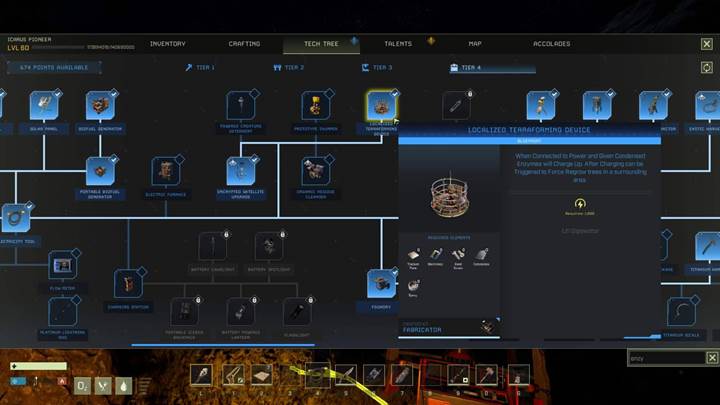
The crafting materials include four titanium plates, twenty electronics, ten steel screws, eight composite materials, and twenty-two epoxy. Once crafted, the device can be deployed in any open area.
How to Power the Device
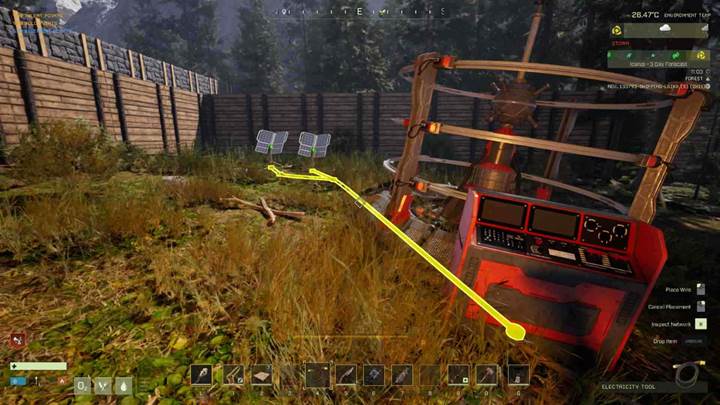
The Localized Terraforming Device requires electricity to function. It needs a steady supply of at least 1,000 power units, which can be provided by a generator, solar panel, or other electrical sources. Once placed in your chosen location, use a wire tool to connect it to a power grid. The device won’t be able to charge or activate without proper power, so setting up a reliable electricity source is essential.
Gathering Fuel Condensed vs. Synthetic Enzymes
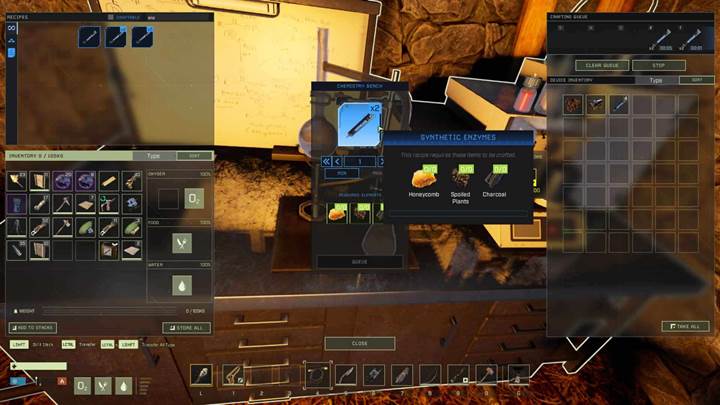
To activate tree regrowth, fuel the device with Condensed Enzymes or Synthetic Enzymes. Condensed Enzymes are the more efficient option, obtained by placing Vapor Condensers on geysers. This method requires planning and geyser access, making it a bit trickier to gather in large quantities. On the other hand, synthetic enzymes can be crafted at the Chemistry Bench using organic resin, spoiled meat, and charcoal. While less efficient, they are much easier to produce in bulk, allowing players to fuel the device without relying on geyser locations.
Activating Tree Regrowth
Once the device is powered and filled with fuel, it takes about 30 minutes to charge. During this time, fog forms around the machine, signaling that the process is underway. Once fully charged, the fog will clear, and the device will be ready to trigger. Interact with the device and select the “Trigger Device” option to activate tree regrowth. A sudden burst of energy will spread across the area, with a storm-like effect. When the storm fades, trees will begin appearing within the affected radius.
Place the Localized Terraforming Device for optimal tree regrowth in areas where trees originally existed. The device does not create trees in barren landscapes like deserts or rocky cliffs. Instead, it restores trees to locations where they were present when the map first loaded. It also does not increase the density of trees beyond their original amount, so repeatedly using the device in the same area won’t lead to a massive forest. If you want to keep a steady supply of wood near your base, place the device strategically in logging areas to cycle tree regrowth.
Tree Regrowth and Base Building
One important consideration when using the Localized Terraforming Device is how it interacts with built structures. Trees will not regrow in areas where buildings are present. This means that if you place a device near your base, trees will only return to the open spaces surrounding it. If you want to maintain a balance between tree regrowth and base expansion, be mindful of where you construct buildings to allow enough room for trees to return.

How Many Enzymes Are Needed?
The amount of fuel required depends on the type of enzyme used. Condensed Enzymes are the most efficient, with five being enough to complete a full regrowth cycle in 30 minutes. Synthetic Enzymes require significantly more fuel, with about 45 needed for the same process. If you have access to geysers, using Condensed Enzymes is the best option, but if you prefer crafting your fuel, stock up on Synthetic Enzymes to keep the device running.
Does the Device Attract Enemies?
Unlike other deployable devices like the Thumper, the Localized Terraforming Device does not attract wildlife. You don’t need to worry about sudden wolf or bear attacks while waiting for trees to regrow, making it a much safer option for restoring forests without the added danger of defending their base.

Moving the Device for Multiple Regrowth Cycles
Once you’ve successfully regrown trees in one area, you can pick up the device and move it to a new location. This allows players to restore multiple forests across different regions without crafting multiple devices. If you have a completely deforested area, relocate the device, power it up, and start the process again.
By crafting the device, gathering the right fuel, and strategically placing it in the right locations, you can bring forests back to life and keep your world thriving. Now go out there, power up your device, and let the trees grow once again!