
How to install mods on your Gamever Ark Survival Evolved server
There are plenty of mods existing for ARK: Survival Evolved for you to choose from. In this short tutorial we will show you easy and simple way to install mods from Steam Workshop on your Ark: Survival Evolved server.
To begin, we need to open steam workshop page of the game, and then find a mod we desire to install. For demostration purposes, we will use small mod. Check ModsId on mod page or enable in steam settings option to display web address and take ModId from address.
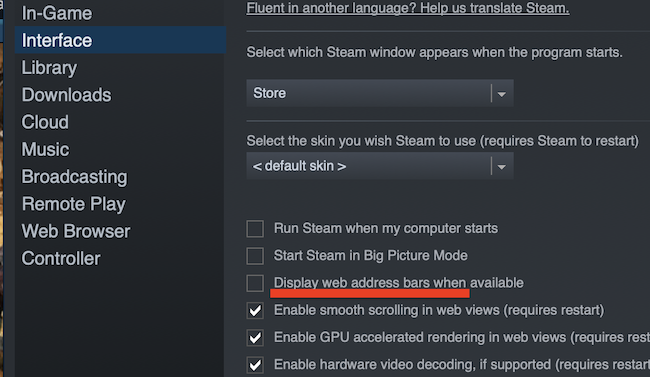
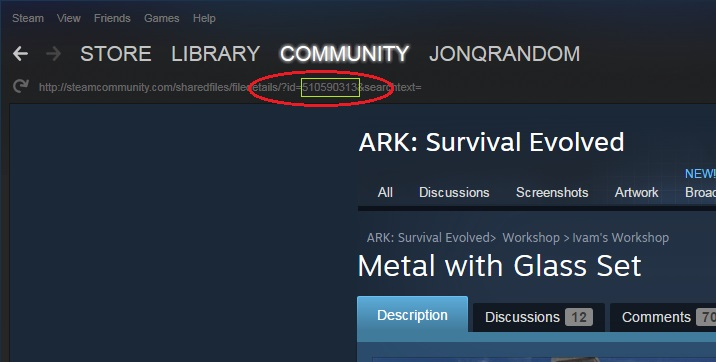
Now we are going to upload your mod on our Gamever Ark: Survival Evolved server.
1) Open your server in Gamever.io.
2) In ”Server Info” panel - open settings tab and paste mod ID to Steam Mods field
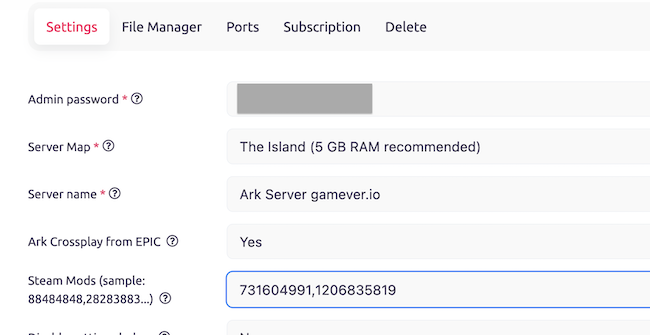
3) Сlick save and wait until your server starts up.
WARNING!
ARK mods are known to be very sensitive to server memory size, and if your server is running low on memory, it can cause your server to take a longer time to start.
If you notice that your server is taking a long time to start, it may be due to low memory, and you may need to removing some of the installed mods.
If you have any questions or concerns, please do not hesitate to reach out to our support team. We are always here to help.