
How to change ARK: Survival Evolved server save frequency
ARK: Survival Evolved is a popular survival game that allows players to explore a vast open world filled with dangerous dinos and other players. If you are running your own ARK server, you may want to change the server save frequency to more suit your requirements. In this guide, we will show you how to change the ARK: Survival Evolved server save frequency in a many simple steps. You also can read how works Ark Saves in this guide.
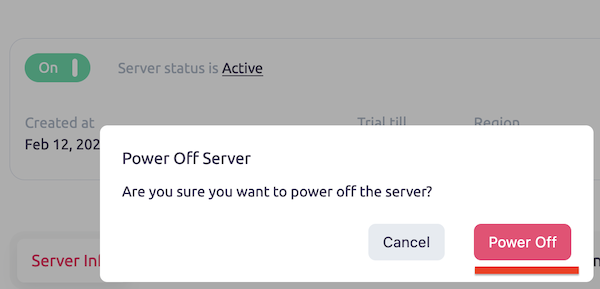
Step 1: Stop the Server
Before making any changes to your ARK server, you should stop the server to avoid any potential data loss or corruption. You can do this by logging into your server control panel and selecting the option to stop the server.
Step 2: Download the GameUserSettings.ini File
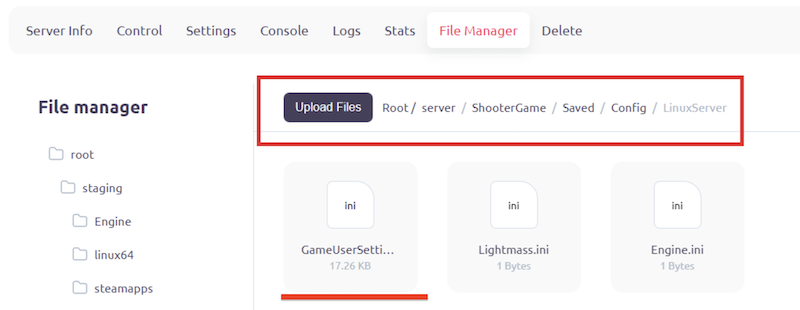
Once the server is stopped, you will need to download the GameUserSettings.ini file from your server. This file contains all of the server settings and configurations for your ARK server. You can find this file in Root/server/ShooterGame/Saved/Config/LinuxServer directory.
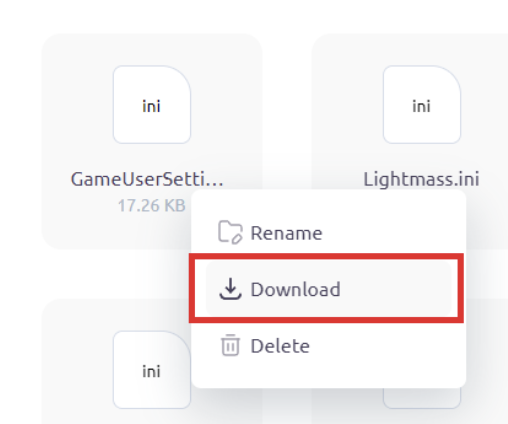
Right click on this file and then press ”Download”.
Step 3: Add the AutoSavePeriodMinutes=<time> String to the Setting File
Open the GameUserSettings.ini file using a text editor and locate the line that reads [ServerSettings]. Add AutoSavePeriodMinutes=<time> parameter under this line. Replace <time> with the number of minutes you want between each server save. For example, if you want to save the server every 10 minutes, you must add "AutoSavePeriodMinutes=10" to the file. By default this time is 15 minutes.

AutoSavePeriodMinutes=10
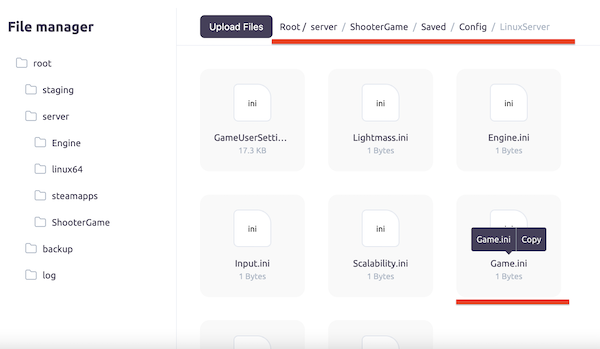
Step 4: Upload the Setting File to the Server
Once you have made the necessary changes to the GameUserSettings.ini file, save the file and upload it back to your server. You can do this by logging into your server control panel and selecting the option to upload files.
Step 5: Start the Server to Apply Changes
After uploading the GameUserSettings.ini file to your server, you can start the server again to apply the changes. You can do this by logging into your server control panel and selecting the option to start the server.
Changing the ARK: Survival Evolved server save frequency is a simple process that can be done in just a few steps. By following the steps outlined in this guide, you can customize your server settings to better suit your needs and preferences. Remember to always stop the server before making any changes and to upload the GameUserSettings.ini file back to the server.