
Why Your Dragonwilds Base Says UNSTABLE: Anchors, Beams and the Oak Rule
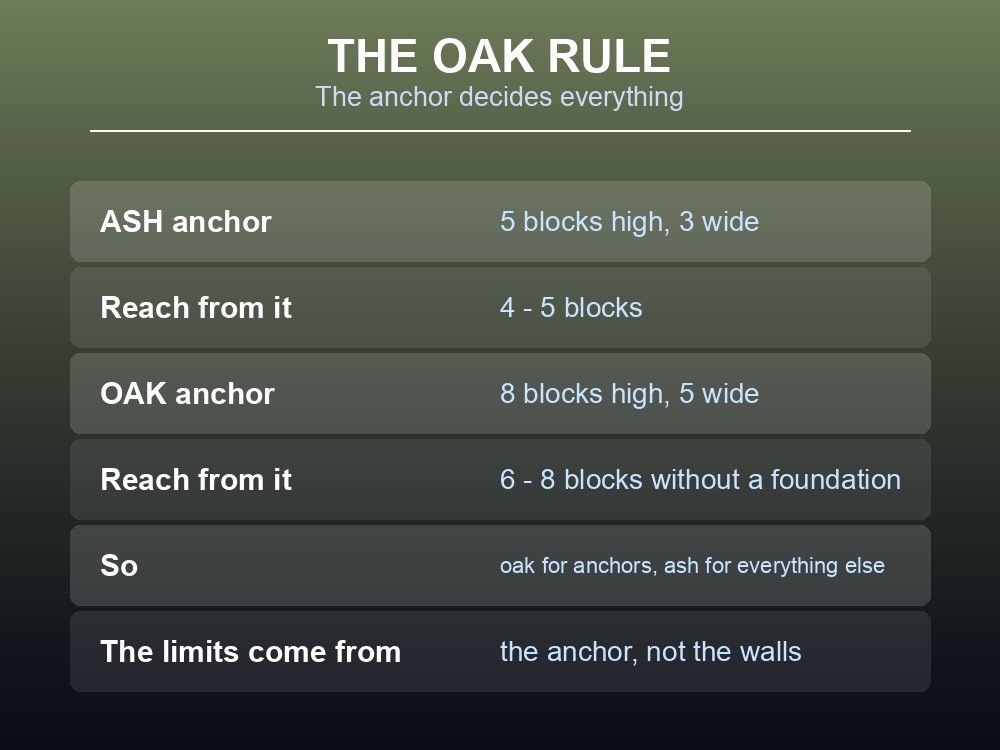
The material of your anchor block decides how big your whole base can be — and almost nobody realises it. An ash anchor caps the structure above it at roughly five blocks high and three wide. Swap that same anchor for oak and the limit jumps to eight high and five wide, with a stable reach of six to eight blocks instead of four to five. The rest of the building can stay ash. This is the single most useful thing to know about Dragonwilds construction, and Jagex explain none of it.
On sourcing. Jagex do not document the stability system. The rules below come from the community RuneScape: Dragonwilds wiki, and can change with any patch.
What an Anchor Is
Open the build menu with B, and every piece you place is either an anchor — something touching the ground and providing stability — or something hanging off an anchor.
Not all anchors are equal:
| Block type | Stability as an anchor |
|---|---|
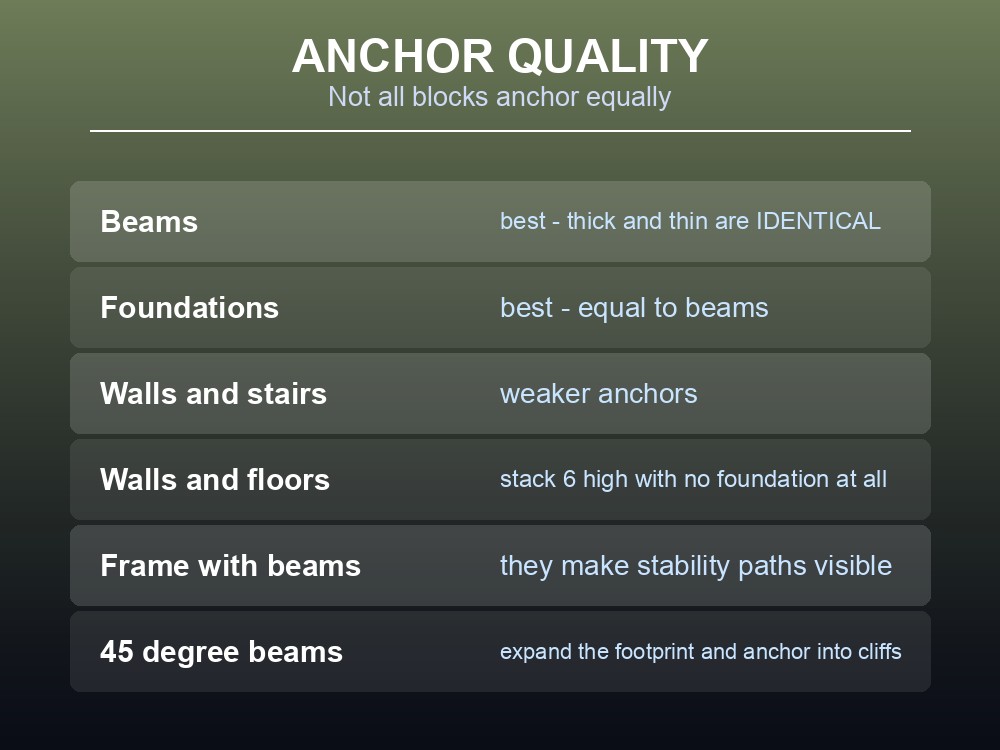
| Beams | Best — thick and thin beams provide identical stability |
| Foundations | Best — equal to beams |
| Walls | Less than beams or foundations |
| Stairs | Less than beams or foundations |
And the anchor's material sets the limits for everything built on it:
| Anchor material | Max height | Max width | Stable travel distance |
|---|---|---|---|
| Ash | 5 blocks | 3 blocks | 4–5 blocks from the anchor |
| Oak | 8 blocks | 5 blocks | 6–8 blocks without a foundation |
Oak is currently the highest-tier anchor material, and this is where the money is: use oak for the anchors and ash for everything else. The stability limits come from the anchor, not from the walls, so a base can be almost entirely cheap material as long as its frame is not.
Separately, walls and floors can be stacked up to six structures above the ground without a foundation at all — the game gives you some vertical slack before it starts objecting.
The Two Outlines and the Flat-Land Rule
Dragonwilds tells you about stability with colour:
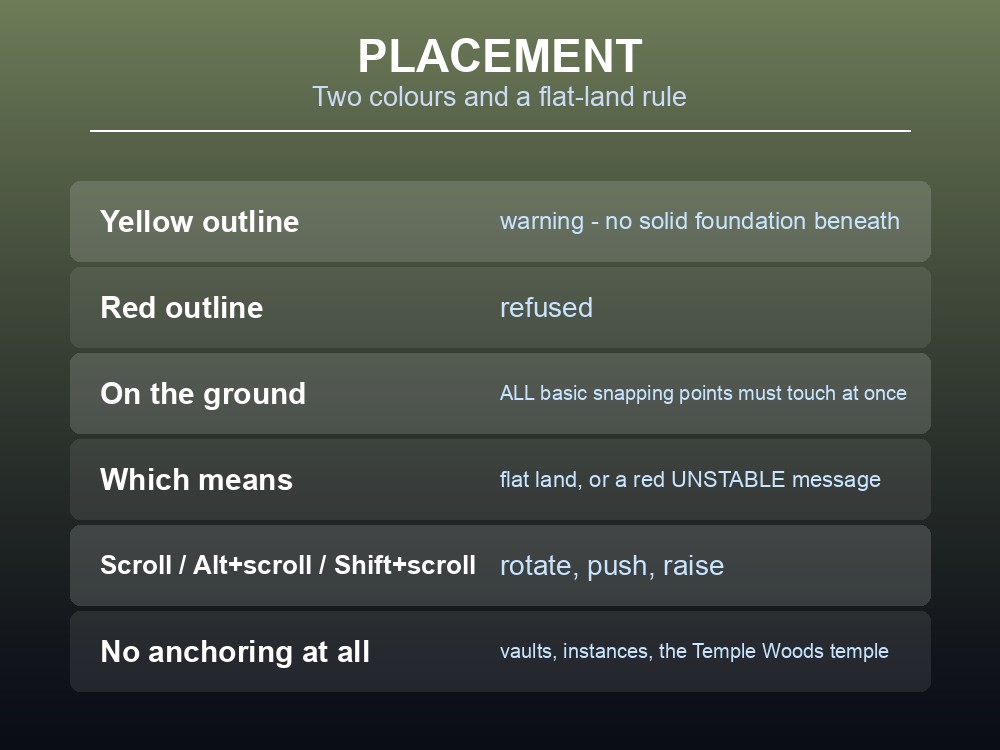
- A yellow outline is a warning — the object has no solid foundation beneath it.
- A red outline is a prohibition — it will not place.
And the rule that catches every new builder is about the ground itself. When placing a foundation or anything directly on terrain, all of the piece's basic snapping points must contact the ground at the same time. In practice that means flat land. On a slope, one corner floats, and a red UNSTABLE message appears on screen.
That applies to the tent from Summon Shelter too — not just to permanent construction.
Three places refuse anchoring entirely:
| Location | Ghost mode | Stable foundations |
|---|---|---|
| The temple at Temple Woods | No | No |
| Vaults | No | No |
| Instanced areas | No | No |
So a plan to fortify a vault entrance from inside will not work, and the temple — otherwise the safest building in the early game, since a "faint aura of priestly magic" repels the wilder creatures — cannot be built in.
Rotation controls, since they are not obvious:
| Input | Moves the preview |
|---|---|
| Scroll wheel | Rotates along the Z-axis |
| Alt + scroll | Towards / away from you |
| Shift + scroll | Up / down from the world surface |
Ghost Mode and Snapping
Ghost mode lets you place structures you cannot yet afford. It creates a pseudo-structure — a placeholder that can be built later once you have the materials — and it works on solid foundations and walls.
Its real use is testing. Ghost mode is "useful for determining whether an object can be stable without building with physical materials on hand" — meaning you can lay out an entire floor plan, see where the game objects, and only then go and chop the wood.
Cycle snapping mode changes how much the game shows you:
| Mode | What you see |
|---|---|
| No snapping | Nothing — place freely, without auto-alignment |
| Basic snapping | The most critical points of contact — a wall and a square tile show 4, one per corner |
| Advanced snapping | All points of contact — the same pairing shows 13, with three between each corner |
Two caveats. Snapping only appears while hovering the preview over an already-built object, and only house structures show contact points — decorations like barrels never will.
No snapping is the mode for decorating, since auto-alignment is exactly what you do not want when placing furniture at an angle.
Repair, Collapse and Practical Framing
Structures take damage — monsters attack them, goblin raids specifically — and the repair rules are stricter than they look:
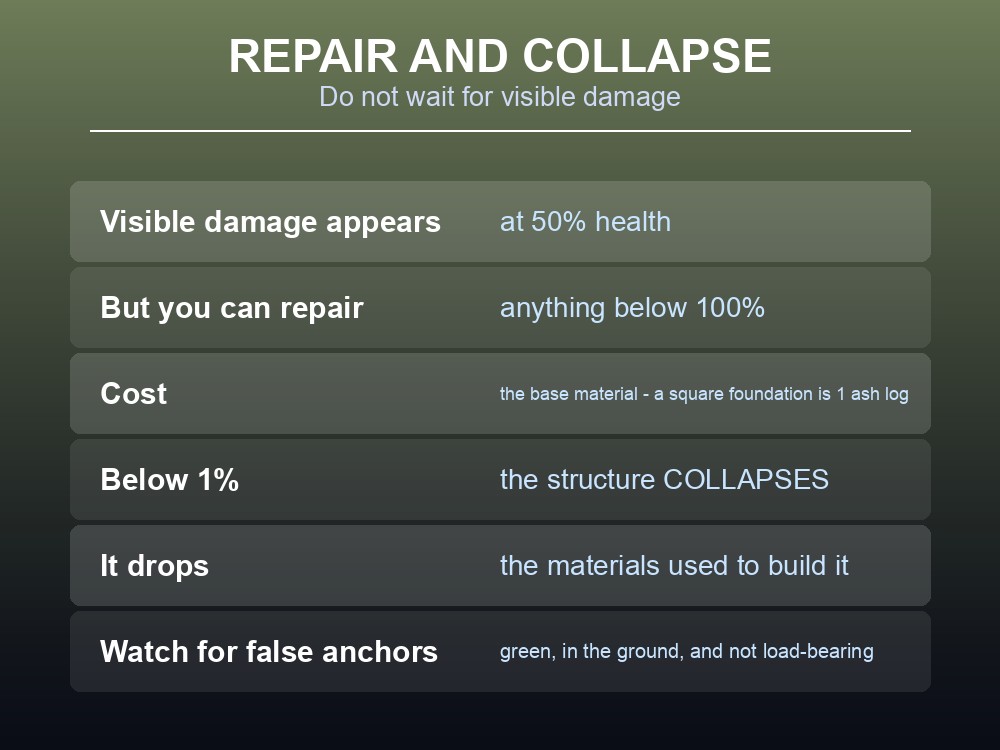
- Visible damage appears at 50% health or below, but you can repair anything below 100%.
- Repair costs the base material — a square foundation takes one ash log.
- Below 1% the structure collapses, leaving behind the base materials used to build it.
So waiting for visible damage is waiting too long. By the time a wall looks broken it is already at half health, and the repair costs the same as it would have at 99%.
Four framing habits that come straight from the stability rules:
- Frame with beams. They are the strongest anchors and "make it easy to visualise and trace stability paths" — you can see where the support is going.
- Beware false anchors. A block can look green and appear to be in the ground without actually being a true anchor. This is "related to a known issue of placing beams on cliffs" — and it means deleting a block you assumed was decorative can collapse the structure above it.
- Plan roofs early. Roofs are hard to place because stability runs out at the top of a building. The recommended fix is blunt: build one or two floors fewer and give the roof the headroom, or run frequent support beams up from the anchors.
- Use angled beams to expand the footprint. 45° beams fill the gaps between horizontal and vertical members, widening the buildable area — and they are the tool for anchoring a structure into a cliffside.
Long beams for the main frame, short poles to extend it. Short poles have their own snapping points, which sometimes buys extra buildable room that a long beam cannot reach.
Practical tips
- The anchor's material sets the limits. Ash: 5 high, 3 wide. Oak: 8 high, 5 wide.
- Use oak for anchors, ash for everything else — the savings are large and the limits unchanged.
- Beams and foundations are the strongest anchors; walls and stairs are weaker.
- Thick and thin beams give identical stability.
- All snapping points must touch ground at once — build foundations on flat land.
- Ghost mode tests a layout for free, but not in vaults, instances or Temple Woods' temple.
- Repair anything below 100% — visible damage means you are already at 50%.
- Below 1% a structure collapses and drops its materials.
- Watch for false anchors, especially beams placed on cliffs.
Running your own RuneScape: Dragonwilds server
A base is the one thing in Dragonwilds built across many sessions by several people, and it needs the world to be there between them — including after a goblin raid nobody was online to fight. A gamever Dragonwilds server keeps Ashenfall available around the clock for up to six players, updates automatically so client and server versions never drift, and takes one-click backups before disruptive changes.
Conclusion
Dragonwilds' build stability comes down to anchors. Beams and foundations are the strongest, walls and stairs are weaker, and the anchor's material dictates the limits for everything above it: ash allows roughly five blocks high and three wide with a four-to-five block reach, while oak allows eight high, five wide and a six-to-eight block reach — so the correct move is oak anchors and ash everywhere else. Placement is governed by two colours, yellow for warning and red for refused, and by the rule that every basic snapping point must contact the ground simultaneously, which in practice means flat land. Ghost mode lets you prototype a whole layout without materials — though not in vaults, instanced areas or the temple at Temple Woods, none of which support anchoring at all. And on maintenance: repair anything below 100% rather than waiting for visible damage at 50%, because a structure that reaches 1% collapses and gives its materials back on the floor.
Want a base that is still standing when you log back in? Rent a Dragonwilds server at gamever.io — instant setup, one-click backups and updates, and 24/7 uptime. Start with a free trial and use promo code WELCOME.