
Valheim Server Ports: Your Address and the "Change Port" Question
A Valheim dedicated server uses a small, fixed set of ports, and on gamever they're already open and assigned to your server — there's nothing to forward. The common "how do I change the port?" question usually really means "where's the address my friends connect to?". This guide answers both, and explains what changing the port does and doesn't do here.
Your ports and addresses
Open the Network tab:
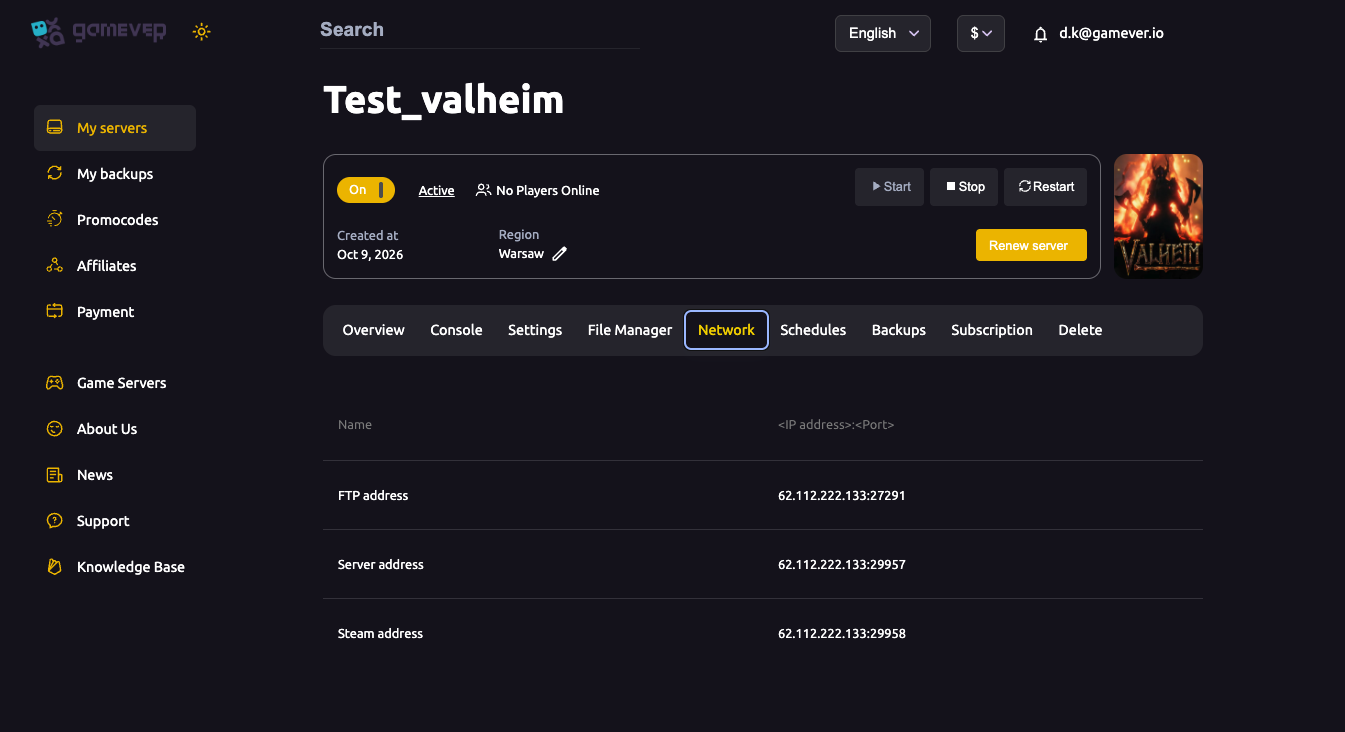
| Address | Port | Purpose |
|---|---|---|
| Server address | IP:29957 | The game port — this is what players use to join. |
| Steam address | IP:29958 | The Steam query port (game port + 1), used for the server browser. |
| FTP address | IP:27291 | File access for configs, worlds and backups (not for joining). |
Valheim uses the game port and the next port up (here 29957 and 29958) — that pairing is built into how Valheim's server works, so the two always go together. These are panel-assigned and already open; you never configure a firewall.
How players join
Share the Server address (IP:29957) from the Network or Overview tab. Players use Join Game → Join by IP (or the crossplay join code if crossplay is on). If your server is private/unlisted, the address is the only way in.
"Changing the port" on gamever
On many hosts you don't pick an arbitrary port — gamever assigns your server's ports and opens them for you. So:
- You don't need to change the port to let friends in — the assigned Server address already works from anywhere.
- There's no firewall step on your side; the ports are open.
- If you specifically need a different port assignment (e.g. a conflict with another service), contact our support team — it's a host-side change, not a config-file edit, and they'll sort it.
Trying to override the port in Server Args won't move the open, mapped port — always connect on the address the Network tab shows.
Troubleshooting a failed connection
If players can't join, it's rarely the port itself:
- Wrong address — copy
IP:29957exactly from the Network tab. - Server still starting — wait for Active on Overview.
- Branch mismatch — server and clients must be on the same build/branch.
- Wrong password — Valheim requires one; check it.
Additional Tips
- Join on
IP:29957— the Server address, not the Steam or FTP port. - Game port + 1 is the query port — Valheim always uses the pair.
- Ports are open already — no forwarding, ever, on gamever.
- Need a different assignment? Ask support — it's host-side.
- "Can't connect" is usually address/version/password, not the port.
Conclusion
Your Valheim server's ports are fixed and already open on gamever: players join on the Server address (IP:29957), with the Steam query port one above it. There's no port-forwarding and normally no reason to change the port — the assigned address works from anywhere. If you truly need a different assignment, support handles it host-side. Copy the address, share it, and your crew is in.
Rent your Valheim server at gamever.io — all ports open out of the box, with a support team for any special setup. Free trial, promo code WELCOME.