
V Rising Server Settings Explained
gamever's Settings tab is where you set the everyday options for your V Rising server: its name, passwords, the RCON password, how often it auto-saves, and your FTP login. It's a single page (not sub-tabbed), with an FTP block at the bottom. The deeper gameplay tuning — PvP/PvE rules, rates, blood, decay, raids — lives in the config JSON instead, which this guide points you to. Here's every field on the page.
The Settings page
Open the Settings tab:
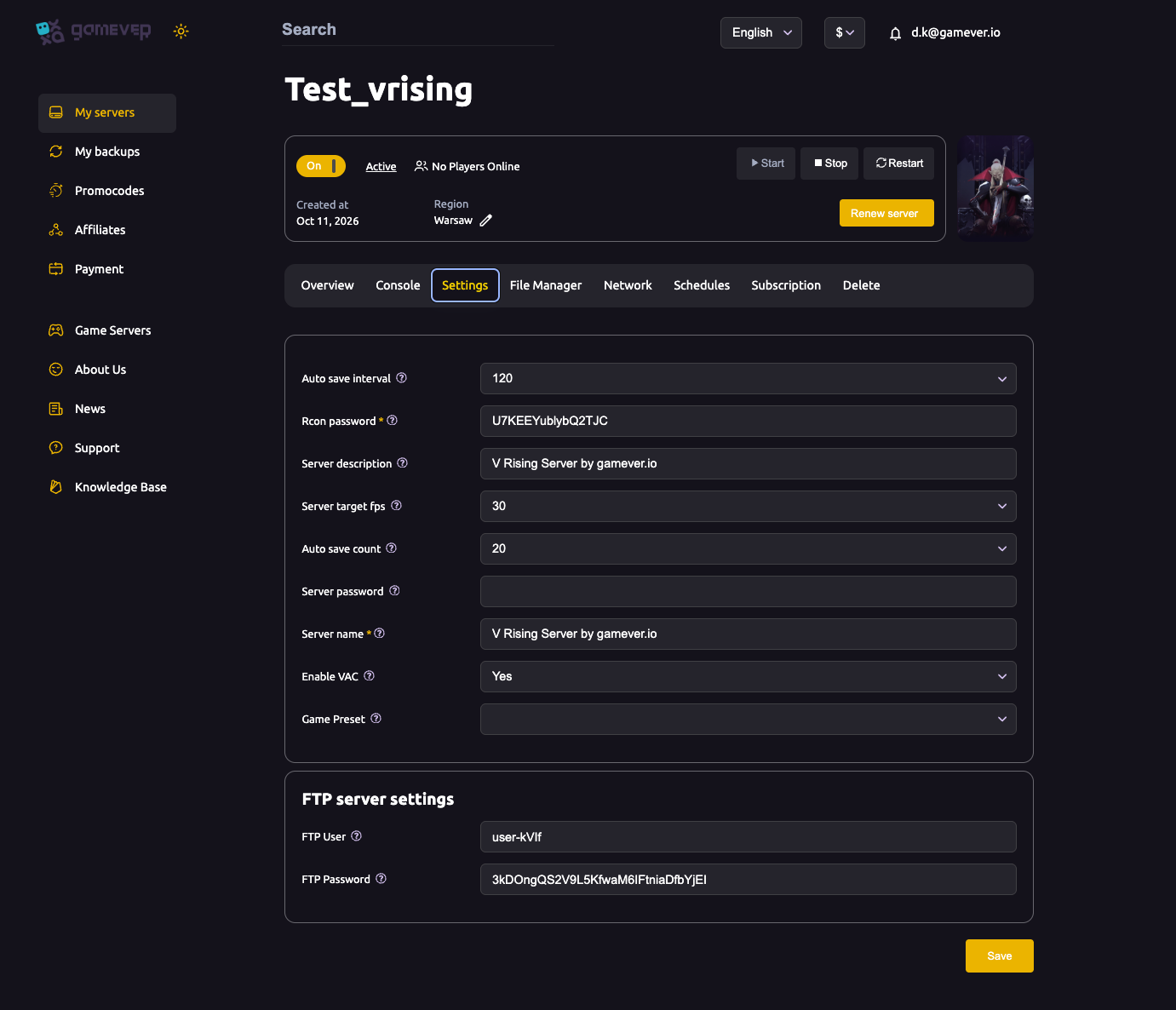
| Field | What it does |
|---|---|
| Auto save interval | Seconds between automatic saves (default 120). Lower = more frequent saves, slightly more disk I/O — see backup & restore. |
| Auto save count | How many autosaves to keep (default 20) before the oldest is rotated out. |
| Rcon password (required) | Password for remote console access — see admins & bans. |
| Server description | The blurb shown for your server in the list. |
| Server target fps | The server's simulation rate (default 30). Leave it unless you're tuning performance — see fixing lag. |
| Server password | Optional join password. Leave blank for an open server, set one to keep it private. |
| Server name (required) | The name shown in the server browser. |
| Enable VAC | Valve Anti-Cheat (Yes/No). |
| Game Preset | A dropdown that selects a built-in rule set (blank by default) — see game presets. |
After changing anything, Save, then Restart the server to apply.
The FTP block
Below the settings you'll find the FTP server settings:
| Field | What it does |
|---|---|
| FTP User | Your FTP username. |
| FTP Password | Your FTP password. |
Use these with an FTP client to download saves or edit the config files directly — handy for the deeper tuning described below. The FTP address is on the Network tab (:28781).
Deeper tuning lives in the JSON
The Settings page covers the common options, but V Rising's detailed rules — PvP vs PvE, gather/craft rates, clan size, castle decay, blood pool, raid windows — are set in ServerGameSettings.json via the File Manager or FTP. For that, see the config JSON guide. The Game Preset dropdown on this page is the quick way to apply a whole preset without touching the file — see game presets.
Additional Tips
- Save, then Restart — settings apply on the next start.
- Set the Rcon and Server passwords before you share the IP.
- Leave target fps at 30 unless you're actively troubleshooting performance.
- Auto save interval + count together decide how far back you can roll — see backup & restore.
- Use the Game Preset dropdown for a fast PvP/PvE setup; use the JSON for fine control.
Conclusion
The Settings tab is your V Rising server's front panel: name it, set the server and RCON passwords, pick an auto-save rhythm, choose a Game Preset, and note your FTP login. Save and restart to apply. For everything the page doesn't expose — the real gameplay rules — head to the config JSON guide.
Rent your V Rising server at gamever.io — all the common settings in one clean panel, plus full FTP for the advanced tuning. Free trial, promo code WELCOME.