
The enshrouded_server.json Config File Explained
Most of your Enshrouded server's behaviour is set from the panel, but the full picture lives in one file: enshrouded_server.json. Knowing its layout lets you change things the panel doesn't expose — player slots, roles, voice/text chat, and custom difficulty. This guide tours the file and the single most important rule for editing it safely.
The golden rule: stop the server first
Enshrouded writes its current configuration back to enshrouded_server.json when the server stops. That means if you edit the file while the server is running, your changes are overwritten on exit. So always:
- Stop the server (Overview → Stop).
- Edit the file.
- Start the server.
Also keep the JSON valid — a stray comma or missing brace can make the server reject the file. Copy the text out before a big edit so you have a backup.
Where the file is
Open the File Manager; the file is in the server root:
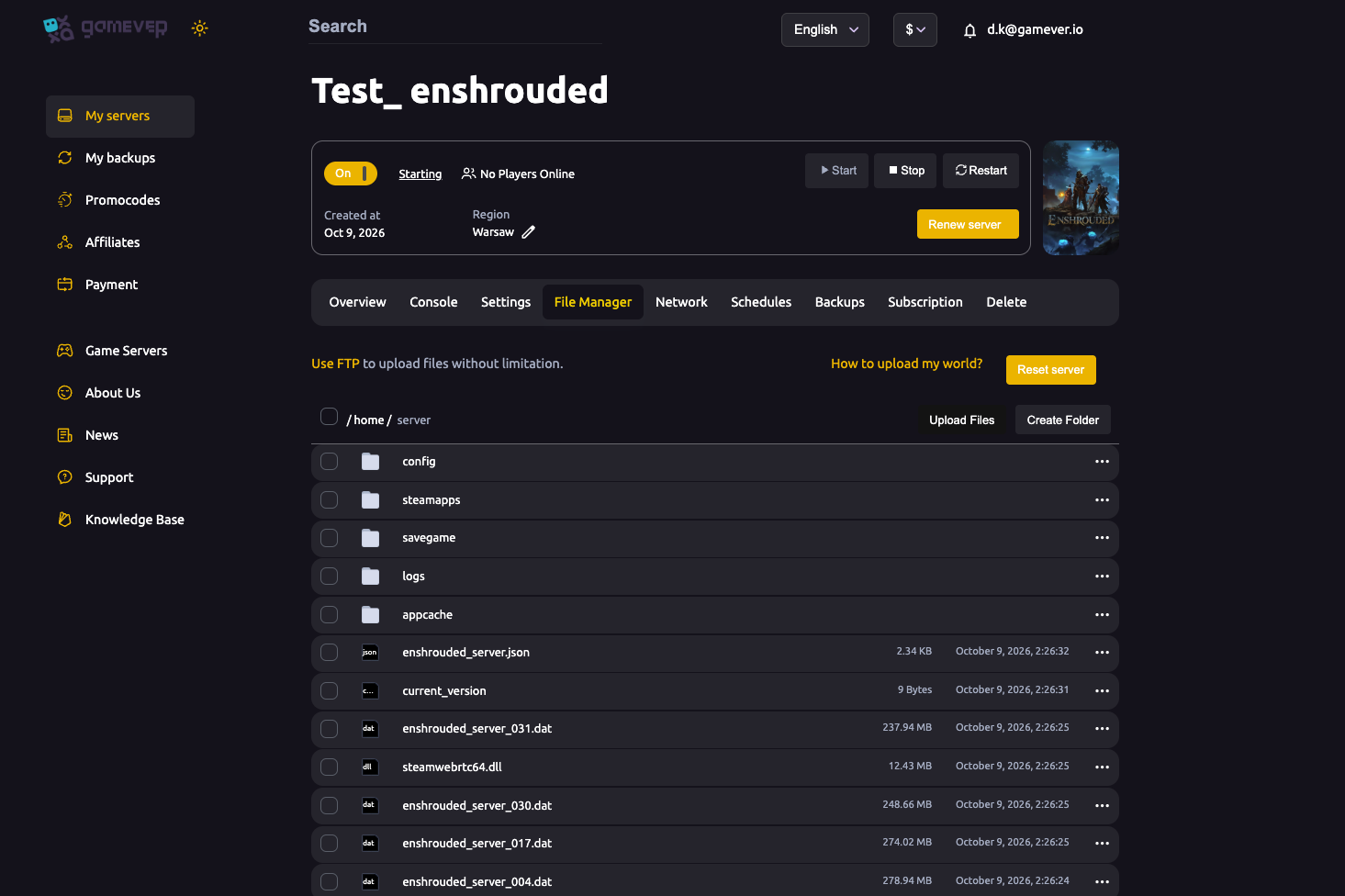
/home/server/enshrouded_server.json
Edit it in the panel editor, or over FTP ("Use FTP to upload files without limitation").
The main fields
| Field | What it controls |
|---|---|
| name | Server name (also on the Settings tab). |
| saveDirectory / logDirectory | Where the world and logs are stored (./savegame, ./logs). |
| ip | Bind address — leave 0.0.0.0 (all interfaces). |
| gamePort / queryPort | Network ports. Must be different values. On gamever these are pre-assigned (see the Network tab); don't change them. |
| slotCount | Maximum players, 1–16 — see max players. |
| gameSettingsPreset | Default, Relaxed, Hard, Survival, or Custom — see difficulty. |
| gameSettings | The detailed difficulty values — only used when the preset is Custom. |
| userGroups | The Admin/Friend/Guest roles and their passwords — see admin roles. |
| enableVoiceChat / enableTextChat / voiceChatMode | In-game chat options. |
What to edit here vs. on the panel
- Name, password, difficulty preset, day/night length — easiest on the Settings tab.
- slotCount, userGroups (roles), chat options, custom gameSettings — edit here in the JSON (server stopped).
If a field appears both on the Settings tab and in the file, prefer the tab for it, so a later panel Save doesn't revert your file edit.
If the server won't start after an edit
- You likely broke the JSON (a comma/brace) — check the Console for a parse error and fix the syntax, or paste back your backup.
- You may have edited while the server was running — redo the change with it stopped.
Additional Tips
- Stop before editing — the #1 rule; running edits are overwritten.
- Keep valid JSON — one typo and the server rejects the file.
- Back up the text before a big change.
- gamePort ≠ queryPort — never set them equal; leave gamever's assigned ports alone.
- Custom only —
gameSettingsvalues apply solely when the preset isCustom.
Conclusion
enshrouded_server.json is the master switch for your server — slots, roles, chat and custom difficulty all live here. The one rule that prevents most headaches: stop the server before you edit it, because Enshrouded rewrites the file on shutdown. Keep the JSON valid, prefer the Settings tab for overlapping fields, and this file lets you tune anything the panel doesn't.
Rent your Enshrouded server at gamever.io — a browser JSON editor and full FTP so you can configure every last setting. Free trial, promo code WELCOME.