
Sons of the Forest Server Settings Explained

The core identity and access controls for your Sons of the Forest server live on one panel sub-tab: its name, the join and admin passwords, Valve Anti-Cheat, and whether cheats are allowed. This guide explains each field and when to change it. Difficulty and world rules have their own sub-tabs — see difficulty settings and world settings.
Server settings
Open Settings → Server settings:
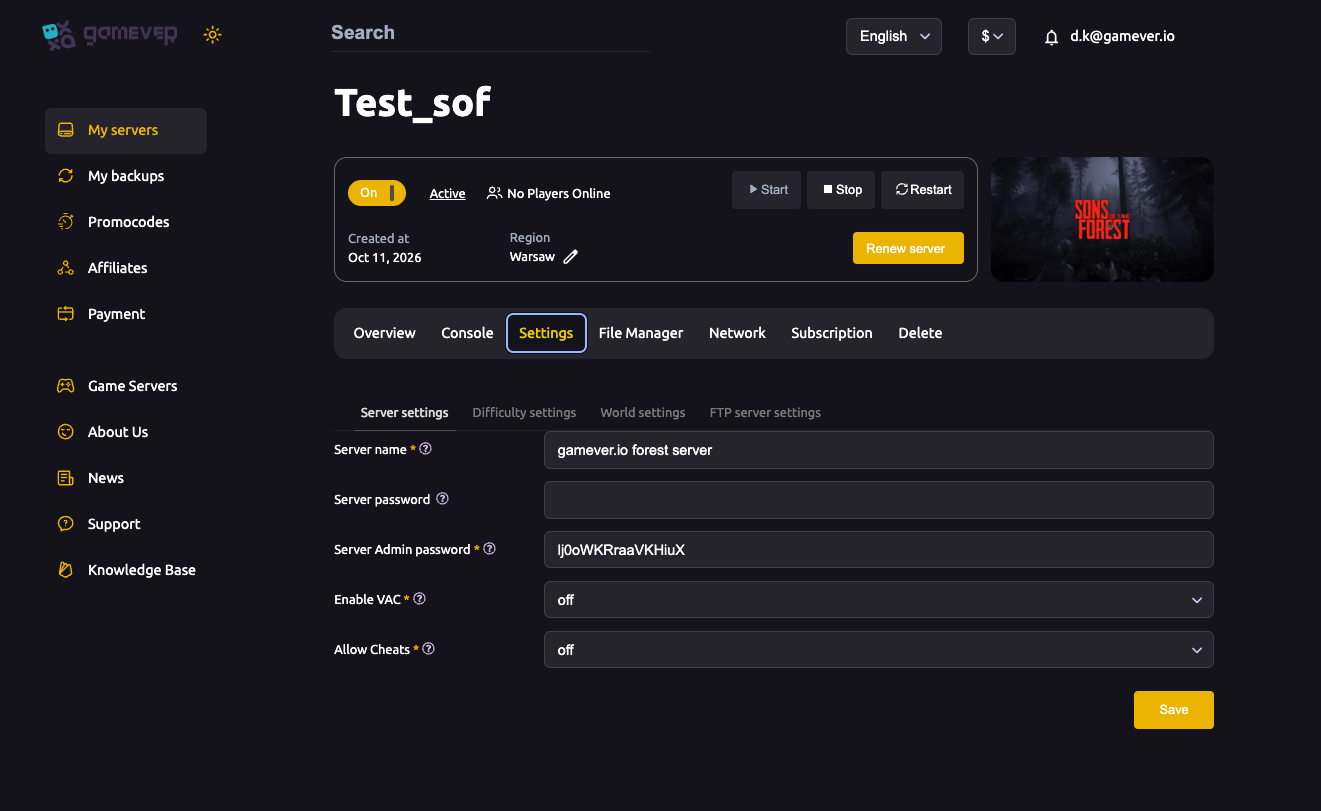
| Setting | What it does |
|---|---|
| Server name | The name shown for your server in the Dedicated Servers browser. Make it recognizable to your group. |
| Server password | The join password players need to connect. Leave it blank for an open server, or set one to keep it private — see password & admin. |
| Server Admin password | A separate password that grants administrative control. Share it only with co-admins. |
| Enable VAC | Turns Valve Anti-Cheat on or off. Keep it on for public servers to help keep cheaters out; some private groups turn it off. |
| Allow Cheats | Enables or disables cheat functionality on the server — see cheats & commands. |
Change what you want, save, then Restart from Overview so the changes take effect.
Name and passwords first
For most servers the first three fields are what matter:
- Server name makes you findable in the browser.
- Server password decides who can join — set it before you share the address so the server isn't briefly open.
- Server Admin password is your control key; keep it separate from the join password and share it sparingly.
See password & admin for the full breakdown of the two passwords and the owners whitelist.
VAC and cheats
- Enable VAC adds Valve's anti-cheat protection. It's the simplest way to reduce cheating on a public server; leave it on unless you have a reason not to.
- Allow Cheats is an on/off toggle for cheat features. Most survival-focused groups leave it off; turn it on only if you want cheats available (details in cheats & commands).
Additional Tips
- Set the password before sharing the address so the server isn't open for even a moment.
- Two passwords, two jobs — server password = join, admin password = control. Keep them different.
- Leave VAC on for public servers.
- Allow Cheats is off territory for serious survival — only enable it if your group wants cheats.
- Save then Restart — server settings apply on restart.
Conclusion
Your Sons of the Forest server's identity and access are a few fields on Settings → Server settings: name it, set a join password and a separate admin password, decide on VAC, and choose whether cheats are allowed. Save, restart, and the server runs the way you want — then move on to difficulty and world settings.
Rent your Sons of the Forest server at gamever.io — every key setting in one panel, with a browser console and full FTP for the rest. Free trial, promo code WELCOME.