
Sons of the Forest Server Difficulty Settings
Sons of the Forest lets you decide how dangerous the peninsula is — the overall difficulty level, whether enemies (the cannibals and mutants) appear at all, and how punishing damage feels. On gamever that's its own panel sub-tab, so you can set the tone for your group in a few clicks. This guide covers every control.
The difficulty controls
Open Settings → Difficulty settings:
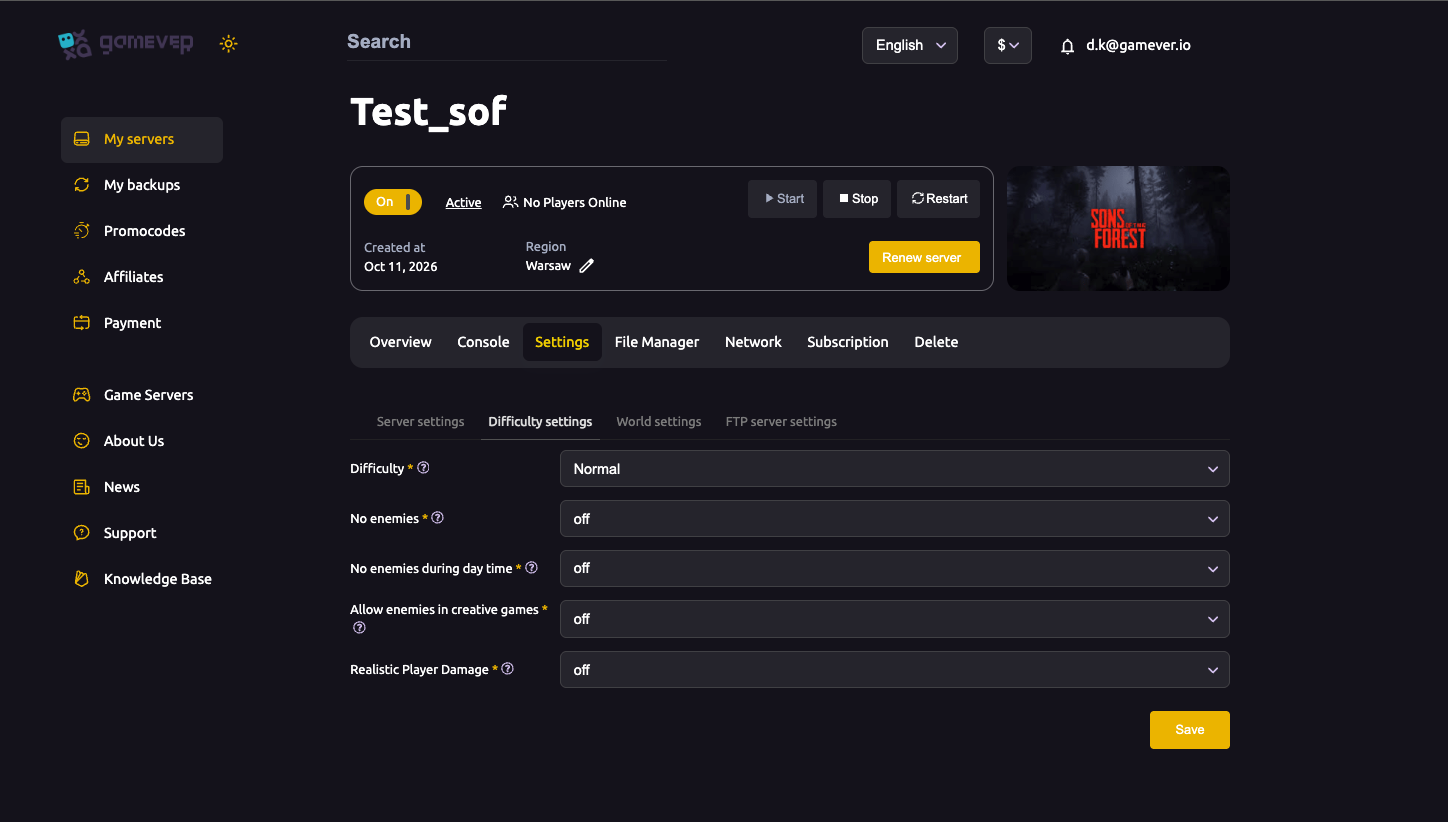
| Setting | What it does |
|---|---|
| Difficulty | The overall preset — Peaceful, Normal, Hard and the game's other modes. Sets the baseline challenge for combat and survival. |
| No enemies | When on, no enemies spawn at all — a pure building/exploration experience. |
| No enemies during day time | When on, enemies only appear at night, leaving daytime safe for gathering and building. |
| Allow enemies in creative games | When on, enemies can still spawn in creative-style play; off keeps creative sessions threat-free. |
| Realistic Player Damage | When on, players take damage more realistically (more punishing); off is more forgiving. |
Pick what you want, save, then Restart from Overview.
Choosing a difficulty
- Peaceful / No enemies → best for building-focused or relaxed groups who want to explore and construct without combat pressure.
- Normal → the standard, balanced survival experience.
- Hard → tougher enemies and survival for experienced players.
- Pair the preset with the enemy toggles to shape exactly how combat feels — for example, Normal difficulty with No enemies during day time gives dangerous nights and peaceful days.
Realistic Player Damage
Turning Realistic Player Damage on makes the survivors more fragile and combat more consequential — a good fit for a hardcore run. Leave it off for a more casual, forgiving group. It stacks with your chosen difficulty, so a Hard server with realistic damage is a serious challenge.
Additional Tips
- No enemies = building mode — the fastest way to a peaceful, construction-focused server.
- No enemies during day time keeps days safe and nights tense — a popular middle ground.
- Realistic Player Damage raises the stakes; pair it with Hard only if your group wants real difficulty.
- Match it to your group — a casual group and a hardcore group want very different settings.
- Save then Restart — difficulty changes apply on restart.
Conclusion
Sons of the Forest difficulty on gamever is a dedicated sub-tab: pick an overall Difficulty, use the No enemies and No enemies during day time toggles to decide if and when the cannibals show up, control enemies in creative play, and flip Realistic Player Damage for a tougher run. Set the tone your group wants, restart, and the peninsula plays exactly how you like it.
Rent your Sons of the Forest server at gamever.io — one-click difficulty and enemy controls from the panel, plus world settings for the rest. Free trial, promo code WELCOME.