
Sons of the Forest: How to Fix Saving Problems
Welcome to Sons of the Forest, where survival is paramount, but saving your progress shouldn't be a challenge. If you've encountered issues with saving your game, fear not!
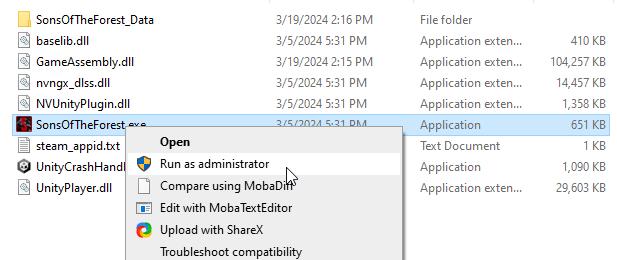
Run the Game as an Administrator
Grant administrative privileges to the game executable to ensure smooth saving processes.
Allow the Game Through Your Firewall or Antivirus
Configure firewall and antivirus settings to permit Sons of the Forest multiplayer, preventing interference with saving
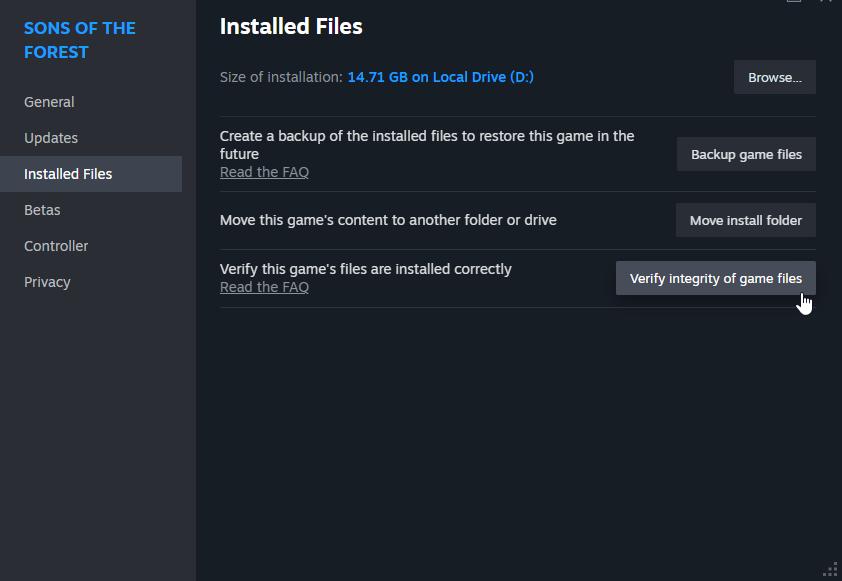
Verify the Integrity of Game Files
Utilize Steam's "Verify Integrity of Game Files" feature to detect and repair corrupted game files, resolving potential saving issues.
Clear Corrupted Saved Files
Locate and delete corrupted save files to prevent further issues and ensure smooth progress saving.
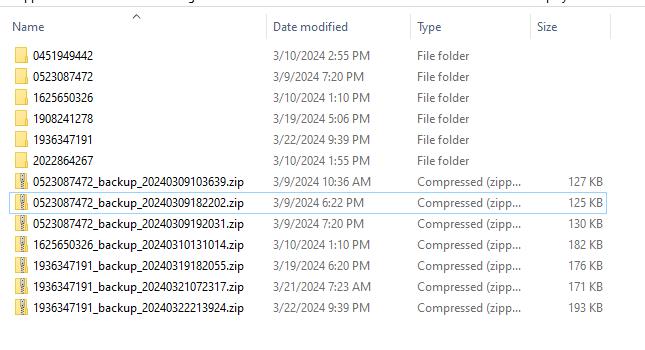
Manually Back Up Multiplayer Saves
Create manual backups of multiplayer save files as a precaution against future saving complications.
Stay Updated and Await Fixes
Keep the game and related software up-to-date and monitor developer announcements for potential fixes and updates.

With these troubleshooting steps, you can conquer saving problems in Sons of the Forest and embark on your multiplayer survival journey with confidence. Remember, persistence and proactive problem-solving are essential in overcoming challenges and ensuring a seamless gaming experience. Don't let saving issues hold you back—dive back into the immersive world of Sons of the Forest and thrive alongside your fellow survivors!