
Rust World Settings: Seed, World Size and Radiation Explained
A Rust server's world is defined by three things: how big the map is, which seed generates it, and whether radiation is on. All three live on one page in the gamever panel. This guide explains what each does and how to change them — including how a seed or size change gives you a clean map.
Where the settings are
Open Settings → World Settings:
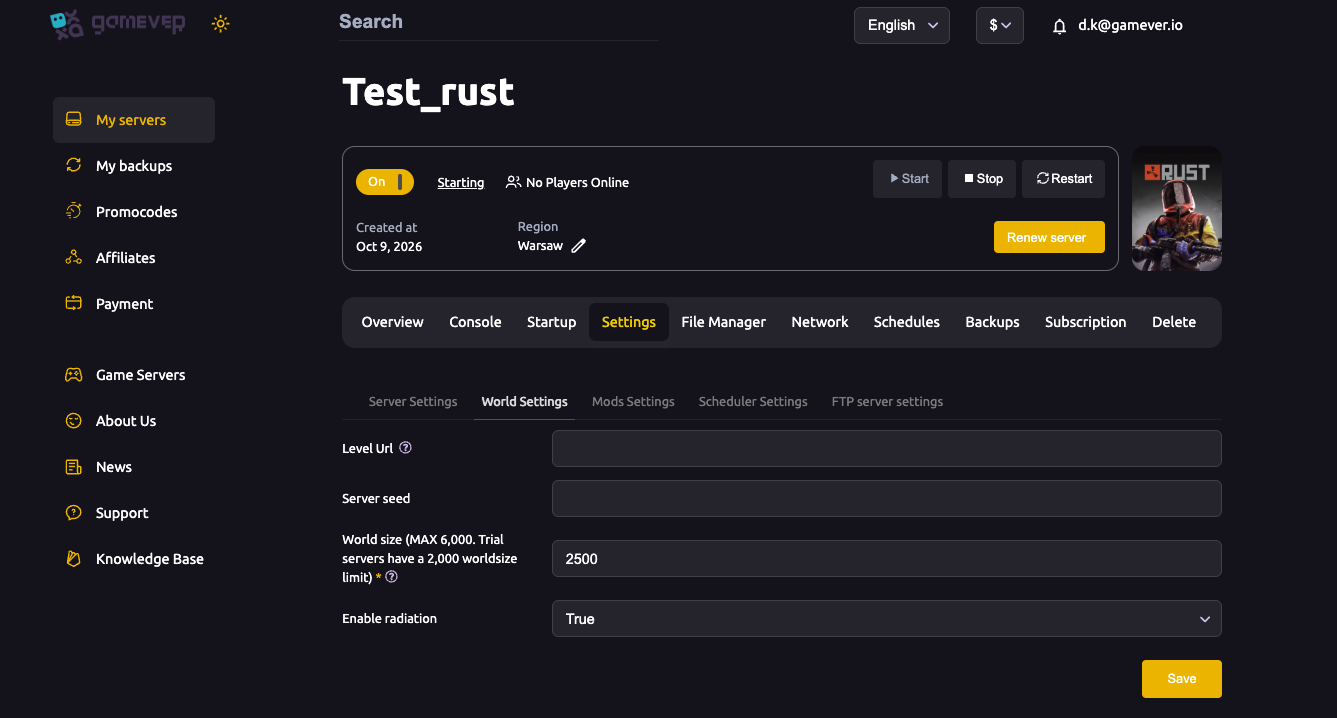
| Setting | What it does |
|---|---|
| World size | Map size in metres. Bigger = more to explore, but more RAM/CPU and longer generation. |
| Server seed | The number that generates the procedural map. Same seed + same size = the same map, every time. |
| Level Url | A link to a custom (RustEdit) map. Leave blank for a normal procedural map. |
| Enable radiation | Turns radiation zones on or off. |
Change what you want, click Save, then Restart.
World size — pick the right scale
World size is the single biggest driver of how your server feels (and how much hardware it needs):
- ~3000–3500 — small/medium, fast to fill, good for small groups and quick wipes.
- ~4000–4500 — the common "default" feel for public servers.
- ~5000–6000 — large, lots of monuments and space; needs more RAM/CPU.
The panel caps world size at 6000, and trial servers are limited to 2000. If a bigger map lags or won't generate, upgrade your plan (Upgrade server on the Overview tab) — a large world needs the memory to match.
Seed — random or fixed
The seed decides the actual terrain layout:
- Leave it blank / change it each wipe for a fresh, random map players have to re-learn.
- Set a fixed seed (any number up to 2147483647) to keep the same map across wipes — handy if your community likes learning monuments and rotations.
Because the map file is named after the size and seed, changing either one makes the server generate a brand-new world on restart — effectively a clean map wipe with no files to delete (see how to wipe your server).
Custom maps
To run a community-made (RustEdit) map instead of a procedural one, paste its direct download link into Level Url. The server loads that map instead of generating one. (World size and seed are ignored while a Level Url is set.)
Additional Tips
- Match world size to your plan — a 6000 map on a small server is the classic cause of lag and slow generation.
- Changing seed or size = fresh map — the easiest, file-free way to do a map wipe.
- Fixed seed = learnable map; random seed = fresh exploration each wipe.
- First boot of a new/large map is slow — generation takes time; watch the Console.
- Trial servers cap at 2000 world size — upgrade for bigger worlds.
Conclusion
Everything about your Rust world — size, seed, custom map and radiation — lives under Settings → World Settings. Pick a world size your plan can handle, choose a fixed or random seed, and remember that changing either one gives you a fresh map on restart. Save, restart, and your new world is live.
Rent your Rust server at gamever.io — set your seed, scale your world and upgrade RAM in one click. Free trial, promo code WELCOME.