
Rust Server Ports and Firewall Explained
Self-hosting a Rust server means wrestling with port forwarding and firewall rules. On a gamever Rust server you skip all of it — every port is assigned and opened for you. This guide explains what each address on your server is for and why there's no firewall to configure.
Where your ports live
Open the Network tab. You'll see your server's addresses, each as IP:port:
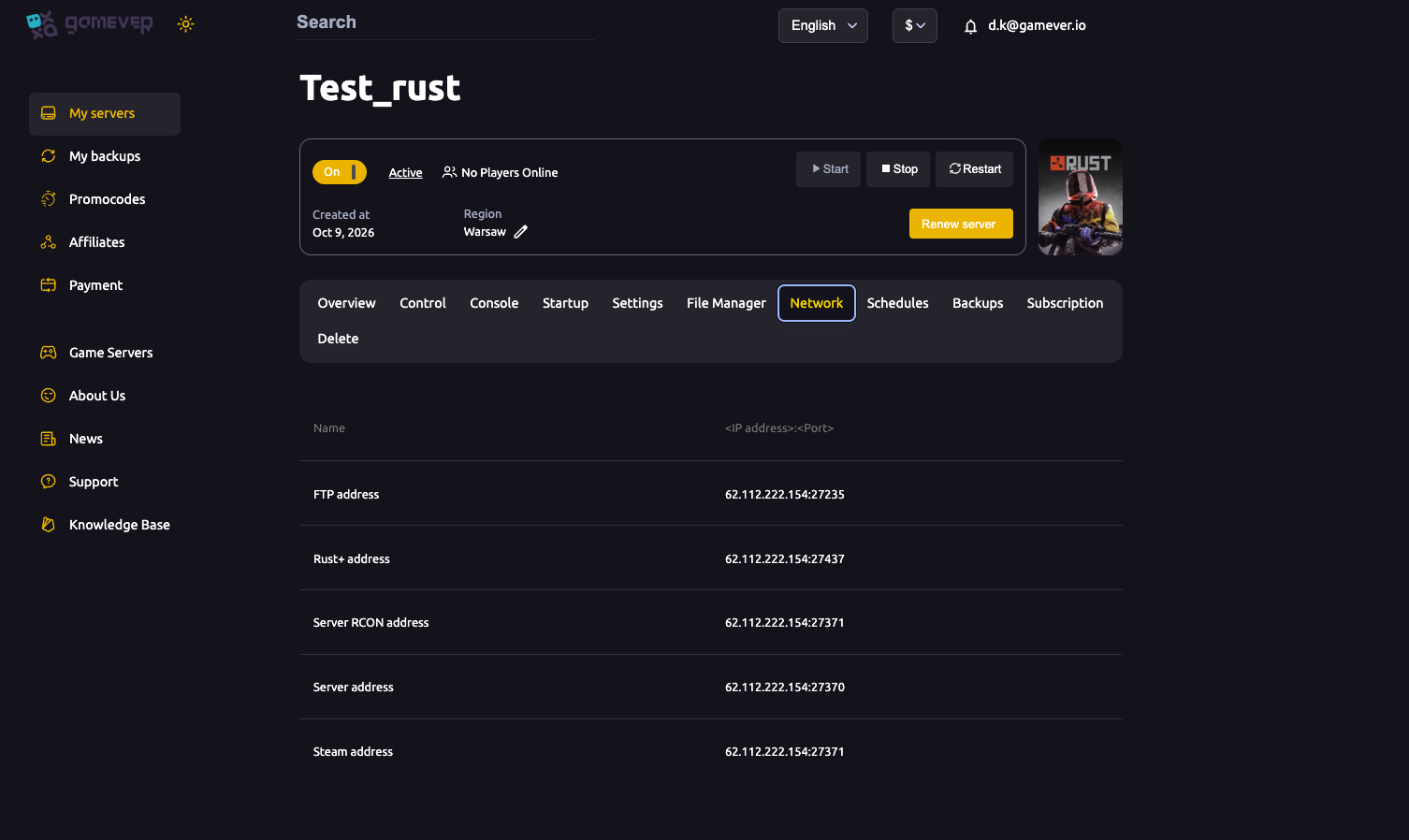
| Address | What it's for |
|---|---|
| Server address | The game port — what players connect to in-game (client.connect). |
| Steam address | The Steam query port, used by the server browser to list and ping you. |
| Server RCON address | WebRCON for admin tools/bots — see our RCON guide. |
| Rust+ address | The companion-app port for the Rust+ mobile app (alarms, map, chat). |
| FTP address | For uploading files, plugins and maps. |
Each is a ready-to-copy IP:port.
Do you need to open ports or set up a firewall?
No. gamever runs your server where the required ports are already open and mapped to your instance. There's no port forwarding (that only applies to home hosting) and no firewall rules for you to add. The addresses on the Network tab are reachable as-is.
How players connect
- In-game console: players press F1 and type
client.connect <Server address>(your gameIP:port). - Server browser / Community tab: your server is listed and pinged through the Steam address (query port), so players can find it by name.
- Rust+ app: players pair the companion app using the Rust+ address.
If someone can't connect, on a managed host it's almost never ports — it's usually the server wiping/restarting, a password, or a version mismatch right after an update.
The ports behind the scenes
A stock Rust server uses a game port (default 28015), a Steam query port (default 28016/+1), an RCON port and the Rust+ (app) port. On gamever these are remapped to the per-server ports on your Network tab — so always use the exact numbers the panel shows, not the generic defaults.
Additional Tips
- Copy addresses from the Network tab — don't assume 28015/28016; your instance uses assigned ports.
- No port forwarding or firewall — that's a self-hosting concern; a managed server is already reachable.
- Give players the Server address for a direct
client.connect. - Rust+ uses its own address — share it for companion-app pairing.
- Can't connect right after wipe day? Restart onto the new build first; it's a version issue, not ports.
Conclusion
You never touch ports or firewalls for Rust on gamever — game, query, RCON, Rust+ and FTP are all opened for you and listed on the Network tab. Hand players your Server address, share the Rust+ address for the app, and point admin tools at the RCON address.
Rent your Rust server at gamever.io — every port opened and managed, no forwarding, no firewall. Free trial, promo code WELCOME.