
RuneScape: Dragonwilds Dedicated Server Setup (Full Guide)
A RuneScape: Dragonwilds dedicated server is straightforward to run once you know two things that catch most people out: the server will not start without your Owner ID on the documented baseline, and editing the config while it is running silently discards your changes. Jagex have been relaxing both — this guide covers the documented setup and flags what is changing. This guide covers the whole setup from the official documentation — requirements, ports, every configuration value, and the three-way split between Owner, Admin and regular players.
Requirements
| Field | Value |
|---|---|
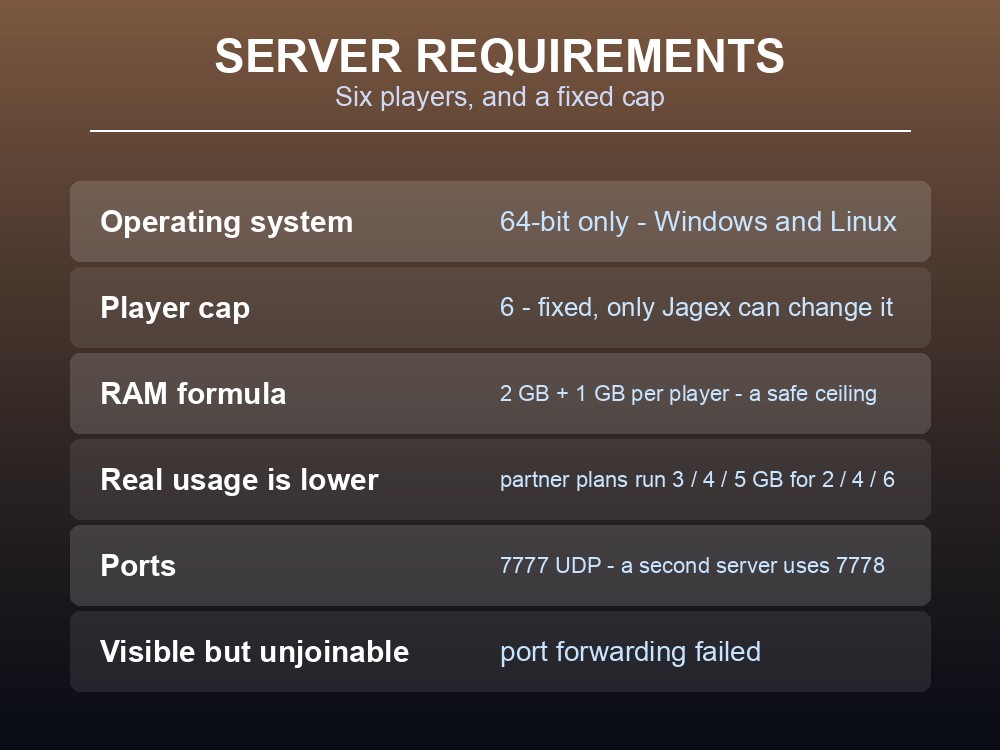
| Operating system | 64-bit only — Windows and Linux both supported |
| Player cap | 6 players (as of version 0.11, March 2026) |
| RAM | 2 GB + 1 GB per player |
| RAM for 6 players | 8 GB |
| RAM for 2 players | 4 GB |
| Ports | 7777 UDP by default; a second server uses 7778 |
The player cap is fixed. Six is the server maximum, and it is not a configuration value you can raise — only Jagex can change it.
The RAM formula is deliberately conservative, and Jagex have since said so. After collecting live data from hosted worlds they reported that "memory usage is below our originally expected amount" and cut the allocations on their partner's plans accordingly — those now run 3 GB for 2 players, 4 GB for 4 and 5 GB for 6, against the guide's formula of 4, 6 and 8. Jagex were explicit that this "isn't a downgrade… the extra resources simply aren't being used." So treat 2 GB + 1 GB per player as a safe ceiling rather than a floor.
Ports are UDP, not TCP, which is the single most common self-hosting mistake. Every router between your machine and your ISP needs the forward, and some ISPs block port forwarding entirely — a few offer admin tools for it, others require a support call.
The diagnostic tell: if your server appears in the server list for other players but cannot be joined, port forwarding has failed somewhere. A server that does not appear at all is usually a different problem — see the troubleshooting section below.
Installing the Server
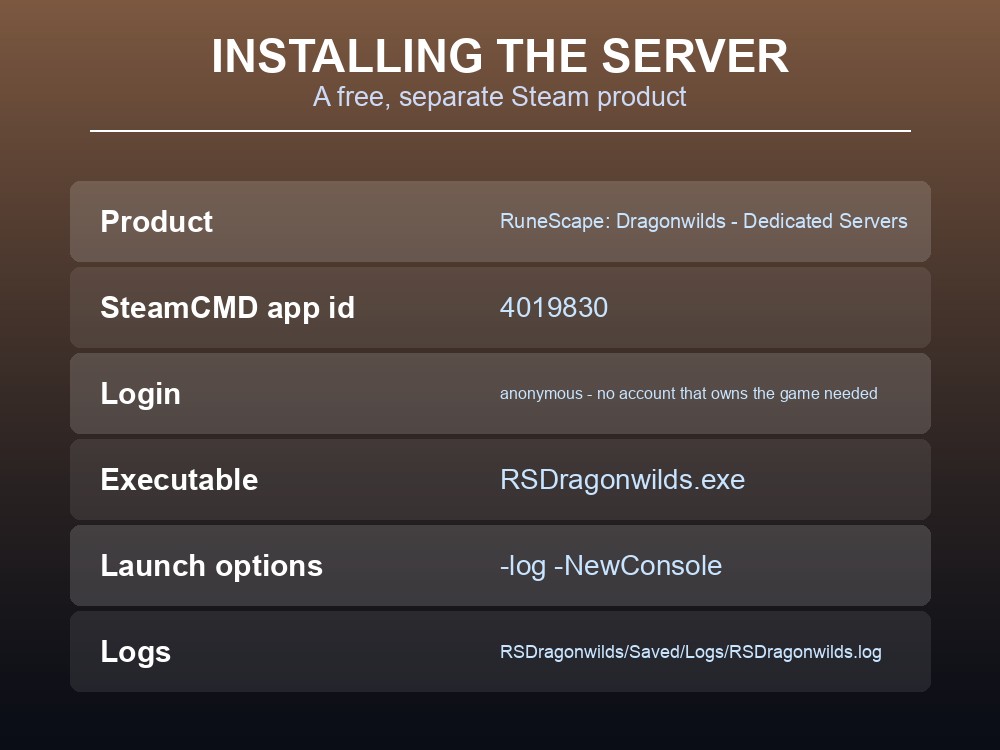
The server is a free Steam product — "RuneScape: Dragonwilds - Dedicated Servers" — separate from the game itself. You can install it through the Steam client, or via SteamCMD:
steamcmd +force_install_dir C:\MyInstallFolder +login anonymous +app_update 4019830 +quit
Note +login anonymous — you do not need to sign in with an account that owns the game.
Then run RSDragonwilds.exe from the install folder, or launch it through Steam.
Always add these launch options:
-log -NewConsole
Jagex's own advice, and it is worth following: without them you get no console output, and with them "you get a console feedback telling you exactly what's happening on the server." Set them in Steam by right-clicking RuneScape: Dragonwilds Dedicated Server → Properties → launch options.
Logs live at .../RSDragonwilds/Saved/Logs/RSDragonwilds.log.
The Configuration File
The config lives in different places depending on your OS, and Windows is the awkward one:
| OS | Path |
|---|---|
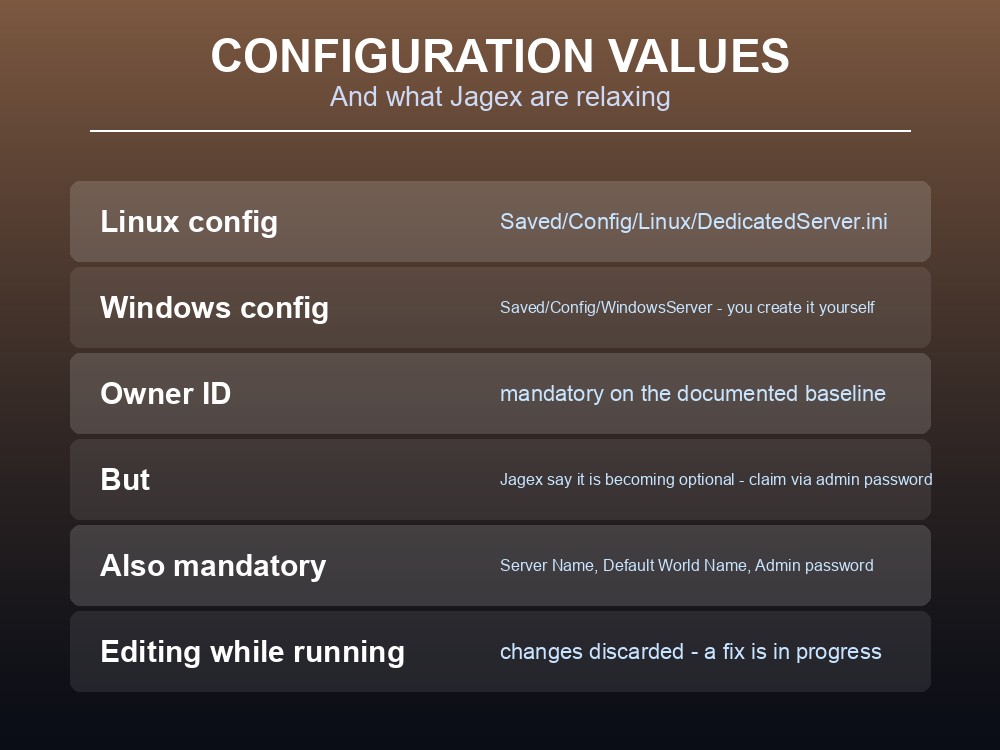
| Linux | RSDragonwilds/Saved/Config/Linux/DedicatedServer.ini |
| Windows | RSDragonwilds/Saved/Config/WindowsServer/DedicatedServer.ini |
On Windows the file is not created for you. Per the official guide, Windows configuration values "will need to be copied from linux and created in" the WindowsServer folder. If you are setting up on Windows and cannot find a config file, that is why — you make it yourself.
Mandatory values — the server will not function without these:
| Value | What it is |
|---|---|
| Owner ID | Your Dragonwilds Player ID. Found in game at the bottom of the Settings menu, with a copy button. Per the original guide, the server will not start without it — but see the note below. |
| Server Name | The server's name, independent of which world it runs |
| Default World Name | What the auto-created world is called on first startup |
| Admin password | Grants access to the Server Management tab |
Optional:
| Value | What it does |
|---|---|
| World password | Supersedes any password stored in the world. Leave empty to let anyone join |
The rule that costs people an evening: do not edit the config while the server is running. The official wording is unambiguous — "Changing those values while the server is running will result in those changes being lost." Stop the server, edit, start it again.
Two of these requirements were being relaxed. In April 2026 Jagex announced that the Owner ID requirement "is becoming optional" — "You'll be able to claim your server with an admin password when you first join" — and that a fix for configuration values resetting unexpectedly was in progress. Both were described as underway rather than shipped, so check your build: if your server starts without an Owner ID, you are on a version that has the change. The setup above is the documented baseline and still works either way.
Owner, Admin and Everyone Else
Dragonwilds splits users three ways, and the permissions are asymmetric in a way worth knowing before you hand out the admin password:
| Role | Who they are | Can ban | Can unban |
|---|---|---|---|
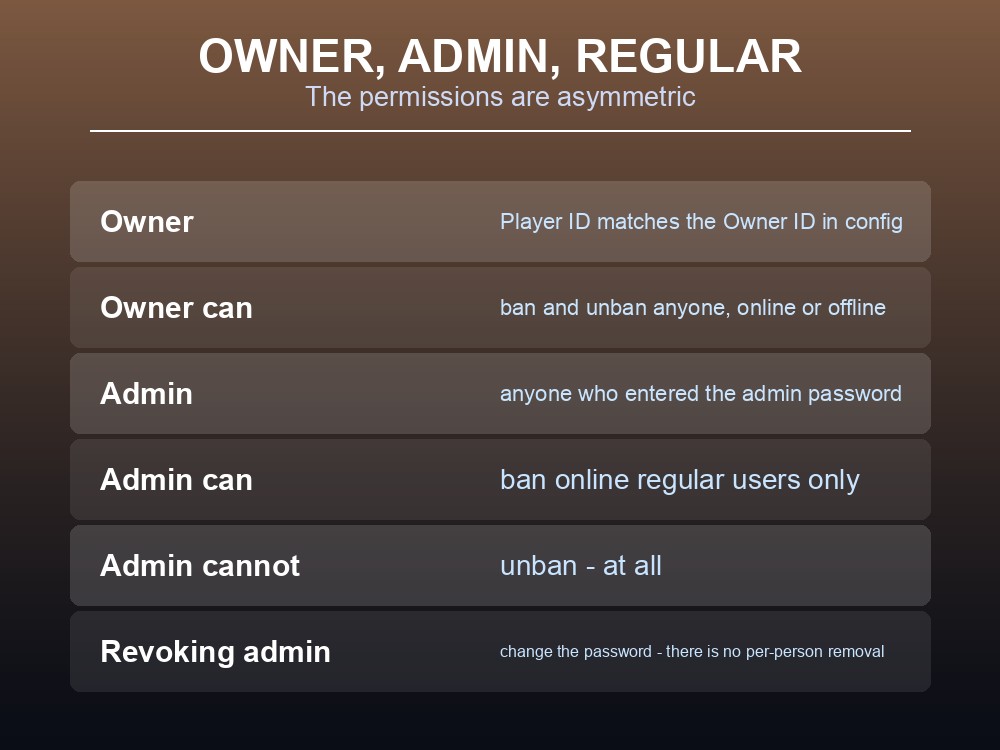
| Owner | Whoever's Player ID matches the Owner ID in config | Anyone, online or offline | Yes |
| Admin | Anyone who has entered the admin password | Regular users who are online | No |
| Regular | Everyone else | No | No |
Only the Owner can unban. If an Admin bans someone in error and the Owner is away, that player stays out until the Owner returns. Worth telling your admins.
Admin status is granted by knowing the password, not by being on a list. Anyone who enters it at Pause Menu → Settings → Server Management becomes an Admin "until the Admin Password is changed again". Changing the password is therefore how you revoke admin — there is no per-person removal.
You can see who has used it. The list of everyone who entered the admin password is written into DedicatedServer.ini, so an audit is a file read rather than a guess.
Two known issues from the official documentation, so you do not waste time diagnosing them:
- Steam invites do not work — "Inviting a player to your Dedicated Server via Steam Invites doesn't currently connect as intended." Players must find the server manually instead.
- Live config edits are lost, as above.
To find your server, players go to the Public tab of the Worlds screen and search the exact world name — it is case sensitive. Jagex have also been rolling out direct IP connections, letting players "join a server directly via its IP address, without needing to rely on the in-game server browser", plus auto-discovery so your own server appears prominently without searching. If it does not appear: check that client and server are on the same version, that the world name searched is the one currently running, that the mandatory config values are set, and then read the log.
Version mismatch is the most common disappearance. Server and client must run the same build, and "this is likely to happen any time an update or hotfix is released." The server's version is at the top of its log; the client's is in the top-left corner of the game.
Practical tips
- The Owner ID was mandatory to start the server, and is being made optional — check your build.
- Direct IP connection is being rolled out as an alternative to the server browser.
- Never edit the config while the server runs — the changes are discarded.
- RAM: 2 GB + 1 GB per player is the documented formula, but real usage is lower — partner plans run 3/4/5 GB for 2/4/6 players.
- Ports are UDP from 7777, and every router in the chain needs the forward.
- Visible but unjoinable = port forwarding failed. Invisible = usually a version mismatch.
- Only the Owner can unban. Admins can only ban online regular users.
- Change the admin password to revoke admin — there is no way to remove one person.
- Steam invites are known not to work. Search the exact, case-sensitive world name.
Running your own RuneScape: Dragonwilds server
Most of this guide is a list of things that stop being your problem on managed hosting: no port forwarding, no ISP negotiation, no SteamCMD, no hand-built config file on Windows, and no version mismatch after every hotfix because the server updates itself. A gamever Dragonwilds server keeps your world online around the clock so a six-player group can play on their own schedules rather than waiting for a host, with one-click backups protecting a world you have invested weeks in — which matters more than usual with 1.0 arriving on 15 September.
Conclusion
A RuneScape: Dragonwilds dedicated server runs on 64-bit Windows or Linux, supports up to 6 players, and wants 2 GB of RAM plus 1 GB per player — so 8 GB for a full server. Install it as the free Steam product via app_update 4019830, run it with -log -NewConsole so you can actually see what it is doing, and forward UDP port 7777. The two details that cause the most wasted time are that the server would not start without your Owner ID from the bottom of the in-game Settings menu — a requirement Jagex have since said is becoming optional — and that editing DedicatedServer.ini while the server runs silently discards the changes, which is also being fixed. Remember that only the Owner can unban, that changing the admin password is the only way to revoke admin, and that Steam invites are known not to work — players search the exact, case-sensitive world name on the Public tab.
Want a Dragonwilds server without the port forwarding? Rent one at gamever.io — instant setup, one-click backups and updates, and 24/7 uptime. Start with a free trial and use promo code WELCOME.