
Resetting or Wiping Your V Rising Server for a Fresh World
Sometimes you want a clean slate: a new season, a fresh map after a big patch, or a switch from PvE to PvP that needs everyone starting even. On gamever that's a reset — a wiped save and a brand-new world. This guide shows how, and the one thing to do before you pull the trigger.
Back up first — always
A wipe is permanent. Before anything:
- Download your current save over FTP (login on the Settings tab, address
:28781on the Network tab). - Keep that copy somewhere safe.
That way, if you ever want the old world back — or you wiped by mistake — you can restore it (see backup & restore). Never wipe without a backup you can get back to.
How to reset
There are two routes, depending on how clean you want the slate:
The panel way — Reset server. The File Manager has a Reset server button. This is the straightforward way to wipe the world and start fresh.
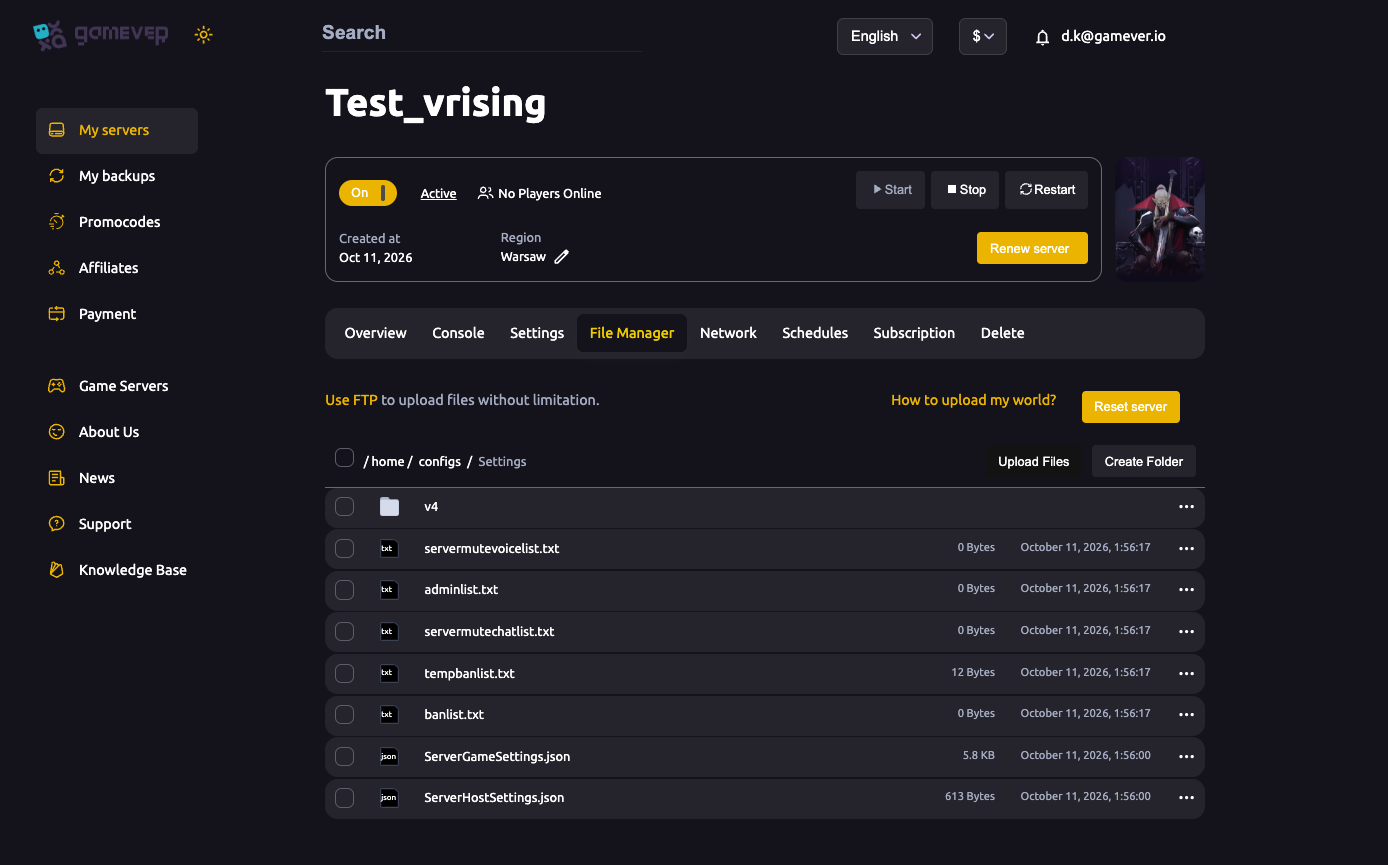
The manual way — clear the save. With the server Stopped, delete the save folder's world files in the File Manager (or over FTP), then Start the server — it generates a new world on boot.
Either way, do it with the server stopped so the files aren't held open, and start it after to roll a fresh world.
Keep what you want
A wipe is a good moment to re-tune. Your config files (ServerGameSettings.json, ServerHostSettings.json) and your admin/ban lists are separate from the world save, so a world wipe doesn't have to reset your rules. If you do want new rules for the new season, now's the time — apply a different Game Preset or edit the config JSON before players rejoin.
Uploading a world instead
If you want to bring in a specific world rather than generate one, the File Manager has a "How to upload my world?" link covering that. The idea is the same: server stopped, swap the save files, start.
Additional Tips
- Back up over FTP first — a wipe can't be undone without one.
- Reset with the server stopped, then start to generate the new world.
- Re-tune while you're at it — a wipe is the perfect time to change preset or rules.
- Your admin/ban lists survive a world wipe — clear them separately if you want a totally clean server.
- Tell your clan before you wipe so no one loses a castle by surprise.
Conclusion
Wiping a V Rising server is quick — Reset server in the File Manager, or clear the save files with the server stopped — but the real rule is to back up over FTP first so a fresh start is a choice, never a loss. Re-tune your rules for the new season while you're at it, start the server, and your clan has a clean world to conquer.
Rent your V Rising server at gamever.io — a one-click reset, full FTP and easy backups so a fresh start is always under control. Free trial, promo code WELCOME.