
Resetting or Wiping Your 7 Days to Die Server
Maybe a new game version dropped, maybe your map is cluttered, or maybe the group just wants to start over. Whatever the reason, your gamever 7 Days to Die server gives you a clean start without losing anything you didn't mean to. This guide covers the two ways to wipe, and the one step you must never skip: back up first.
Back up before you wipe — always
A wipe removes your current world. Before you do anything, make a backup so a "fresh start" doesn't become a regret:
- Check the Backups tab for a recent restore point.
- For a copy you keep, download the save folder over FTP — see backup & restore.
Only once you have a backup should you continue.
Option 1: a new world via the World settings
The cleanest way to start fresh while keeping your server intact is to load a new world from Settings → World settings:
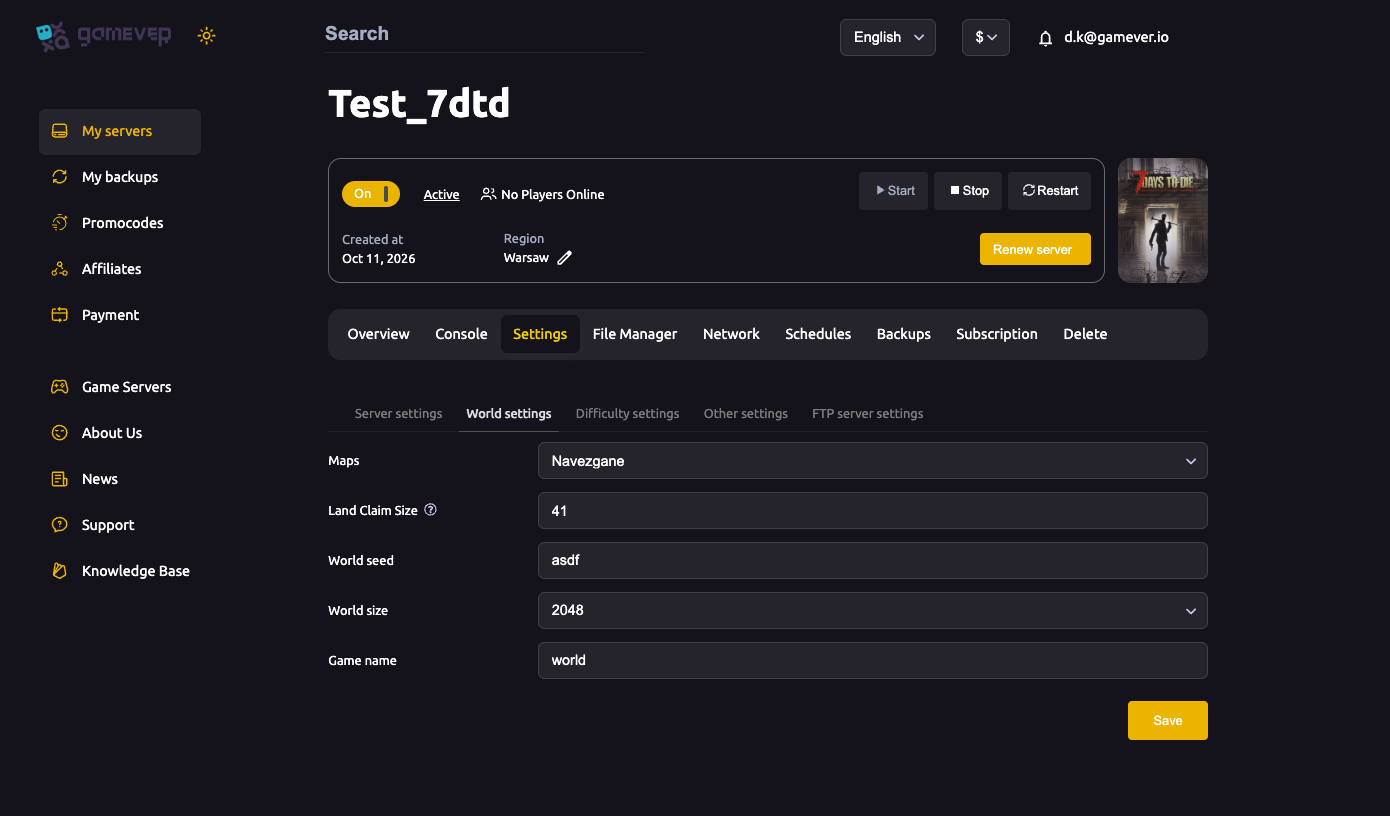
- Change the Game name to a new save name — the server starts a fresh, separate world.
- Or change the World seed, Maps or World size for a different layout — see world settings.
Then Save and Restart. Your old save still exists under its old Game name; you're simply playing a new one.
Option 2: Reset server in the File Manager
The File Manager has a Reset server button for a more thorough clean slate (it also carries a "How to upload my world?" link if you'd rather bring in an existing save). Use Reset server when you want to clear the server files back to a clean state rather than just switching to a new save name.
Because this is destructive, confirm your backup is in hand first.
After the wipe
- Share the IP again — the address is unchanged, so players reconnect the same way.
- Re-check your server, difficulty and other settings — decide if the fresh world wants different rules.
- Turn your scheduled restart back on if needed.
Additional Tips
- Back up first — every time. A wipe is not reversible without one.
- New Game name = new world, old save kept — the gentlest reset.
- Reset server is the thorough option — use it when you want a true clean state.
- The IP doesn't change — players rejoin at the same address.
- Great moment to retune difficulty — a fresh world is a fresh start on the rules too.
Conclusion
Starting over on 7 Days to Die is easy and safe as long as you back up first: load a new world by changing the Game name or seed in World settings, or use Reset server in the File Manager for a full clean slate. Back up, wipe, re-share the IP, and your group is off on a brand-new apocalypse.
Rent your 7 Days to Die server at gamever.io — fresh worlds in a couple of clicks, with backups and FTP so your old world is never lost by accident. Free trial, promo code WELCOME.