
Reading Combat in Dragonwilds: Hitsplats, Resistances & What the Colours Mean
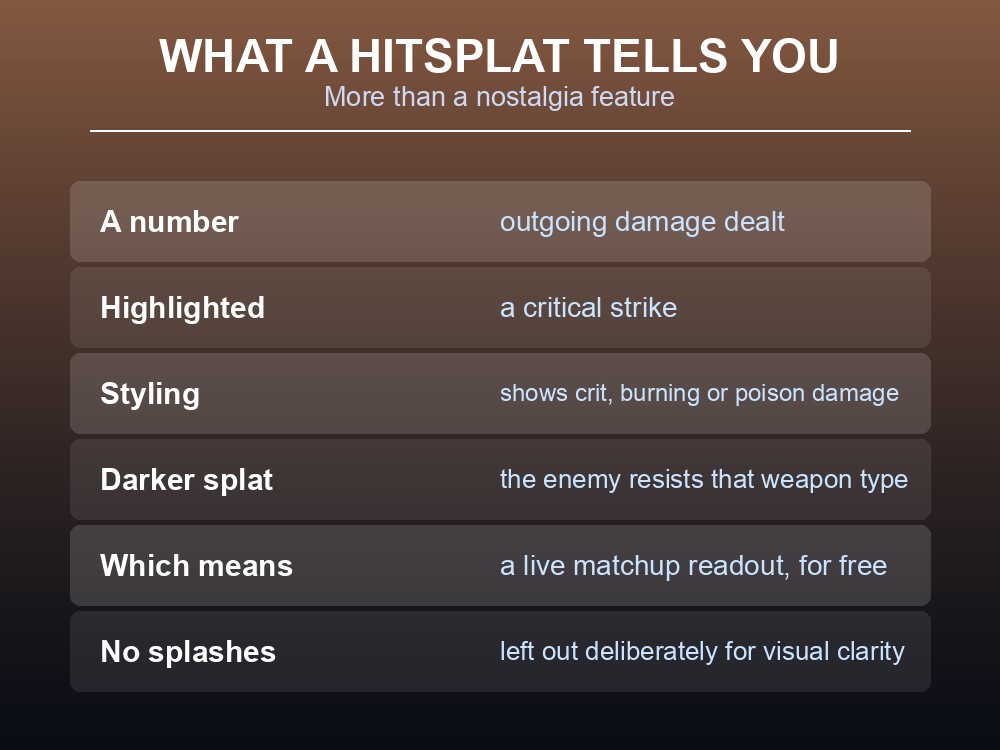
Hitsplats arrived in RuneScape: Dragonwilds 0.9.1 as a nostalgia feature — "the iconic RuneScape Hitsplat is now in. Spec your enemies for 73 and tell them to sit just like on mainland Gielinor." But they are more useful than a callback, because they encode information most players never notice: a darker hitsplat means the enemy resists the weapon type you are using. That is a live damage-type readout, and it is free.
What a Hitsplat Tells You
| Signal | Meaning |
|---|---|
| A number | Outgoing damage dealt |
| Highlighted | A critical strike |
| Distinct styling | Whether crit, burning or poison damage was applied |
| Darker splat | The enemy resists that weapon type |
The resistance indicator is the one worth learning. Jagex's wording: "Enemies with resistances to a specific weapon type will have darker hitsplats to show the relative ineffectiveness."
So you do not need a bestiary. If your numbers look right but the splats are dark, switch weapon type — the game is telling you the matchup is wrong while you fight, rather than after.
Note there are no splashes. Jagex left them out "at this time, for visual clarity", while saying they are listening to feedback on hitsplats generally. So a miss reads differently here than it does in RuneScape.
Why It Matters More After the Combat Rework
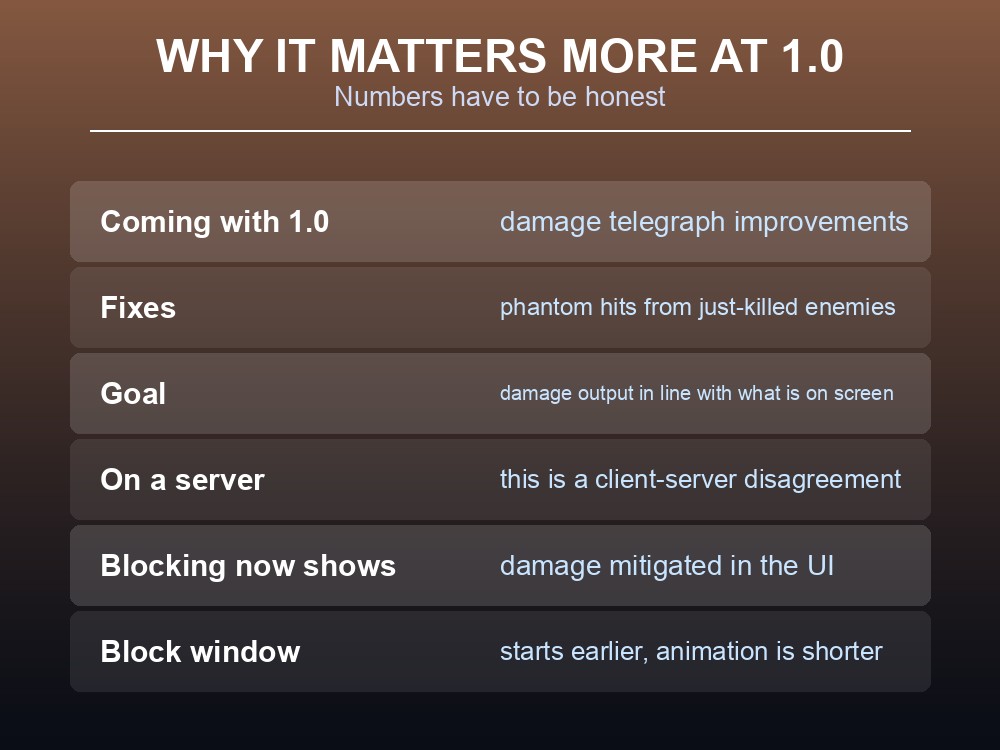
Hitsplats only help if the numbers are honest, and that was a known problem — one the combat rework set out to fix at 1.0:
- Damage telegraph improvements between server and client.
- Reducing "phantom hits" from just-killed enemies.
- Making "your damage output much more in line with what's on screen."
On a dedicated server this is specifically a client-server disagreement. If your group has complained that enemies land hits after visibly dying, or that damage numbers seem detached from what happens, that is the issue being addressed — and it lands with 1.0 on 15 September.
Blocking got its own readout too. The rework shortened the block animation, started the block window earlier, and added UI "to show the damage mitigated" — so blocking stopped being an act of faith.
Together these change how you learn a fight. Before: guess the weapon matchup, guess whether blocking helped. After: dark splats tell you the matchup, mitigation numbers tell you the block worked.
Status Effects Now Have Tooltips
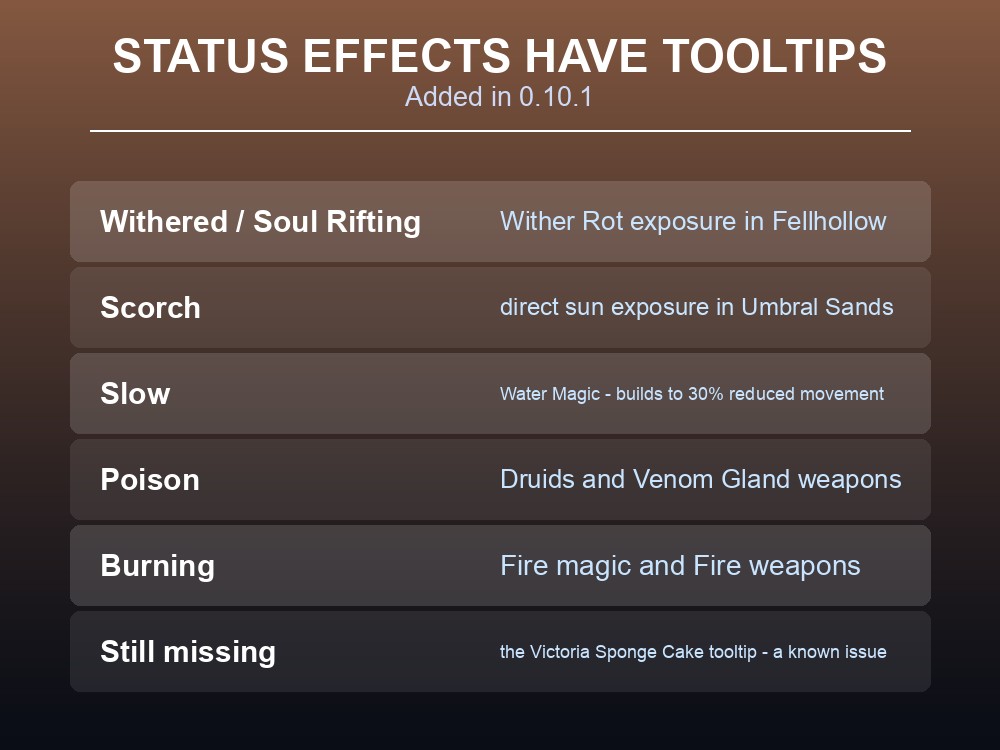
0.10.1 added tooltip descriptions for status effects, which matters because Dragonwilds has accumulated a lot of them:
| Effect | Where it comes from |
|---|---|
| Withered / Soul Rifting | Wither Rot exposure in Fellhollow |
| Scorch | Direct sun exposure in Umbral Sands |
| Poison | Druids, Venom Gland weapons |
| Burning | Fire magic and Fire weapons |
| Slow | Water Magic, building to 30% reduced movement speed |
Each region adds its own, and the counters differ — cleansing pools cure Withering, shade counters Scorch. Being able to read what has been applied is the difference between running for a pool and dying next to one.
One tooltip is still missing, and Jagex list it as a known issue: the Victoria Sponge Cake's tooltip is not visible, though the item does work — it "reduces the drain rate of Fatigue by 25%".
Combat AI Was Rebalanced Too
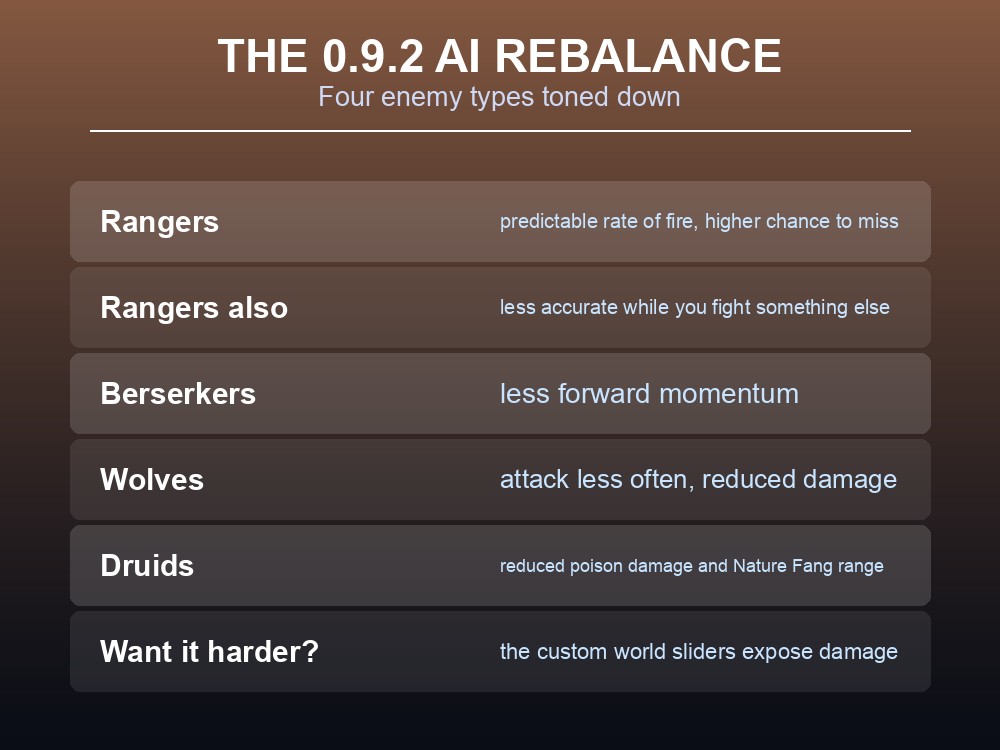
0.9.2 reworked enemy behaviour across Ghornfell, after Jagex found "some players are having a brutal and frustrating time navigating the Tier 3 content."
| Enemy | Change |
|---|---|
| Rangers | Swapped rapid-fire bows for a more predictable rate of fire; "took the scopes off" — higher chance to miss; reduced accuracy while you are in melee with something else |
| Berserkers | Less forward momentum |
| Wolves | Attack less frequently, slightly reduced damage |
| Druids | Reduced poison damage; Nature Fang has reduced range, damage and poison application |
The Ranger change is the most useful to understand. Their reduced accuracy "when the player is engaged in melee combat with other AI" means a mixed pull is less punishing than it used to be — the archer at the back is no longer reliably hitting you while you fight the thing in front.
And if you want the old difficulty back, Jagex point at the tuning dials: "If you want a more challenging time instead you always have those custom world sliders!" Those expose over 40 settings including damage — though remember that Custom Worlds require their own character type and progress does not transfer.
One small movement fix from the same patch that closes a specific frustration: you can now roll while wading through water.
Practical tips
- Darker hitsplats mean the enemy resists your weapon type. Switch weapons when you see them.
- Highlighted splats are criticals; styling also shows burning and poison.
- There are no splashes — misses read differently than in RuneScape.
- Blocking now shows damage mitigated, so you can verify it is working.
- Status effects have tooltips since 0.10.1 — read them before running.
- Rangers miss more while you fight something else, so mixed pulls are safer than they were.
- Custom world sliders raise difficulty if the AI rebalance made things too easy.
Running your own RuneScape: Dragonwilds server
The damage-telegraph fixes arriving with 1.0 are explicitly about server-to-client accuracy — phantom hits are a synchronisation problem, not a balance one. A gamever Dragonwilds server keeps your world on the current build automatically so you get those fixes the day they land, holds up to six players with backups you can roll back in one click, and needs no port forwarding to reach.
Conclusion
Dragonwilds' hitsplats do more than replicate a RuneScape screenshot. They report outgoing damage, highlight criticals, distinguish burning and poison, and — most usefully — render darker when the enemy resists the weapon type you are using, which is a live matchup readout you get for free. There are deliberately no splashes. Combined with blocking now displaying damage mitigated, and status effect tooltips added in 0.10.1, combat became far more legible than it was at Early Access launch. The damage telegraph fixes that reduce "phantom hits" from just-killed enemies land with 1.0 on 15 September, and they matter most on dedicated servers, where the mismatch is a client-server disagreement. And if the 0.9.2 AI rebalance — gentler Rangers, Berserkers, Wolves and Druids — made things too comfortable, the custom world sliders are where you turn it back up.
Want the 1.0 telegraph fixes the day they ship? Rent a Dragonwilds server at gamever.io — instant setup, one-click backups and updates, and 24/7 uptime. Start with a free trial and use promo code WELCOME.