
Project Zomboid Server Ports and Fixing Connection Problems
When a player can't join your Project Zomboid server, it's almost always about the address and port they're using. Your gamever server has a set of ports, each with a specific purpose, listed on the Network tab. This guide explains what each port does and how to troubleshoot connection problems.
The ports
Open the Network tab to see your server's addresses:
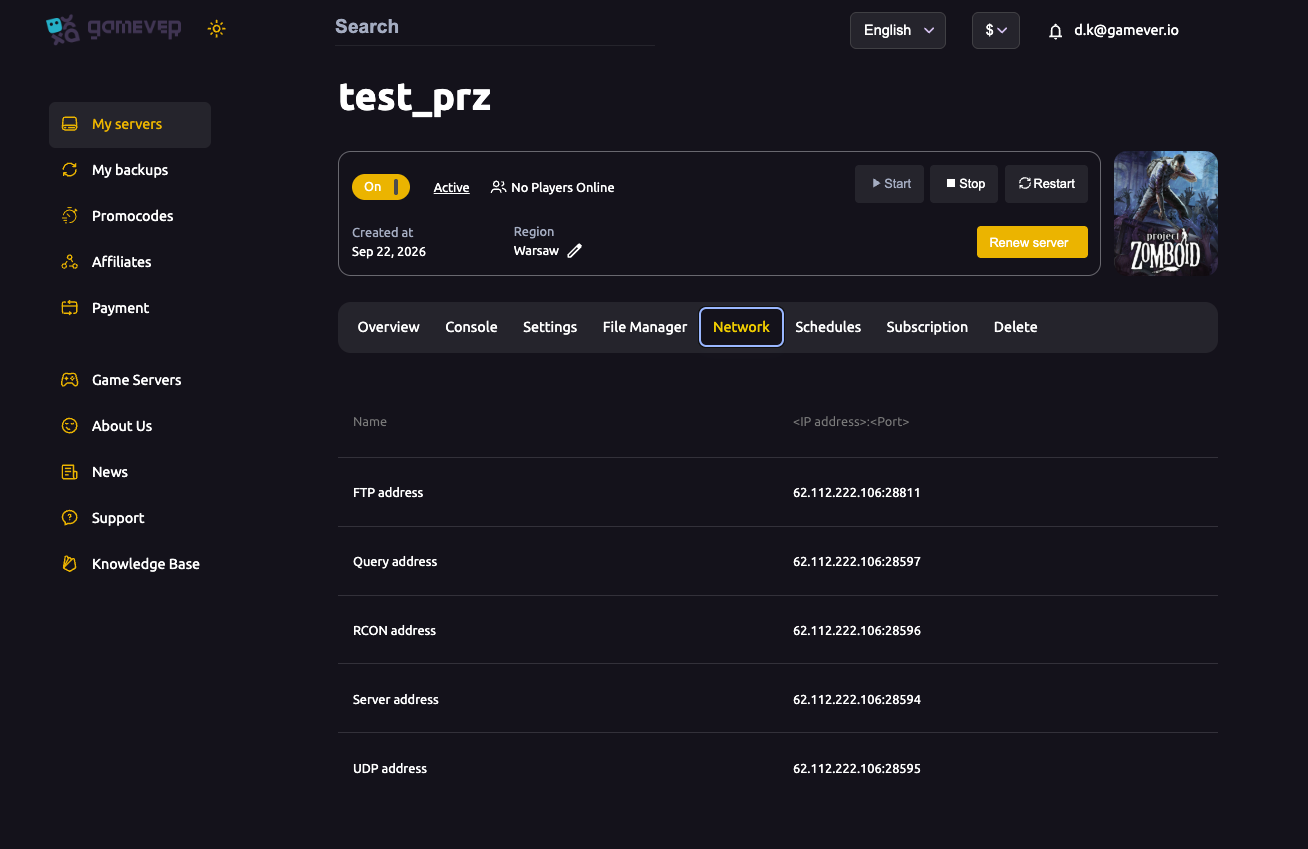
| Port | Address | What it's for |
|---|---|---|
| Server address | 28594 | The main game port — this is what players use to join. |
| UDP address | 28595 | Game traffic (Server port +1). |
| RCON address | 28596 | Remote console administration (Server port +2). |
| Query address | 28597 | Server listing/query so it shows in the browser (Server port +3). |
| FTP address | 28811 | File transfer for backups and world uploads — see upload a world. |
The game ports follow a simple pattern: the Server port is the base, and UDP, RCON and Query are +1, +2 and +3 from it.
How players connect
Players join with the IP address + Server port:
- Share your IP and the Server port
28594(shown on Overview asIP:28594). - In Project Zomboid, each player uses Join → Internet and adds the server by IP and port.
- They enter the server password if you set one, see passwords & admin.
If you set Public server to Enabled (see server settings), the Query port lets the server show up in the in-game browser too.
"Can't connect" — what to check
- Right port? Players must use the Server port (
28594), not UDP/RCON/Query. - Is the server online? Check it shows running on Overview and finished booting (watch the Console).
- Password match? If you set a server password, a wrong or missing one blocks the join.
- Public vs. private? If it's not showing in the in-game browser, confirm Public server is Enabled; otherwise players must join by IP.
- Everyone or just one? If only one player can't connect, the problem is their end, not the server.
- Mod mismatch — if the server runs mods, every player must subscribe to the same ones, or they'll be blocked, see install mods.
Additional Tips
- Players use the Server port (
28594) — the others are for the system, not joining. - UDP/RCON/Query are +1/+2/+3 from the Server port.
- FTP is
28811— for backups and uploads, not for joining. - Check Public server if it won't appear in the browser.
- Same mods on every client or the connect fails.
Conclusion
Your Project Zomboid server's ports each have a clear job, and almost every "can't connect" comes down to using the right one: players join on the Server port (28594) with your IP, the others handle UDP game traffic, RCON, server queries and FTP. Check the port, the password, the public toggle and matching mods, and your group connects every time.
Rent your Project Zomboid server at gamever.io — all your ports laid out clearly on one Network tab. Free trial, promo code WELCOME.