
Project Zomboid Custom Sandbox Settings Explained: All 12 Categories and Their Defaults
Project Zomboid's Custom Sandbox menu is how every non-default game actually gets built: after choosing a starting location, the player either hand-picks every option or starts from a preset (Apocalypse, Survival, Initial Infection, The First Week, Six Months Later) and customizes from there. The wiki's Custom Sandbox page organizes the whole menu into 12 categories, and each one hides settings that quietly change how a run plays — this guide walks through the ones that matter most, with the actual default values pulled directly from the source.
One honesty note first: the wiki page carries its own currency warning, quoted verbatim — "This page was last updated for an older version ( 41.78.19 ). The current stable version is 42.20.4 , so information on this page may be inaccurate." Treat every default below as documented for 41.78.19, not guaranteed identical on the latest build.
The 12 Sandbox Categories at a Glance
The source's Contents list names exactly 12 categories under Sandbox options: Population, Time, World, Nature, Sadistic AI Director, Meta, Loot Rarity, Character, In-game Map, Vehicle, Zombie Lore, and Advanced Zombie Options. The page also notes that "the Character options have a set default 'difficulty' for each preset" — presets don't just set one slider, they set a coordinated bundle across multiple categories at once. In the Saved Presets box, "each default option is the same settings used in the default game modes," so picking Apocalypse and never touching another slider reproduces that mode exactly.
Population, Time and World: Setting the Pace
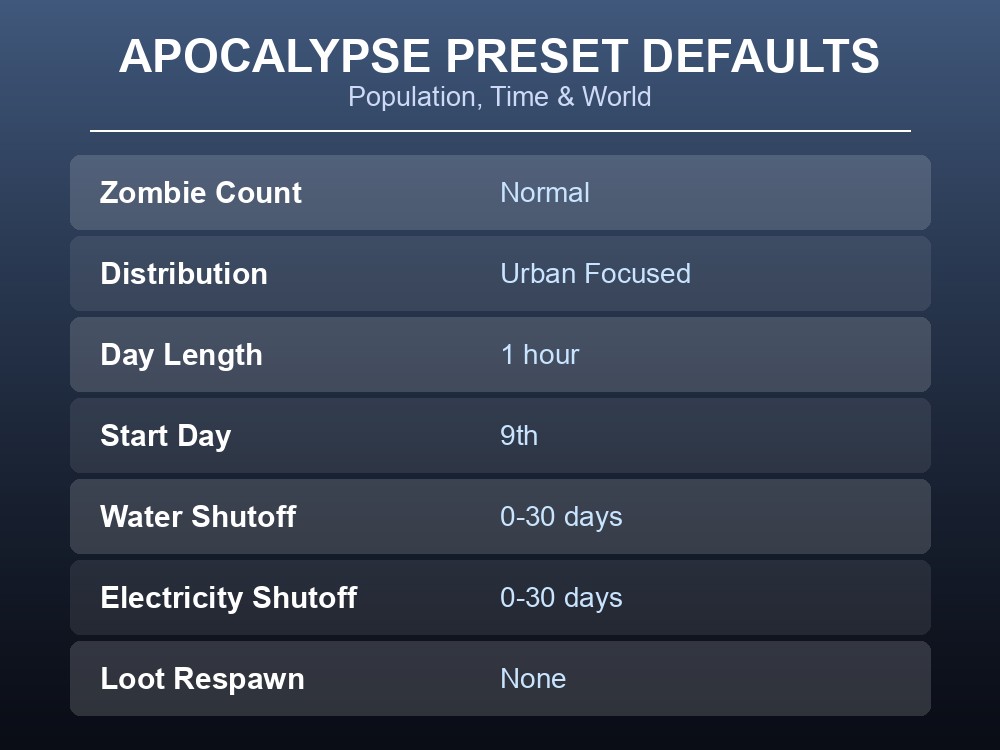
Zombie Count is the headline Population setting, and it "will adjust the 'Population Multiplier' advanced option" under the hood. Reading the preset table directly: Apocalypse and The First Week default to Normal, Survival to High, Six Months Later to Insane, and Initial Infection to Low. Zombie Distribution defaults to Urban Focused across all five standard presets — Uniform is available but isn't any preset's default.
Day Length defaults to 1 hour for all game modes, and per the source "can be adjusted hourly from anywhere between 1 hour to real-time (24 hours), or 15 and 30 minutes." Start Day defaults to the 9th, for all game modes. Water Shutoff and Electricity Shutoff share the same value table: Apocalypse and Survival default to 0-30 days, Six Months Later to Instant, The First Week to 2-6 months, and Initial Infection to 6-12 months. Loot Respawn defaults to None across every standard preset — a looted container stays empty unless you change it. Rotten Food Removal defaults to -1, and per the source "-1 means rotten food will never be removed."
Character, Loot Rarity and Nature: Difficulty Dials
XP Multiplier is bracketed in the source as [Minimum-0.001] [Maximum-1000] [Default=1], quoted as written. Free Traits defaults to 0 extra points on top of the standard 8, and Starter Kit, when enabled, gives a set list quoted directly: "Start with a school bag , baseball bat , hammer , water bottle and chips" — off by default.
Loot Rarity runs ten separate sliders — Non-Canned Food, Canned Food, Melee Weapons, Ranged Weapons, Ammo, Medical, Survival Essentials, Mechanics, Literature and Other — each on the same seven-step scale from "None (not recommended)" up through Insanely rare, Extremely rare, Rare, Normal, Common, to Abundant. Apocalypse, Six Months Later and Survival default every one of those ten sliders to Rare; The First Week defaults to Common; Initial Infection defaults to Abundant.
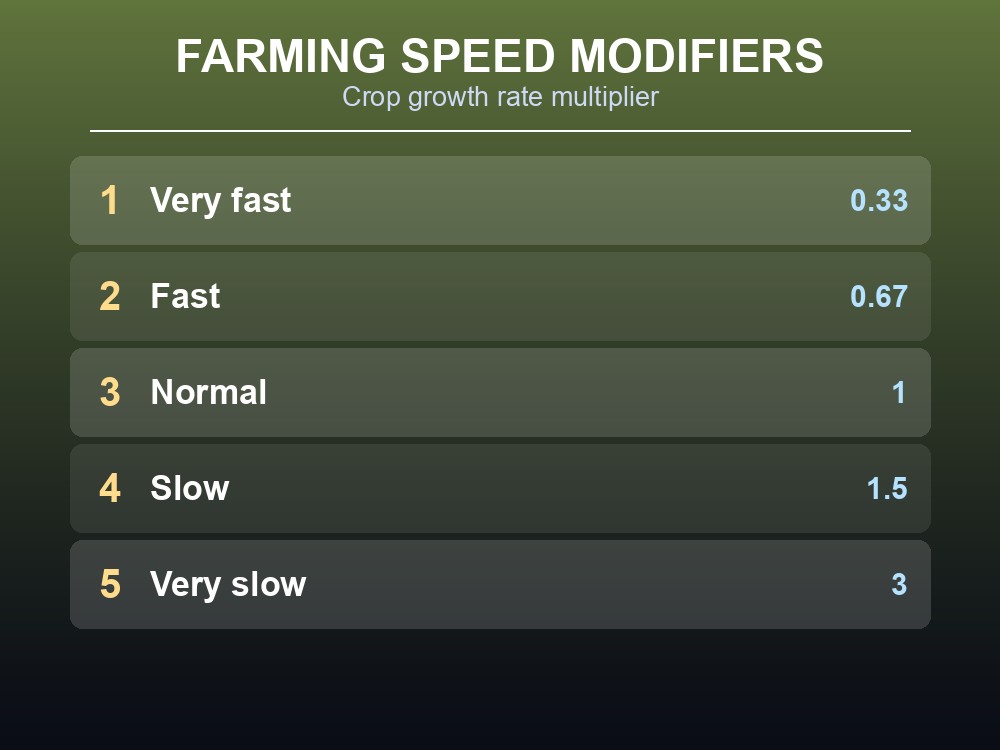
Under Nature, Farming Speed is a straight multiplier on crop growth time: Very fast = 0.33, Fast = 0.67, Normal = 1, Slow = 1.5, Very slow = 3. By the arithmetic, a Very fast farm grows roughly three times faster than Normal (1 ÷ 0.33 ≈ 3), and Very slow is three times slower.
Zombie Lore and Advanced Zombie Options: The Deep Settings
Zombie Lore is where "Proper Zombies" behavior tuning lives. Speed defaults to Fast Shamblers for Apocalypse, The First Week, Six Months Later and Survival, and to Shamblers for Initial Infection. Strength defaults to Normal for Apocalypse and Survival, but to Weak for the other three presets. Toughness defaults to Normal for four of the five presets, and to Fragile for Initial Infection. Transmission defaults to "Blood + Saliva" across all five; "Everyone's Infected," quoted directly, "will cause all players to reanimate once they're killed, similarly to The Walking Dead." Infection Mortality defaults to 2-3 days across all five, and the source explains the zero-setting precisely: "If you set the infection mortality rate to zero, you will get sick when bitten by a zombie, but you won't turn into a zombie and die."
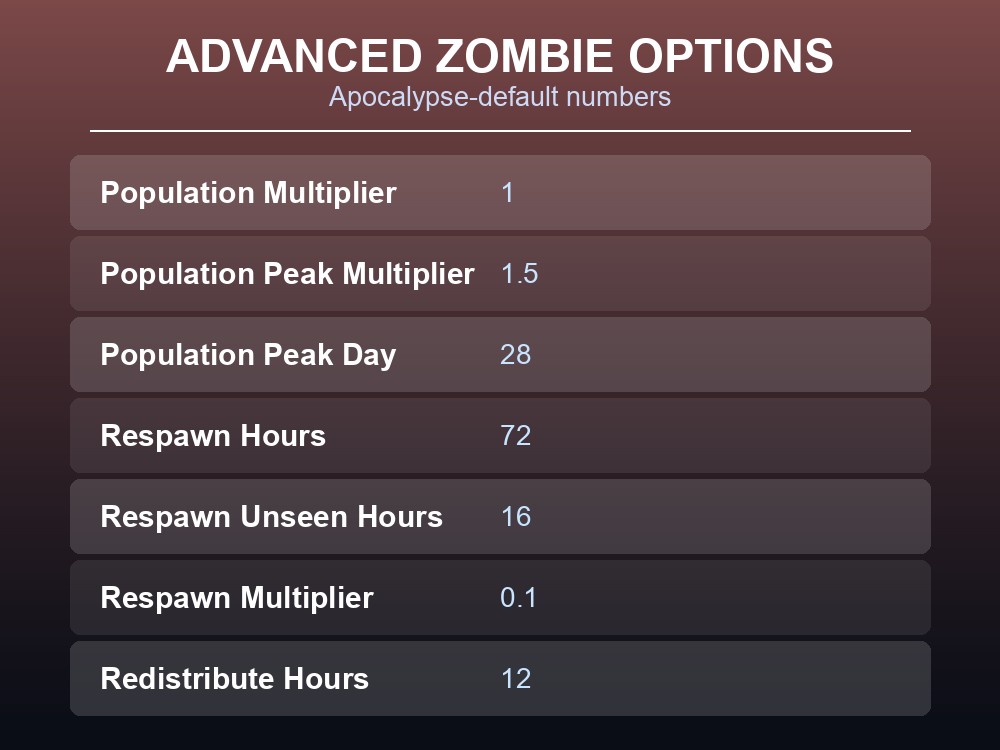
Advanced Zombie Options exposes the raw numbers, with defaults noted as being "for the Apocalypse game mode." Population Multiplier defaults to 1, spelled out directly as "4.0 = Insane, 2.0 = High, 1.0 = Normal, 0.35 = Low, 0.0 = None." Population Peak Multiplier defaults to 1.5, Population Peak Day to 28, Respawn Hours to 72, Respawn Unseen Hours to 16, Respawn Multiplier to 0.1, and Redistribute Hours to 12.
Practical tips
- Loot Respawn is None by default on every standard preset — containers only restock if you turn that on yourself.
- Zombie Count is a friendly label over the Population Multiplier advanced option, so if a preset's population feels wrong, edit that number directly.
- Rotten Food Removal's default of -1 means spoiled food sits in the world forever unless you set a positive day count.
- The wiki page is flagged as documented for an older build (41.78.19) against the current 42.20.4 — verify anything critical in-game first.
Running your own Project Zomboid server
Every setting in this guide applies the same way to a dedicated server's sandbox preset, not just a solo game — Population, Zombie Lore and Loot Rarity are what shape the difficulty your whole group experiences together. A hosted Project Zomboid server keeps those settings running around the clock, so your custom Apocalypse-plus-Insane-population build stays live whether or not you're the one online, with automatic backups protecting the world you tuned.
Conclusion
Custom Sandbox's 12 categories cover far more ground than the five headline presets suggest — Population, Time and World settings alone reshape zombie count, distribution and shutoff timers preset by preset, while Loot Rarity's ten sliders and Zombie Lore's toggles change the entire feel of a run. Knowing the actual Apocalypse-default numbers, from Population Multiplier 1 to Farming Speed 1, is what makes a custom preset a deliberate choice instead of a guess.
Want your custom sandbox settings running for the whole group, all the time? Rent a Project Zomboid server at gamever.io — one-click setup, automatic backups, and full control over every setting in this guide. Start with a free trial and use promo code WELCOME.