
Passwords and Admin on Your Project Zomboid Server
Who can join your Project Zomboid server, and who can control it, is decided by a few fields on the Server Settings sub-tab. This guide covers the server password, the admin account, the RCON password, the public toggle and Steam VAC — everything you need to keep your server private and under your control.
The fields that matter
Open Settings → Server Settings:
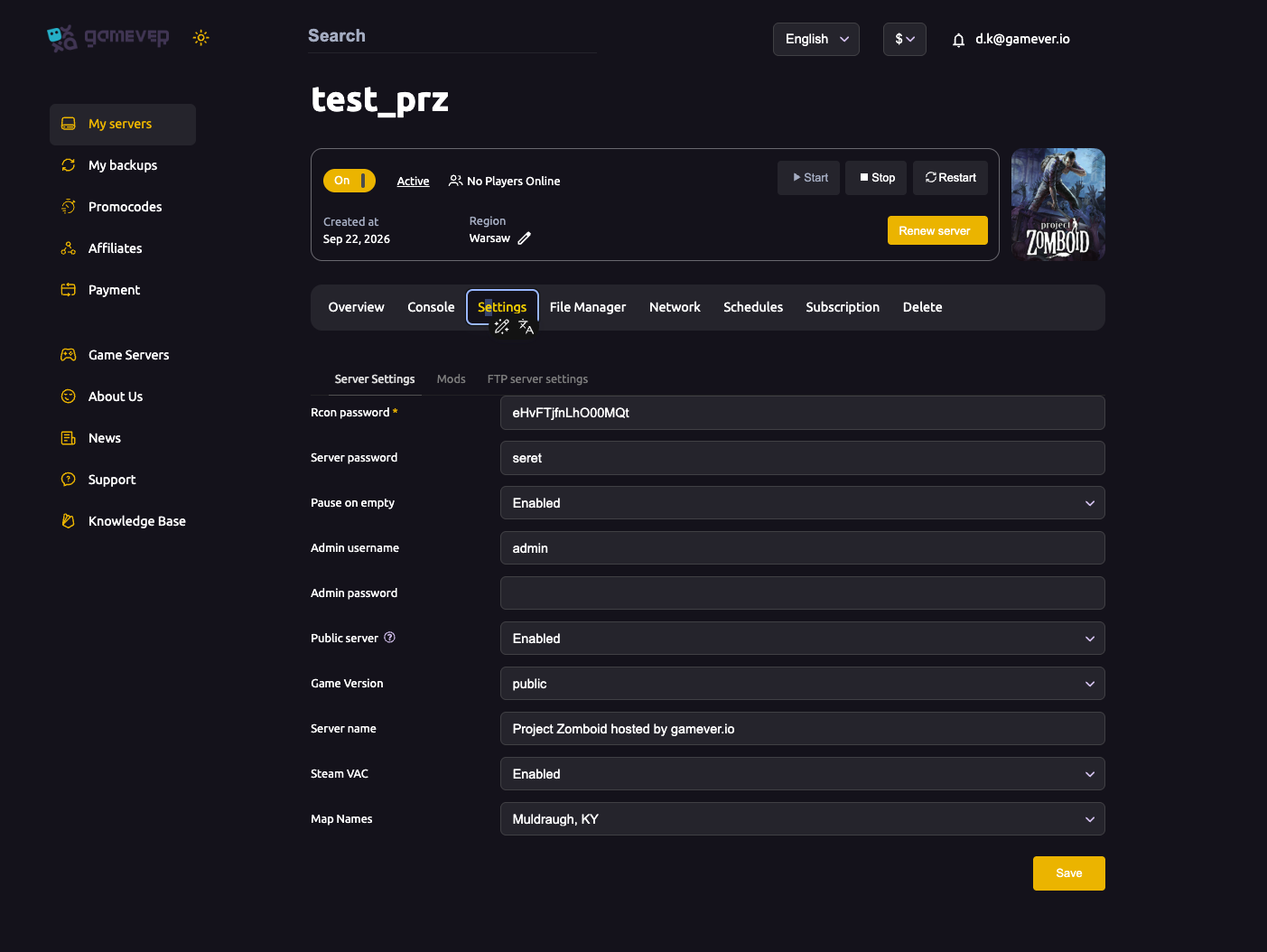
| Field | What it controls |
|---|---|
| Server password | The password players must enter to join. Blank = anyone with the IP can connect; set one for a private group. |
| Admin username | The in-game admin account name. |
| Admin password | That account's password — log in with it in-game to get admin powers. |
| Rcon password | The remote-console password for RCON tools. |
| Public server | Enabled lists the server in the in-game browser; Disabled keeps it off the list (IP-only). |
| Steam VAC | Enabled turns on Valve Anti-Cheat; Disabled turns it off. |
Change what you need, Save, then Restart.
Setting up your admin account
The admin account is how you moderate the server from in-game — kick/ban players, teleport, spawn items, change the weather and more:
- Set an Admin username and a strong Admin password on Server Settings.
- Save and Restart.
- Join the server, then log in as admin in-game using that username and password.
- Once logged in you have the admin menu and can run admin commands.
Keep the admin password private — anyone who has it controls the server.
Public vs. private
- Private group — leave Public server Disabled and set a Server password. Players join by IP (see ports & connection) and enter the password.
- Open/community server — set Public server Enabled so it appears in the in-game browser. You can still set a password, or leave it open.
Additional Tips
- Set a server password for a private group; leave it blank only for open play.
- Strong, private admin password — it's full control of the server.
- RCON password matters if you use remote-console tools; keep it secret too.
- Public off + password on is the usual private-group setup.
- Save and restart for any of these to take effect.
Conclusion
Locking down a Project Zomboid server is a handful of fields: a server password to control who joins, an admin username/password to control the server from in-game, an RCON password for remote tools, and the Public server and Steam VAC toggles. Set them, save, restart — and your Knox County is exactly as private and well-moderated as you want.
Rent your Project Zomboid server at gamever.io — passwords, admin and anti-cheat all in one simple panel. Free trial, promo code WELCOME.