
Password and Privacy on Your Abiotic Factor Server
Abiotic Factor is a co-op game, and most groups want their run kept to the people they invited. On gamever that comes down to one field — the Server Password — which turns an open server into a private one. This guide covers setting it, how players join a passworded server, and when to leave it blank.
Setting (or clearing) the password
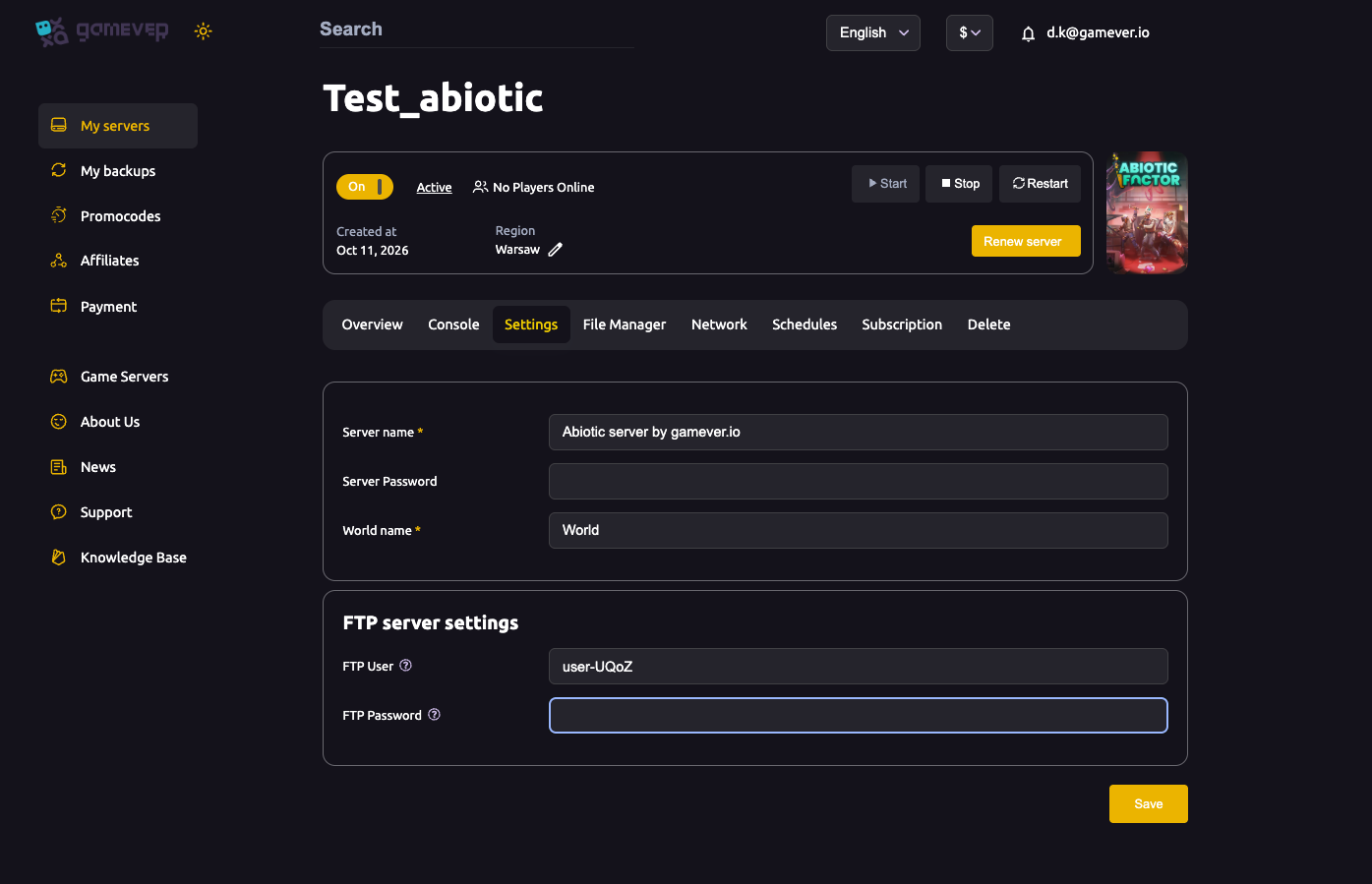
Open the Settings tab — it's a single page with the password field near the top:
| Field | Effect |
|---|---|
| Server Password (blank) | Public — anyone with your IP address can connect. |
| Server Password (set) | Private — only players who enter the password can join. |
After changing it, click Save, then Restart from Overview so the new setting takes effect.
The Server name and World name on the same page are separate — the password is the only field that controls who can get in. See server settings for the full page.
How players join a passworded server
- Share your IP address from Overview (
62.112.222.133:28333) with your squad — see getting started. - In Abiotic Factor, each player connects to that address via Multiplayer.
- When prompted, they enter the password you set.
That's it — anyone without the password is turned away, so you can share your IP more freely without opening the facility to strangers.
Public vs. private — which to pick
- Private (password set) — the default choice for a friends-only campaign. Recommended for most groups.
- Public (blank) — fine only if you genuinely want a drop-in server anyone can join. On an open server, treat your world as public.
If you ever suspect the password leaked, just change it and restart — everyone reconnects with the new one.
Additional Tips
- One field does it all — the Server Password is the whole privacy control.
- Blank = open to anyone with your IP — set a password for a friends-only run.
- Always Save then Restart after changing it.
- Share IP + password separately with your squad for a private campaign.
- Rotate the password (change + restart) if it ever gets out.
Conclusion
Privacy on your gamever Abiotic Factor server is a single decision: set a Server Password for an invite-only facility, or leave it blank for an open one. Players enter it when they connect by your IP, and changing it is a quick Save-and-Restart away. For most co-op groups, set a password and keep your run to your squad.
Rent your Abiotic Factor server at gamever.io — private co-op in minutes, with a simple password you control. Free trial, promo code WELCOME.