
Minecraft World Settings Explained (Spawn Protection, View Distance, Mobs, Nether)
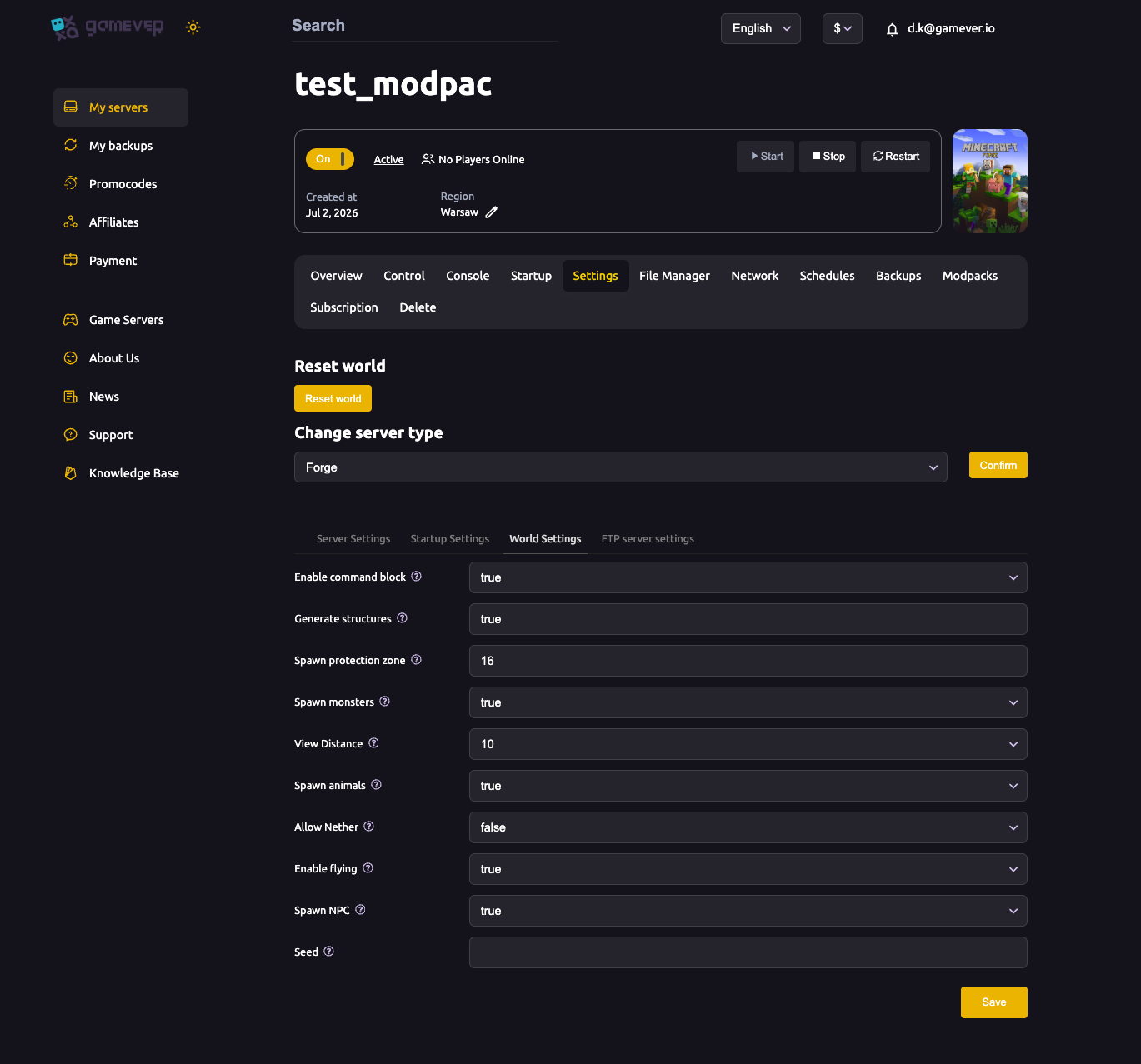
The World Settings sub-tab controls how your Minecraft world is generated and behaves: which mobs spawn, how far players can see, how much of spawn is protected, whether the Nether is open, and more. These map to the familiar server.properties world options, with a friendly panel on top. This guide walks through each one.
Where to find it
Open the Settings tab, then the World Settings sub-tab. Make your changes, click Save, and Restart the server so they apply.
The World Settings fields
| Setting | What it does |
|---|---|
| Enable command block | true / false. Allows command blocks to run — needed for maps and redstone contraptions that use commands. |
| Generate structures | true / false. Whether villages, temples, strongholds and other structures generate in new chunks. |
| Spawn protection zone | Radius (in blocks) around world spawn that non-operators can't build in or break. Default 16. Set 0 to disable it. |
| Spawn monsters | true / false. Whether hostile mobs spawn. Note difficulty peaceful overrides this. |
| View Distance | How many chunks the server sends to each client (default 10). Lower it to reduce CPU/RAM load — see fixing lag. |
| Spawn animals | true / false. Whether passive animals (cows, sheep, etc.) spawn. |
| Allow Nether | true / false. Whether players can travel to the Nether. |
| Enable flying | true / false. When true, the server allows flight (for creative mode and certain mods/plugins) without kicking players for "flying is not enabled". |
| Spawn NPC | true / false. Whether village NPCs (villagers) spawn. |
| Seed | The world generation seed. Leave blank for a random world; enter a value for a specific, reproducible world. The seed only affects a newly generated world — see reset world. |
The settings people ask about most
- View Distance is the big performance lever. Each extra chunk of view distance multiplies what the server tracks. If your server runs hot with a full group or a heavy modpack, lowering this from
10to6–8is one of the most effective fixes — more in fixing lag. - Spawn protection stops new players griefing near spawn. Operators ignore it, so you can still build there — see ops & whitelist.
- Seed only matters for a fresh world. Changing it won't alter terrain already generated; you need to reset the world (back up first) to use a new seed.
- Spawn monsters vs. difficulty. On
peacefuldifficulty, hostile mobs never spawn regardless of this toggle — set difficulty too.
Additional Tips
- Lower View Distance first when you have lag — it's the highest-impact world setting.
- Set Spawn protection to 0 if operators want builds right at spawn without the protected radius.
- A Seed change needs a world reset to take effect — back up before you reset.
- Turn off Allow Nether for a map that should stay in the Overworld only.
- Save then Restart after editing — world settings don't apply live.
Conclusion
The World Settings sub-tab shapes the world your players live in: command blocks and structures, how much of spawn is protected, how far people can see, which mobs appear, and whether the Nether is open. For performance, View Distance is the one to watch; for a fresh start, the Seed and Reset world go together. Save, restart, and your world runs by your rules.
Rent your Minecraft Java server at gamever.io — every world option in a clean panel, plus full file access for the advanced tweaks. Free trial, promo code WELCOME.