
Minecraft Startup Settings: Java Version, Aikar's Flags and JVM Options
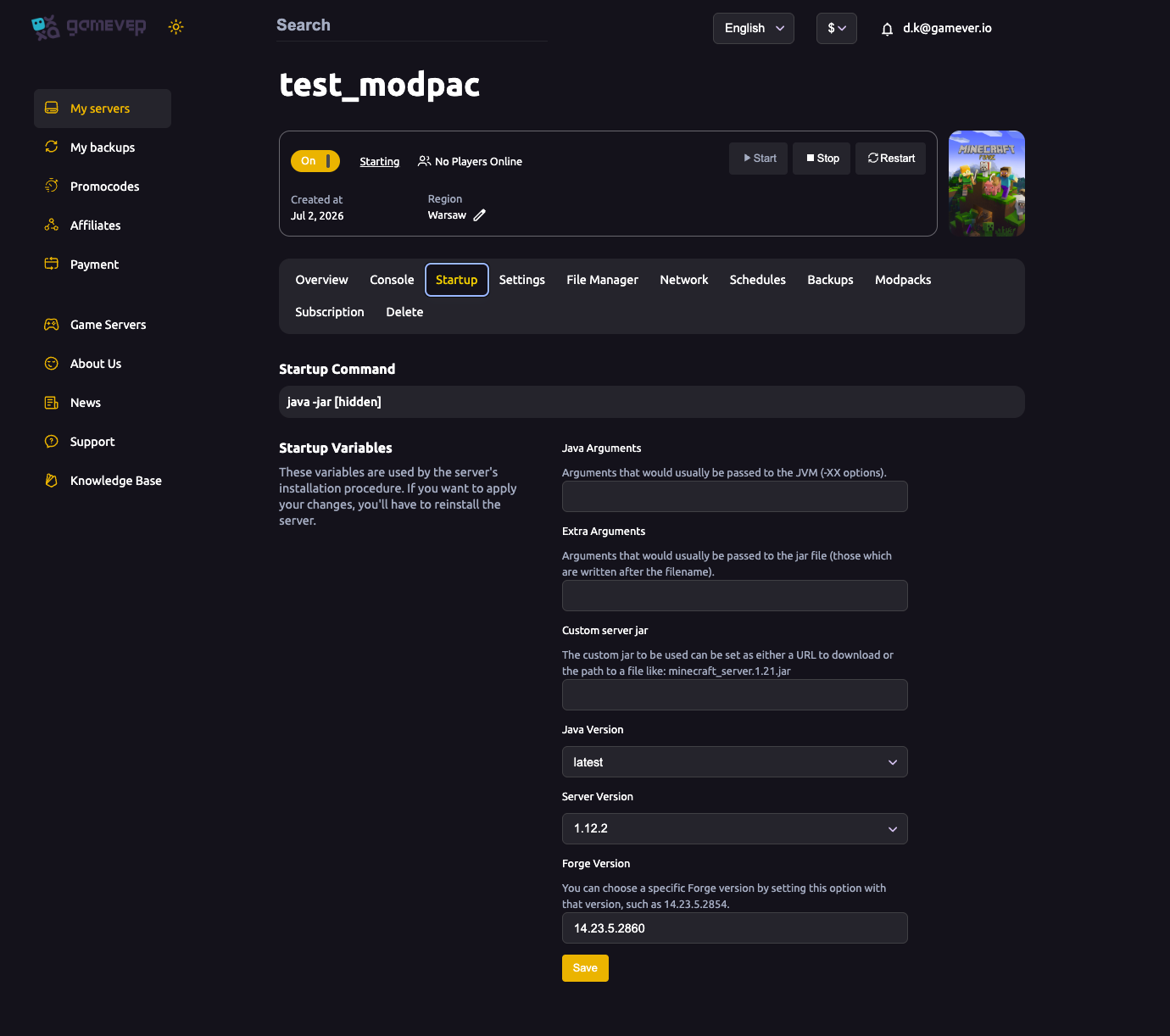
The Startup tab (and the Startup Settings sub-tab under Settings) is where you control the engine room of your Minecraft server: which Java it runs on, which server and Forge version it installs, and the memory flags that keep a big modpack smooth. This is more advanced than the day-to-day settings, so there's one rule to keep in mind: changes here require a reinstall to apply. This guide explains each field.
The Startup tab
Open the Startup tab. At the top you'll see the Startup Command (java -jar [hidden] — managed for you), then the startup variables:
| Field | What it does |
|---|---|
| Java Arguments | Arguments passed to the JVM (the -XX options), e.g. memory and garbage-collection flags. |
| Extra Arguments | Arguments passed to the jar (those written after the filename). |
| Custom server jar | A URL to download, or a path to a specific jar (e.g. minecraft_server.1.21.jar). Leave blank for the managed install. |
| Java Version | A dropdown, default latest. Older versions of Minecraft (e.g. 1.12.2) and some modpacks need an older Java — pick the one your version requires. |
| Server Version | The Minecraft version to install (e.g. 1.12.2). |
| Forge Version | A specific Forge build (e.g. 14.23.5.2860) on a Forge server. |
As the panel notes: "These variables are used by the server's installation procedure. If you want to apply your changes, you'll have to reinstall the server." So set them, then let the server reinstall — don't expect a plain restart to pick up a version change.
Startup Settings sub-tab
Under Settings → Startup Settings are the performance-oriented options:
| Setting | What it does |
|---|---|
| Custom Jarfile | The jar the server launches. |
| Java Version | Same choice as the Startup tab (default latest). |
| Enable Aikar's Flags | true / false. Turns on Aikar's well-known JVM garbage-collection flags, tuned to keep Minecraft smooth and avoid lag spikes. Recommended true for most servers, especially modpacks. |
| Jarfile Options | Extra options passed to the jar. |
| JVM Options | Low-level JVM flags, e.g. -XX:MaxRAMPercentage=95.0 to let the server use most of its allotted RAM. |
Java version and Minecraft version — getting the pair right
Minecraft versions are tied to Java versions. Older versions (1.12.2 and earlier) expect an older Java, while current releases need Java 17/21+. If the server won't start after a version change, the Java Version dropdown is the first thing to check — set it to one compatible with your Server Version, then reinstall. For modpacks, install from the Modpacks tab, which pins the right versions for you.
Aikar's Flags and RAM
For a heavy Forge modpack, two things make the biggest difference to smoothness:
- Enable Aikar's Flags (
true) so the JVM collects garbage without long pauses. - Set
-XX:MaxRAMPercentageso the JVM is allowed to use most of the RAM on your plan. Modpacks are RAM-hungry — see fixing lag and consider the Upgrade server button if you're constantly near the limit.
Additional Tips
- Reinstall to apply — version, Java and jar changes need the reinstall, not just a restart.
- Match Java to your Minecraft version — the #1 cause of a server that won't boot after a version change.
- Enable Aikar's Flags on modpacks for noticeably fewer lag spikes.
- Use the Modpacks tab for modpacks so versions are pinned correctly — see install a modpack.
- Back up before a version change — see backup & restore; a new version can affect your world.
Conclusion
The Startup tab and Startup Settings are the engine controls for your Minecraft server: pick the Java and server/Forge version, turn on Aikar's Flags, and set a sensible MaxRAMPercentage so a big modpack has the memory it needs. Remember that these apply on reinstall, keep Java and Minecraft versions matched, and your server launches clean and runs smooth.
Rent your Minecraft Java server at gamever.io — pick your version, Java and flags from the panel, with one-click modpacks and an Upgrade button when you need more RAM. Free trial, promo code WELCOME.