
Minecraft Commands Guide: How to use summon, kill, damage for your quests
Ever wanted to create an epic ambush, a boss fight, or a secret trap in your Minecraft world? These three commands - /summon, /kill, and /damage - are your go-to tools. With them, you can bring mobs to life, destroy them in a flash, and even control exactly how damage is dealt in your custom games and quests. Let’s dive into how each one works and what kind of awesome stuff you can make with them.
Summon command
This command lets you bring any mob or entity into the world wherever you want. It's like calling creatures from thin air. The basic format is /summon <entity> [pos] [nbt]. The entity can be anything from zombie to armor_stand. Position is optional; if you leave it blank, the mob appears where you're standing. You can also add NBT data to give it armor, weapons, names, or even special behavior. Try /summon zombie ~ ~ ~ and you'll get a zombie right next to you. You can summon a pig named Your personal Nightmare with /summon pig ~ ~ ~ {CustomName:"Your personal Nightmare"}.
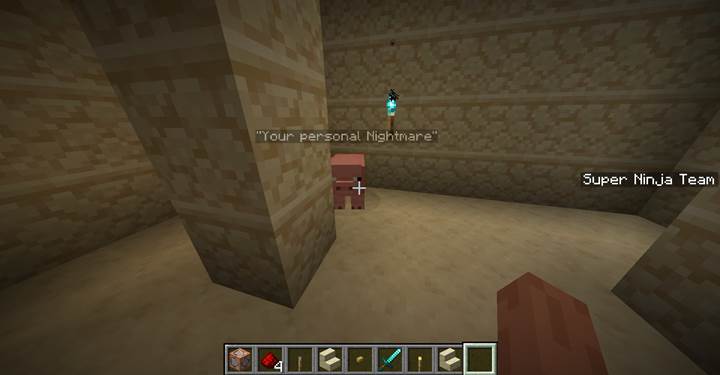
Or go crazy and drop a diamond-armed zombie boss like /summon zombie ~ ~ ~ {CustomName:"cBoss Zombie",CustomNameVisible:1b,PersistenceRequired:1b,IsBaby:0b, HandItems:[{id:"minecraft:diamond_sword",Count:1b},{}],ArmorItems:[{id:"minecraft:diamond_boots",Count:1b}]}.
And yeah, you can even make it float in the sky by changing the Y coordinate like ~ ~100 ~. This is perfect for traps, boss fights, or summoning allies in the middle of battle.

Kill command
Time to clear the field. The /kill command instantly removes any entity or group of entities. Syntax is super simple: /kill [target]. You can use selectors like @e (all entities), @a (all players), @p (nearest player), or target by name or type. Want to wipe out every mob except players? Try /kill @e[type=!player]. Need to get rid of every creeper near your base? Use /kill @e[type=minecraft:creeper]. Did a named mob go rogue? /kill @e[name=”Your personal Nightmare”] will take care of it. But warning - /kill @e will destroy everything: mobs, items, even minecarts and paintings. Use it with care. This is great for resetting a fight, ending a wave, or triggering a dramatic moment when everything vanishes at once.

Damage command
This one's for controlled pain. /damage lets you deal a specific amount of damage to a target, even choosing the source and type of damage. Format goes like /damage <target> <amount> [damageType] [damager]. Amount is how much damage you want to give, where 1 = half a heart. Damage types include magic, inFire, fall, explosion, and more. You can even say who caused it using the damager argument. For example, /damage @p 5 hits the nearest player with 5 damage.

Want it to look like they fell? Use /damage @p 6 fall. Make it look like a skeleton shot them: /damage @p 6 projectile @e[type=skeleton,limit=1,sort=nearest]. You can use this for booby traps, puzzles, cursed objects, or boss mechanics where players only take damage from certain things. It opens a whole new level of game design inside Minecraft.
Forest ambush and boss battle quest
You can build a full mini quest using just the /summon, /kill, and /damage commands, along with a few smart command blocks. Let’s break it down into three stages: the ambush, the boss, and the damage challenge using levers. Each one builds off the last, and the whole thing runs automatically once a player steps into your trap. Just for practice!
Stage 1 Zombie ambush in the woods
First, imagine this: a player walks into a dark forest clearing at coordinates 100 64 100 — and bam! Five zombies rise from the ground to surround them. Here's how to make that moment work using commands.
Start by creating a scoreboard objective to track whether the ambush has already been triggered for each player:
/scoreboard objectives add started trigger
Then, before the player enters the ambush zone (for example, when they spawn, press a button, or start the quest), make sure to enable the trigger for them:
/scoreboard players enable @a started
Now place a repeating command block set to Always Active. Inside, write this:
/execute as @a[x=100,y=64,z=100,distance=..3] unless score @s started matches 1 at @s run summon zombie ~ ~ ~
This checks if a player is within 3 blocks of the ambush zone and hasn’t triggered it yet. If so, it summons a zombie at their feet — and will do so every game tick (20 times per second) unless you control it.
So to stop the spam and limit the ambush to one time, add a Chain Command Block (Conditional) after it, with this:
/execute as @a[x=100,y=64,z=100,distance=..3] run trigger started set 1
Now the ambush happens once per player. As soon as they enter the zone, five zombies will spawn (if you repeat this five times or summon at five positions), and their score will lock the event. You can manually spread out the summons with offsets or particles for effect.
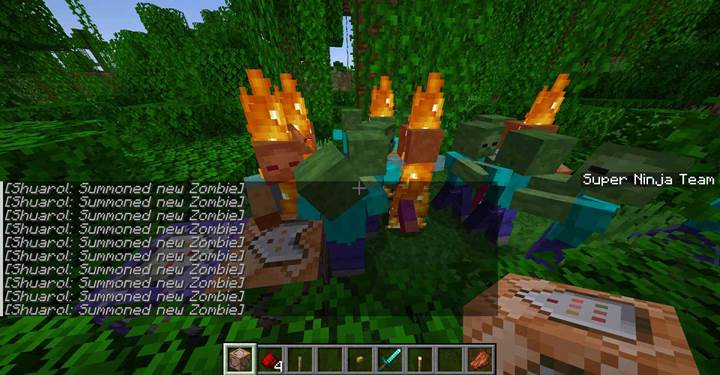
Stage 2 Summoning the boss after the battle
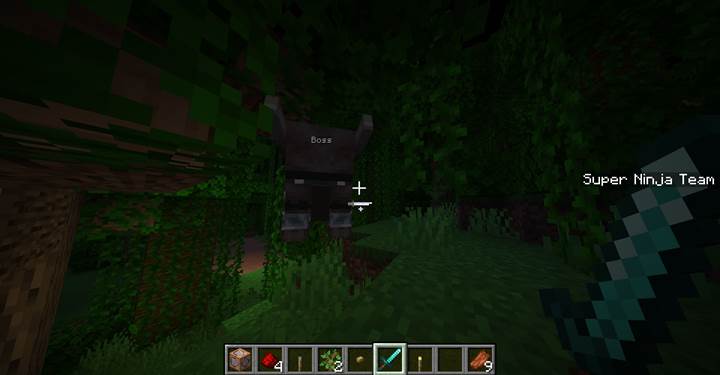
Once the player defeats all the zombies, it’s time to unleash the big boss. Imagine a custom Ravager named “Boss” thundering into the clearing. You add a hidden repeating command block (Always Active) with this line:
/execute if entity @a[scores={started=1}] unless entity @e[type=zombie,distance=..30] unless entity @e[tag=quest_boss] run summon ravager 100 64 100 {CustomName:'{"text":"Boss"}',Health:200f,Tags:["quest_boss"]}
That checks if the player has triggered the ambush, confirms no zombies are still nearby, and ensures the boss hasn't already spawned (by checking the tag). To lock the event after the boss appears, add a chain block with:
/execute if entity @e[name=Boss] run scoreboard players set global boss_spawned 1
But only if you've created the score first:
/scoreboard objectives add boss_spawned dummy
/scoreboard players set global boss_spawned 0
This way, the boss won’t spawn again even if the area resets. Now you have a clean and cinematic progression: beat the wave, face the boss.
Stage 3 Damaging the boss using special levers
And here’s the twist. You can’t just whack the boss with a sword. You have to run to levers placed around the battlefield and activate them multiple times to hurt the boss. Like puzzle combat. Start by creating another scoreboard:
/scoreboard objectives add damage_tick dummy
Then, place command blocks behind each lever and use this line (with the right coordinates):
/scoreboard players add @a[x=...,y=...,z=...,distance=..2] damage_tick 1
Now, in a repeating command block somewhere in the system, add the logic that says, “If a player gained damage_tick points, hurt the boss”:
/execute as @e[tag=quest_boss] at @s if entity @a[scores={damage_tick=1..}] run damage @s 5 magic
That’s five hearts of magic damage to the boss every time someone clicks a lever. To keep things clean, reset the score after each tick:
/scoreboard players set @a damage_tick 0
You can even require players to hit three levers in sequence or reach hard-to-get spots for each one.
This setup feels like a full adventure: ambush, victory, and a mechanic-driven boss battle where you have to move fast and think creatively to win. Toss in some redstone torches, music blocks, or particle effects and you’ve got yourself a story moment players won’t forget.
These three commands—/summon, /kill, and /damage—are like your creative superpowers in Minecraft. Combine them with redstone, pressure plates, and command blocks to create immersive challenges, puzzles, or epic battlefields that feel like a real adventure. Once you get the hang of these, you’ll be building full-on questlines before you know it.