
Minecraft Commands Guide: How to use setblock, fill, fillbiome, and clone for custom building
If you’ve ever dreamed of snapping your fingers and watching a building rise from the ground or a dungeon shift into place, these four commands are your best friends. With /setblock, /fill, /fillbiome, and /clone, you can build like a magician, changing the world instantly to match the player’s progress.

Setblock command
This command places one single block at a specific location. It’s perfect for activating redstone, placing keys, triggering doors, or modifying the world in response to a player’s action. The syntax is:
/setblock <x> <y> <z> <block> [block_state] [destroy|keep|replace]
For example, you can place a sandstone block at a specific spot like:
/setblock 100 65 -100 sandstone
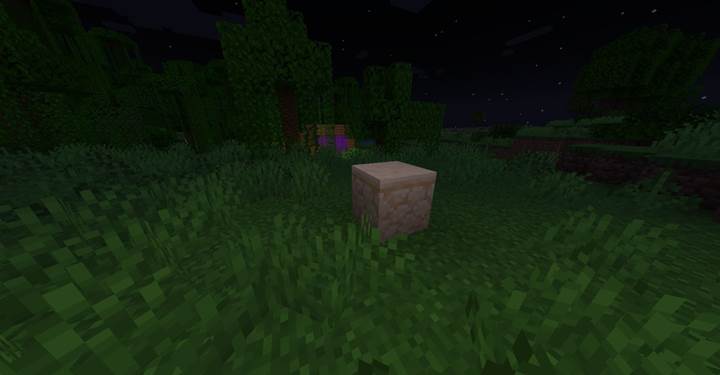
The optional part at the end controls how the block is placed. Use replace to overwrite whatever is there, destroy to break the existing block first (with a drop), or keep to place only if the space is empty. You can also use block states like:
/setblock ~ ~ ~ oak_log[axis=y]
which places a vertical oak log at your feet. It’s small and precise, perfect for traps, locks, or dynamic redstone.
Fill command
This one’s like a massive paintbrush. It fills a whole region with blocks, making it super useful for floors, walls, barriers, and bulk edits. The syntax looks like:
/fill <x1> <y1> <z1> <x2> <y2> <z2> <block> [block_state] [replace|keep|outline|hollow|destroy]
You define two corners of a 3D box, and it fills everything between them. For example:
/fill 100 64 100 110 64 110 stone
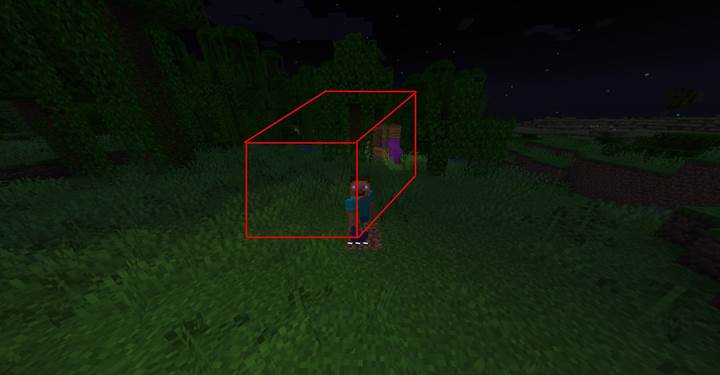
That would lay a big stone floor. You can also get clever with modes. Use replace to swap all blocks, keep to only fill empty space, outline to only place blocks on the edges, hollow to make walls with an empty inside, and destroy to break all blocks before filling. Want a glass box? Try:
/fill ~ ~ ~ ~10 ~5 ~10 glass hollow
Now you’ve got a quick puzzle room or observation cube. Just don’t go too big - there’s a limit of 32,768 blocks per fill.
Fillbiome
This one changes the biome of an area without changing the blocks. It’s new compared to other commands and adds a technical layer to map-making. Syntax is:
/fillbiome <from> <to> <biome> replace [filter]
You give it two opposite corners and the biome name, like plains or jungle. For example:
/fillbiome 100 64 100 110 70 110 minecraft:desert replace
This turns the area into a desert biome on the data level only — the blocks stay the same. That means grass doesn't instantly dry out, and visuals like color or rain may not update right away. You’ll see the effect in the F3 screen under “Biome”, or after reloading chunks.
It only affects the biome metadata, not the world geometry. Biome data is stored in 4×4×4 cells, and Minecraft smooths the transitions, so the actual affected area may look irregular. This is perfect for creating custom zones, controlling mob spawns, adjusting temperature effects, or preparing logic for structure-based systems.
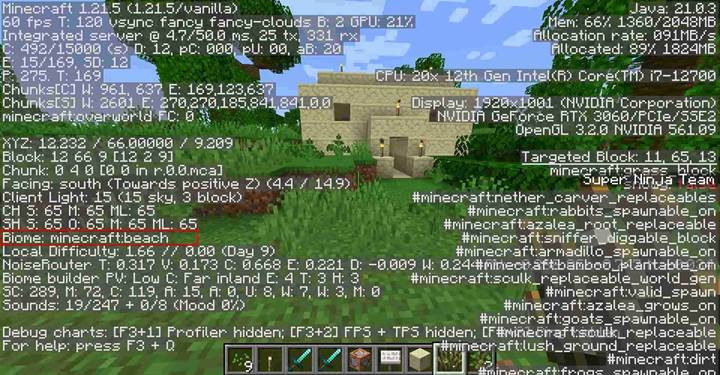
This command is ideal for story zones, biome triggers, or logic systems that react to specific environments.
Clone
This one is the time-saver of all time-savers. It copies blocks from one region and pastes them into another. You can use it to move structures, spawn rooms, reset puzzle areas, or duplicate builds mid-game. Syntax is:
/clone <begin> <end> <destination> [replace|masked|filtered] [normal|force|move]
Let’s say you have a puzzle room from 100 64 100 to 110 70 110 and you want to paste it to 200 64 200. You’d do:
/clone 100 64 100 110 70 110 200 64 200
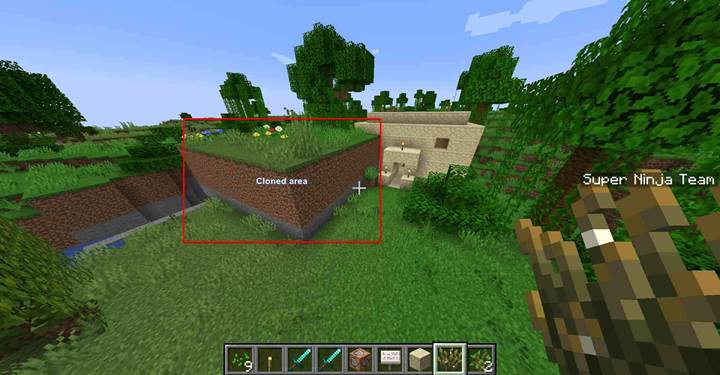
Modes help you control the copy. Replace does everything, masked skips air blocks, and filtered only copies blocks of a certain type (you’ll need to specify which). You can also use move to delete the original after copying. Just keep in mind that the clone region can't exceed 32,768 blocks — for larger areas, you'll need to split it. Need to reload a puzzle after failure? Just clone the original back into place. Need to paste a boss arena after a trigger? Boom, clone it from a hidden buffer zone.

Corrupted forest transformation using biome and structure cloning
Let’s create a story-driven puzzle or world event where the player steps into a magical forest that slowly becomes corrupted as they progress. This section uses a combination of `/fillbiome`, `/clone`, and optionally `/setblock` and `/fill` to build a fully reactive environment. The goal is to show how a world can change visually and functionally to reflect player actions - perfect for quests, RPG maps, or immersive storytelling.
Imagine this: the player solves a riddle in a sacred grove. As soon as they do, the forest begins to darken, leaves change color, the sky looks heavier, and an eerie fog creeps in. You simulate this transformation by changing the biome of the area using
/fillbiome <x1> <y1> <z1> <x2> <y2> <z2> minecraft:sparse_jungle
That sets the stage. Then, after another trigger or event - maybe collecting a forbidden relic - you run:
/fillbiome <x1> <y1> <z1> <x2> <y2> <z2> minecraft:soul_sand_valley
This instantly makes grass dry up, sky tone shift, fog color change, and gives the zone an undead vibe. You now have a visual shift that feels magical, without touching any blocks at all.
Next, to make the environment actually feel transformed, you clone corrupted structures into the area. Maybe a ruined altar replaces the peaceful fountain. In your command block, trigger:
/clone 300 64 300 305 70 305 200 64 200
That pastes a pre-built structure from your buffer zone into the forest. You can even set it to move original blocks away, or use `/fill` to clear the old version first. For example:
/fill 200 64 200 205 70 205 air
Then run the clone, so the corrupted version fits right in.
For added atmosphere, you can use `/setblock` to drop redstone blocks that activate hidden sound loops, particles, or mob spawners. Like:
/setblock 201 65 201 redstone_block
to activate a clock or trigger a growl sound from a command block.
By mixing biomes and cloned builds, you can make the forest feel alive and reacting to the player’s decisions. It turns a static map into a dynamic narrative space - one where puzzles unlock changes, and the world evolves with every step. Perfect for quests about ancient curses, magical decay, or shifting realms. And once you set it up, you can repeat the system for other zones - deserts that bloom into jungle, cities that crumble into ruins, or even dungeons that repair themselves after failure.
These four commands are your instant-construction toolkit. Use /setblock for precise tweaks, /fill for big shapes and walls, /fillbiome to create dynamic environments, and /clone to copy and paste entire buildings or dungeons.