
Loot, XP and Day-Length Settings on Your 7 Days to Die Server
Three settings do more than any others to set the pace of a 7 Days to Die server: how generous the loot is, how fast players level, and how long each day lasts before the night (and the next horde) arrives. On a gamever-hosted server you tune all three from the control panel — two live on labelled Settings sub-tabs, and the XP dial lives in serverconfig.xml, which you reach through the File Manager. This guide shows where each one is, what the underlying config key is called, and how to balance them.
The pace dials at a glance
Every field below is a real serverconfig.xml property. The table maps the panel label you'll click to the config key behind it, its stock default, and what moving it does.
| Panel field | Config key | Default | Effect |
|---|---|---|---|
| LootAbundance | LootAbundance | 100 | Loot quantity as a percentage. Raise for more loot, lower for scarcity. |
| LootRespawnDays | LootRespawnDays | 7 | In-game days before an emptied container refills. |
| (File Manager) | XPMultiplier | 100 | XP gain multiplier as a percentage. Raise to level faster. |
| Day Night duration | DayNightLength | 60 | Real-time minutes in one full in-game day. |
| Duration Sunshines | DayLightLength | 18 | In-game hours of daylight per day. |
Percentages are whole numbers: 100 means stock, 200 means double, 50 means half.
Loot: the Difficulty tab
Open Settings → Difficulty settings. Two of your pace dials live here:
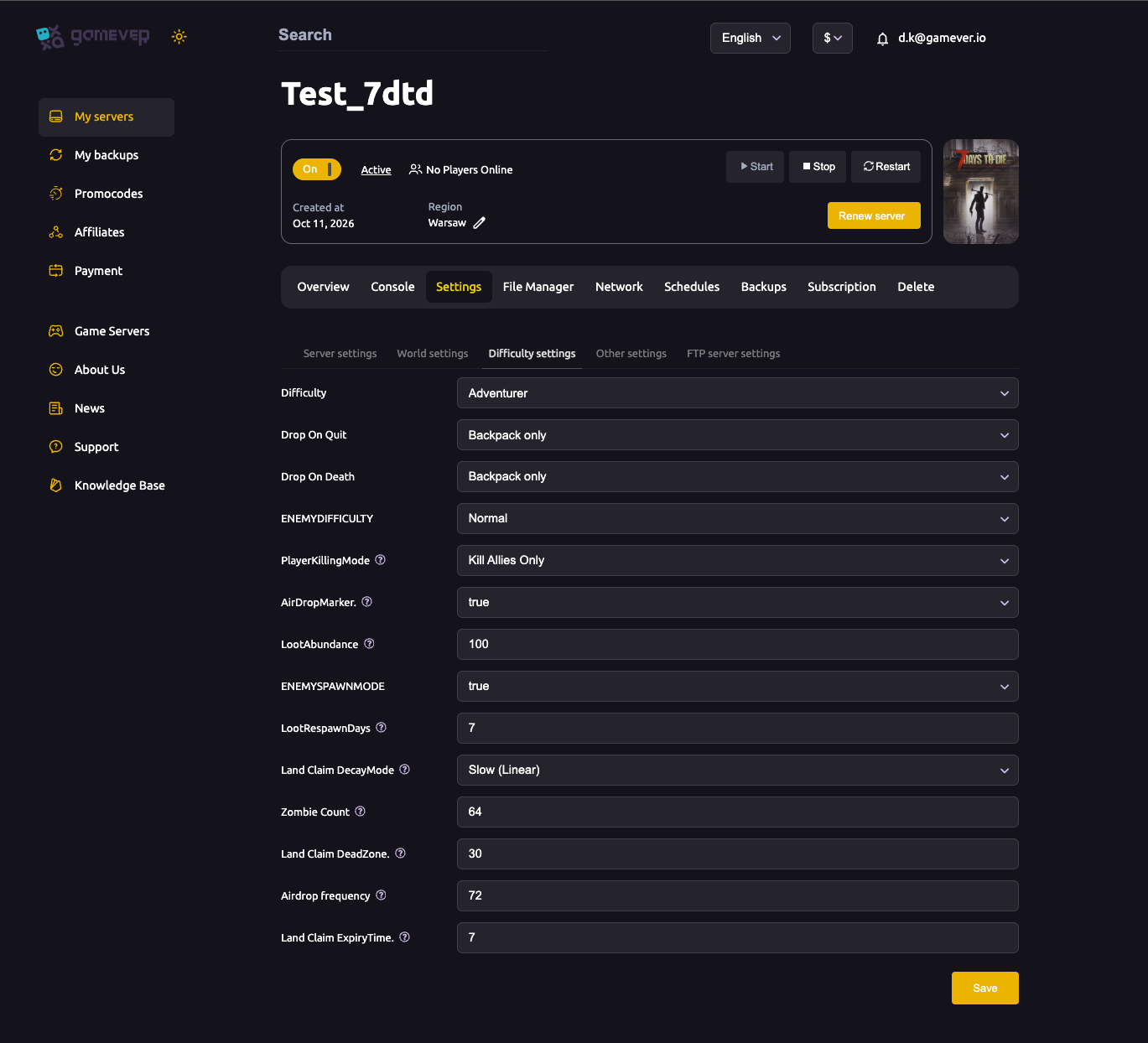
- LootAbundance controls how much loot you find, as a percentage. 100 is the stock default. Push it higher for a faster, more generous start; drop it below 100 for a scarcity run where every supply matters.
- LootRespawnDays sets how many in-game days an emptied container takes to refill — 7 by default. Lower it (even to 1) on a long-running public server so returning players still find something in cleared points of interest; raise it to keep loot feeling finite. For the full picture of how a container's contents are chosen, see how looting and loot respawn work.
Set the values, click Save, then Restart from the Overview tab so the change takes effect. The rest of this tab (Difficulty, Zombie Count, death rules) is covered in our difficulty settings guide.
Day length and daylight: the Other tab
Open Settings → Other settings. The two timing dials that set your day/night rhythm are here:
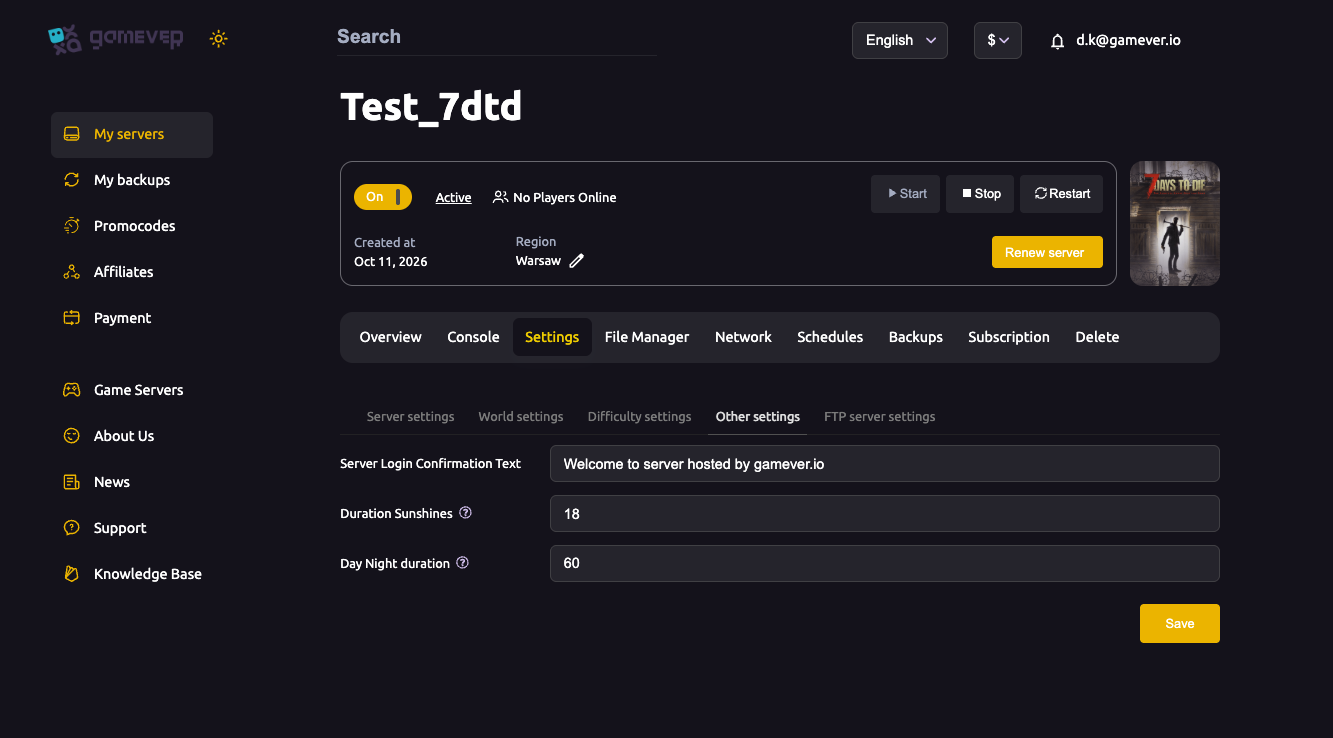
- Day Night duration (
DayNightLength) is the real-time length of one full in-game day, in minutes — 60 by default. Raise it for longer, more relaxed days; lower it to speed the march toward the next blood moon. - Duration Sunshines (
DayLightLength) is how many in-game hours the sun is up each day — 18 by default. More daylight gives players more safe hours to loot and build; fewer makes nights feel longer and tenser.
These two work together: a long day with lots of sunshine is forgiving, while a short day with few daylight hours makes the nights dominate. Pair them with the blood-moon schedule when you plan your horde nights. Save and Restart to apply.
XP multiplier: serverconfig.xml via File Manager
The XP rate is controlled by XPMultiplier, a percentage of normal XP gain (default 100). It isn't surfaced as its own field on the Settings tabs, so you set it by editing the config file directly in the panel:
- Open the File Manager and find
serverconfig.xml. - Locate the line with
property name="XPMultiplier"and change itsvalue. - Save the file, then Restart the server from Overview.
Use 200 for roughly double XP (a quicker progression server), or drop below 100 for a slower, grindier long-haul. Because this edits the live config, take a one-click backup first — see backup and restore — so a mistyped value is easy to roll back.
Additional Tips
- Move percentages in steps. Jumping LootAbundance or XPMultiplier straight to 300 can trivialise a server; nudge by 25–50 and feel it out.
- LootRespawnDays matters most on busy servers. A low value keeps looted towns worth revisiting; a high one preserves scarcity for small groups.
- Balance the two day dials. A very short Day Night duration with few Duration Sunshines hours makes nights overwhelming — raise daylight if you shorten the day.
- Faster XP ≠ easier survival. Levelling quickly raises your Game Stage, which makes zombies tougher — pair a high XPMultiplier with loot that keeps pace.
- Back up before editing serverconfig.xml. File Manager edits are live; a backup makes any change reversible.
- Always Save then Restart. None of these values apply until the server restarts.
Conclusion
Loot, XP and day length are the three dials that turn the same map into a gentle co-op sandbox or a brutal scarcity grind. Set LootAbundance and LootRespawnDays on the Difficulty tab, Day Night duration and Duration Sunshines on the Other tab, and XPMultiplier in serverconfig.xml through the File Manager — then save and restart. Start from the defaults (100 / 7 / 60 / 18 / 100), move in small steps, and you'll find the pace your group enjoys.
Rent your 7 Days to Die server at gamever.io — every pace dial in one clear panel, a built-in File Manager for the finer tweaks, and one-click backups so no change is risky. Free trial, promo code WELCOME.