
Is Satisfactory Crossplay? PC, PS5 and Xbox Explained

"Is Satisfactory crossplay?" is one of the first questions a new group asks before renting a server — and the honest answer is it depends which platforms your friends are on. This guide lays out the current state across Steam, Epic, PlayStation 5 and Xbox, explains who can share a gamever dedicated server and who can't, and shows how everyone actually joins. All of it is checked against Coffee Stain's own wiki, so you can plan your group before you order.
The short answer
- Steam + Epic (PC): Yes — they play together, including on a dedicated server.
- PS5 ↔ Xbox (console): Yes — the two consoles play together.
- PC ↔ console: No — there is currently no crossplay between PC and console, and consoles can't use dedicated servers at all.
So a gamever Satisfactory server is a PC server: any mix of Steam and Epic players can share it, but PS5 and Xbox players cannot join it.
PC crossplay: Steam and Epic are one pool
Satisfactory launched on PC through both the Steam and Epic Games Store storefronts, and the two have always been cross-compatible. Coffee Stain's wiki is explicit: "Game clients from both the Epic and Steam game stores can connect and play on dedicated servers" — and that holds regardless of which store the server itself was built from. On gamever you don't pick a "Steam server" or an "Epic server"; it's simply a Satisfactory dedicated server that either client connects to.
Consoles: PS5 and Xbox
Satisfactory arrived on PlayStation 5 and Xbox Series X|S on 4 November 2025. The two console families crossplay with each other, but two limits matter for anyone thinking about a rented server:
- No dedicated servers on console. The wiki states plainly that "Dedicated servers are not available for the console release", calling it a desktop-only feature with no plan to add console support later. Console players are limited to a co-op session hosted from one player's own machine.
- No PC–console crossplay. There is currently no crossplay between PC and console. Coffee Stain has said bridging the two would require a huge, long-term rework, so it isn't something to count on today.
The practical takeaway: if your whole group is on PS5 or Xbox, a rented PC dedicated server won't help you — you'd play a console co-op session together instead. If even one person is on PC and the rest on console, you can't all share one world yet.
Who can join a gamever Satisfactory server
| Platform | Can join a gamever (PC) server? | |
|---|---|---|
| Steam (PC) | Yes | |
| Epic Games Store (PC) | Yes | |
| Steam + Epic mixed | Yes — same server, no special setup | |
| PlayStation 5 | No — consoles can't use dedicated servers | |
| **Xbox Series X\ | S** | No — consoles can't use dedicated servers |
How PC players actually join (add by IP)
Satisfactory has no server browser — nobody "searches" for your server. Everyone adds it by its address inside the game's Server Manager:
- Open the Network tab in your gamever panel and copy the Server address (
IP:port, e.g.62.112.222.154:29665). - In Satisfactory, open Server Manager → Add Server and paste that
IP:port. - The first person to connect claims the server with an Admin Password — full steps in connect and claim.
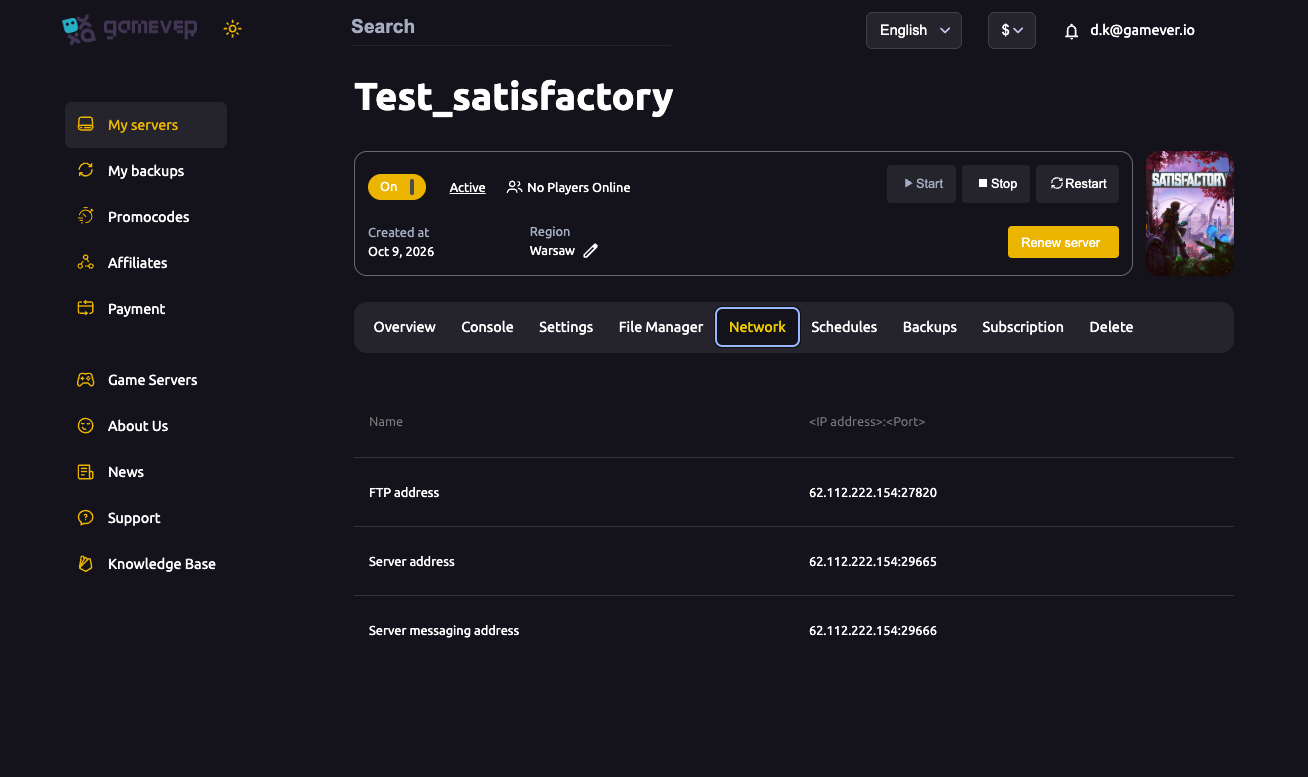
Because the join is a plain IP:port, a Steam player and an Epic player paste the exact same address and land in the same factory. There's no account linking and no store check. If a friend says they "can't find" the server, that's expected — they need to add it by address, not search for it (ports & connection troubleshooting).
Additional Tips
- Mixed Steam/Epic groups work out of the box — just share the one Server address; nothing on the panel changes per storefront.
- Match versions and branches. Crossplay still needs the same build: if one client is on the experimental branch and the server is on stable, the join fails — line them up via updating & branches.
- Mods must match too. Any mod has to be installed on the server and on every client, regardless of Steam or Epic (install mods).
- Console players: your only shared-play option today is a co-op session hosted by one console player — a rented dedicated server is PC-only.
- Don't trust generic "crossplay yes" claims that say consoles can join PC servers; the official wiki is clear they can't.
Conclusion
Satisfactory crossplay is real, but bounded: Steam and Epic PC players freely share a dedicated server, PS5 and Xbox players share co-op sessions with each other, and the two sides don't mix — consoles can't connect to dedicated servers at all. For a gamever server, that means any blend of Steam and Epic friends can build together on one world by pasting the same IP:port from the Network tab into Server Manager.
Rent your Satisfactory server at gamever.io and give your Steam and Epic crew one always-on factory — every port open, Steam and Epic welcome, ready to claim in minutes. Free trial, promo code WELCOME.