
How to Wipe Your Rust Server: Map, Blueprint and Full Wipes
Wiping is a core part of running a Rust server: a fresh map resets the world and keeps the server feeling new. But "wipe" means different things depending on how much you clear — just the map, the map plus blueprints, or a full reset. This guide shows exactly which files to touch in the gamever File Manager, and the shortcut for a complete reset.
Where your save lives
Open the File Manager and browse to your server's identity folder:
/home/server/server/<server-identity>/
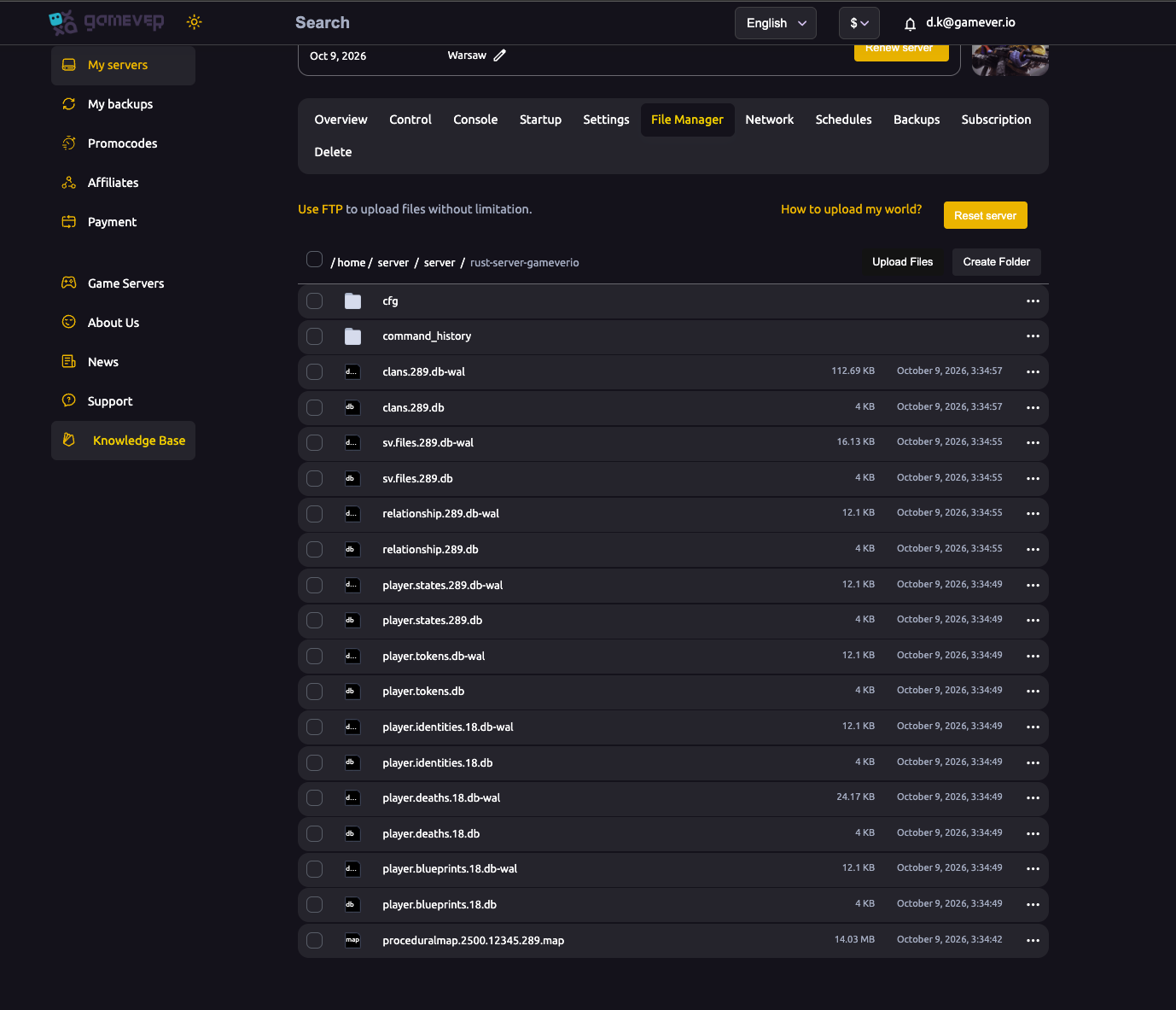
The files that matter:
| File | What it is |
|---|---|
proceduralmap.<size>.<seed>.<ver>.map | The world — terrain, buildings, deployables, everything placed. |
player.blueprints.<n>.db | Learned blueprints (tech tree progress). |
player.deaths / player.states / player.tokens / sv.files / clans / relationship .db | Per-world player and social data. |
Each .db has a matching .db-wal (its write-ahead log) — delete the two together.
Map wipe (keep blueprints)
The most common wipe: fresh world, but players keep what they've unlocked.
- Stop the server.
- Delete the
proceduralmap.*.mapfile (and the per-world player data:player.deaths,player.states,player.tokens,sv.files,clans,relationship— with their.db-wal). - Leave
player.blueprints.*.dbalone. - Start the server — it generates a fresh map; players respawn with their blueprints intact.
Easier map wipe: change the seed. In Settings → World Settings, set a new Server seed (or World size) and Save. Because the map filename encodes the seed and size, the server generates a brand-new world on restart automatically — a clean map wipe without deleting files. See world settings.
Blueprint wipe (fresh tech tree)
A "BP wipe" is a map wipe plus resetting blueprints:
- Do everything in the map wipe above.
- Also delete
player.blueprints.*.db(and its.db-wal). - Start the server — players begin with no learned blueprints.
Full wipe (everything)
A complete reset — new map, no blueprints, no player/social data:
- Easiest: click Reset server on the File Manager page (top right). This wipes the server back to a clean state.
- Manual: delete the
.mapfile and allplayer.*,clans,relationship,sv.files.db/.db-walfiles, then restart.
Additional Tips
- Back up first — copy the files out or use the Backups tab before deleting anything.
- Delete
.dband.db-waltogether — leaving an orphaned WAL can cause odd behaviour. - Changing seed or world size = automatic map wipe — handy for scheduled fresh starts without file deletion.
- Don't switch Gamemode mid-wipe — the panel warns against it; change it only on a fresh wipe.
- Announce it — tell your community the wipe time so no one loses a base unexpectedly.
Conclusion
On gamever you control exactly how much you wipe: delete the .map (and per-world data) for a map wipe, add player.blueprints.*.db for a blueprint wipe, or hit Reset server for a full wipe. For a quick clean map, just change the seed in World Settings. Back up first, announce it, and your server gets that fresh-wipe rush every time.
Rent your Rust server at gamever.io — one-click Reset, full file access, and seed changes from the panel. Free trial, promo code WELCOME.