
How to Wipe or Reset Your Palworld Server
Sometimes you want a clean slate: a brand-new world to explore, a reset after a major Palworld update, or a do-over for a new group. On gamever there isn't just one "wipe" — there are three, depending on how much you want to keep. This guide covers a full wipe, a settings-only reset, and a character-only wipe, and how to do each safely.
First: back up
Every wipe below deletes something permanently. Before anything, make a copy so you can return to it:
- Take an on-demand backup from the Backups tab (see restore a backup), and/or
- Stop the server and download the relevant files from
Pal/Saved/SaveGames/<SteamID>/<WorldID>/over FTP.
Skip this and the wipe is irreversible. Don't skip it.
Palworld's save layout (why there are three wipes)
A Palworld world and its characters are stored separately under the File Manager:
Pal/Saved/SaveGames/<SteamID>/<WorldID>/   ← world data
Pal/Saved/SaveGames/<SteamID>/<WorldID>/Players/   ← one file per player's character
The live config is separate again, at Pal/Saved/Config/LinuxServer/PalWorldSettings.ini. Because world, characters and settings are distinct, you can wipe exactly as much as you want.
| Wipe type | What it clears | What it keeps |
|---|---|---|
| Full wipe | the whole SaveGames world + characters | nothing of the old world (settings can carry over) |
| Settings-only | PalWorldSettings.ini / panel fields back to defaults | the world and all characters |
| Character-only | the Players/ character files | the world (bases, map, progression) |
Method 1 — full wipe
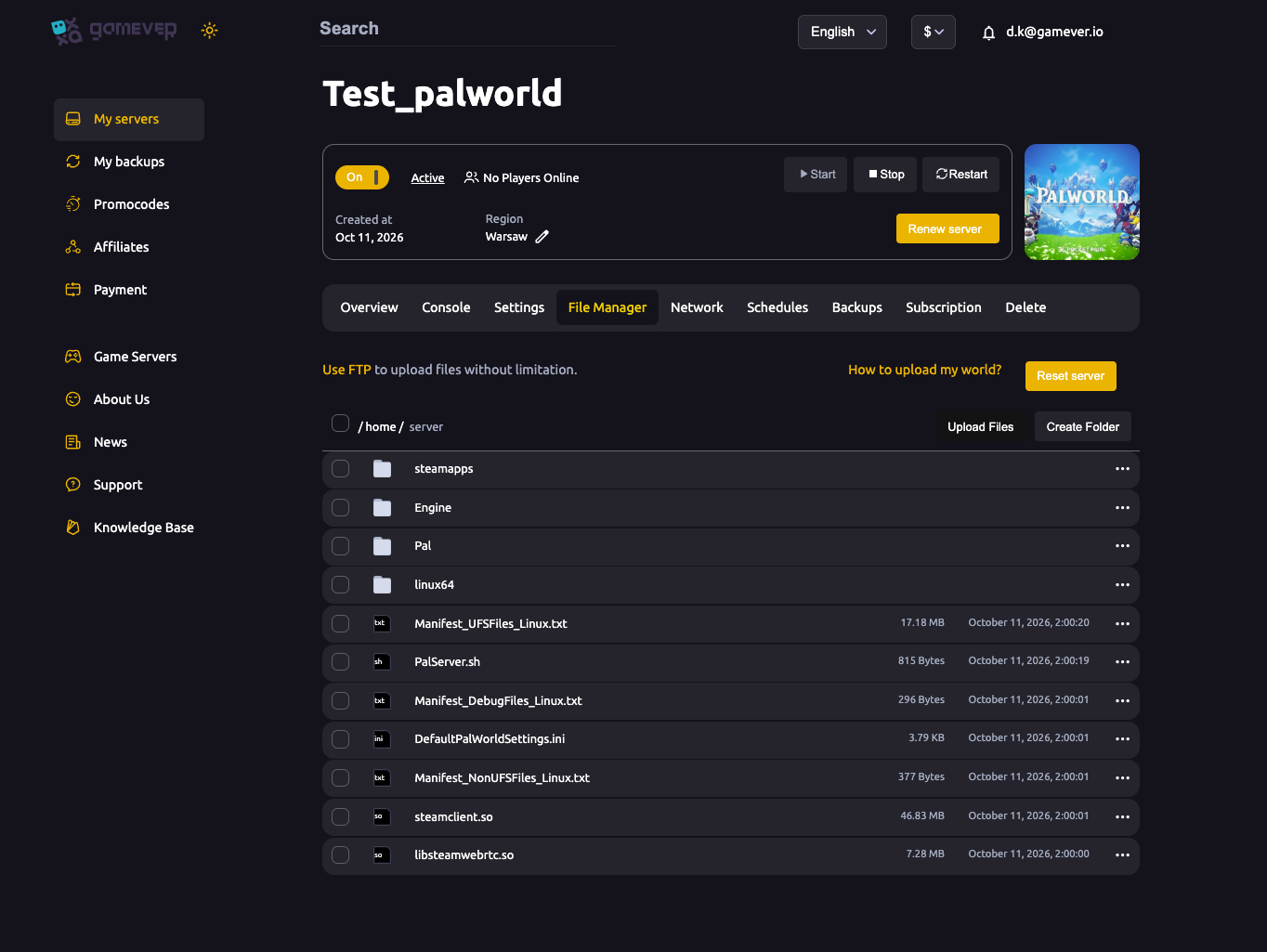
This gives everyone a brand-new world. The quickest path is the Reset server option in the File Manager:
- Make sure you've backed up (above).
- Stop the server.
- In the File Manager, use Reset server — or delete the contents of
Pal/Saved/SaveGames/<SteamID>/<WorldID>/yourself. - Start the server; it generates a fresh world.
On next start, players spawn into a brand-new Palworld world. Your settings can carry over unless you also reset them below.
Method 2 — settings-only reset
Keep the world, but return the rules to defaults:
- Back up first.
- Reset your configuration through the panel — either set the Settings → Server settings fields back to the values you want, or restore
PalWorldSettings.inito defaults over FTP. - If you're hand-editing the ini, mind Overwrite config file: when it's
truethe panel rewritesPalWorldSettings.inifrom the panel fields on restart. Set it tofalsebefore hand-editing, or just use the panel fields. - Restart to apply.
The world, bases and characters are untouched — only the rules change.
Method 3 — character-only wipe
Keep the world and bases, but reset everyone's character (levels, inventory, Pals in the party):
- Back up first.
- Stop the server.
- In the File Manager / over FTP, delete the character files inside the
Players/subfolder ofPal/Saved/SaveGames/<SteamID>/<WorldID>/. Leave the world files in place. - Start the server — players get fresh characters while the world persists.
Only delete files you've backed up or no longer want; deletion is permanent.
Additional Tips
- Back up first, every time — snapshot or download the relevant files before any wipe.
- Stop the server before deleting save files, so nothing is mid-write.
- World ≠ characters ≠ settings — pick the wipe that keeps what you want.
- Reset server = fast full wipe in the File Manager.
- Delete only
Players/for a character-only wipe; leave the world files. - Overwrite config file = false before hand-editing the ini for a settings reset.
Conclusion
A Palworld wipe on gamever is as big or small as you want. Back up first, then choose: full wipe via Reset server (or clearing SaveGames) for a brand-new world, settings-only to return the rules to default while keeping the world, or character-only by deleting the Players/ files to reset progress on the same map. Knowing the save layout means you wipe exactly what you intend — and nothing you didn't.
Rent your Palworld server at gamever.io — one-click reset, backups, and full FTP access so a fresh start never costs you more than you meant. Free trial, promo code WELCOME.