
How to Use Land Claim Blocks in 7 Days to Die
The Land Claim Block (LCB) is the single item standing between your base and the rest of the world in 7 Days to Die — the wiki describes it plainly: "The Land Claim Block (LCB) provides extra protection for a 41x41 (adjustable in map/server settings) horizontally-based region." Beyond the border it draws, an LCB also lets you "pick up your work stations and electric devices within the governed area" by holding "E" while facing them. It's a craftable Building Material block with sharper limits than expected: only three can protect anything at once, the protection is a damage multiplier rather than a wall, and it stops far less zombie activity than its name implies.
The Protection Zone: 41x41 and a Full-Height Column
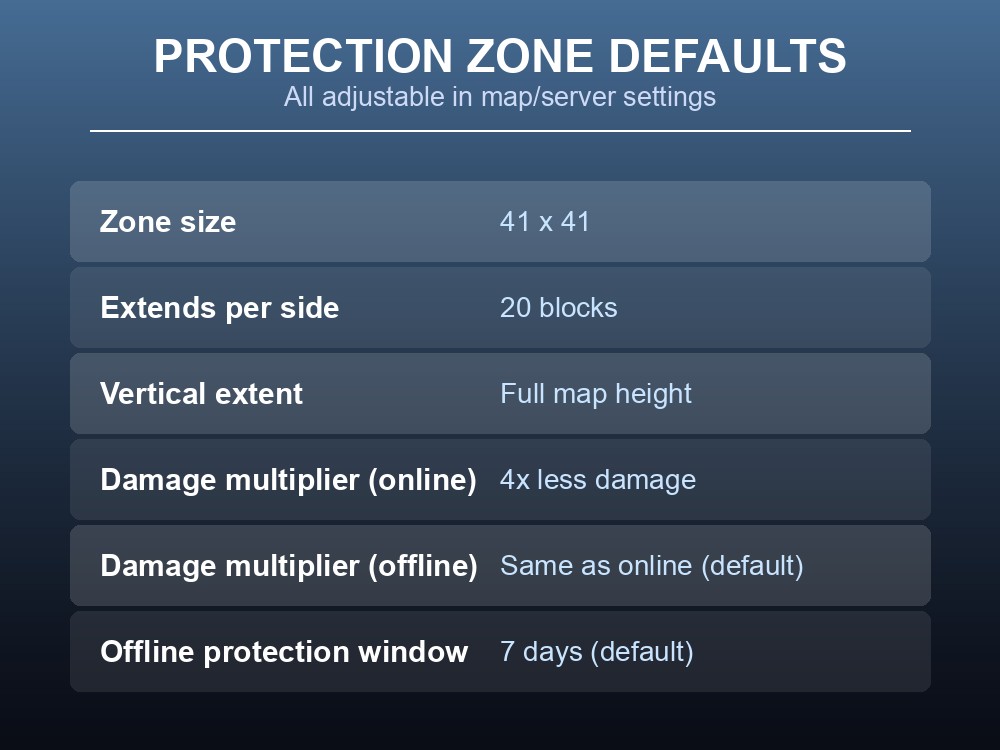
By default, an LCB's protection zone is 41x41 blocks; the wiki's own diagram shows how that number is built, with the claim block at the center and the zone "extends 20 blocks in all four cardinal directions from the LCB." That's 20 + 1 (the LCB's own block) + 20 = 41. Vertically it isn't a flat plate — it "extends infinitely in both directions above and below the LCB, creating a column that extends the full height of the map."
Protection is a durability multiplier, not immunity: "All blocks inside the protection zone receive the durability multiplier... By default, the damage multiplier is 4," so claimed blocks take 4x less damage than unclaimed ones — online or offline, since "Once a player is offline then the Land Claim Block uses the offline protection multiplier. By default this is the same as the online protection multiplier, 4x less damage." That offline coverage expires, too: "the land claim duration setting controls how long a Land Claim Block will continue to provide offline protection for before going inactive, by default this is 7 days." Zone size, multiplier, and offline duration are all adjustable in map/server settings, but the source gives no range for any of them — treat "default" as exactly that, not a ceiling.
Only 3 Active at Once — Not Just Whoever's in Your Party
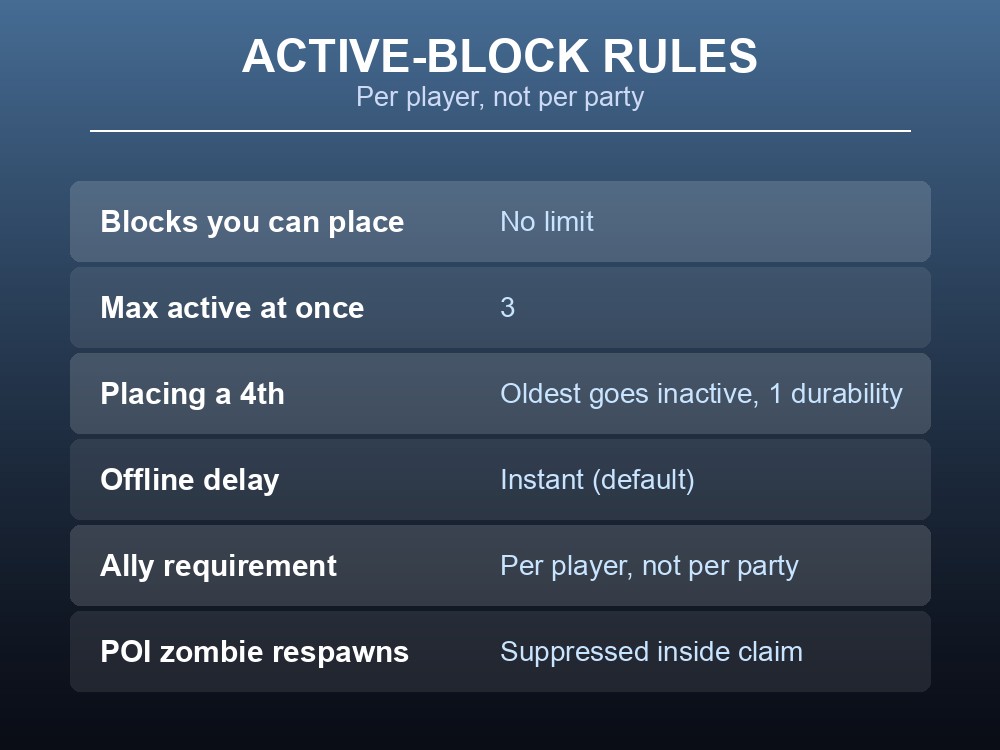
There's no cap on how many LCBs you can place — "there is no limit on the number of Land Claim Blocks a player can place in the world" — but only "three Land Claim Blocks may be active at a time" per player. Place a fourth and the oldest doesn't just quietly stop working: "Placing a new Land Claim Block will cause an old Land Claim Block to go inactive and be reduced to 1 durability. The protection provided by the old Land Claim Block will disappear." That's a wipe from 7000 durability down to 1 on whichever claim gets bumped — worth knowing before scattering LCBs for convenience rather than bases you plan to keep.
An LCB stays active only while you're in the game: "A Land Claim Block is active as long as the player who placed it is in the game. Once a player leaves the game there is a configurable delay to when the Land Claim Block considers them offline. This defaults to the instant they leave." Out of the box you go straight to offline status the moment you disconnect, unless a server changed that delay.
Ownership is enforced per player, not per group. The block "prevents players other than its owner from placing or destroying blocks in its area, except players allied with the owner," and "Party members are ignored; each member of a party is still required to be allies with the specific player who placed the Land Claim Block." Grouping into a party doesn't grant build permission — you need a direct ally relationship with whoever placed the block.
Crafting, Durability, and What It Actually Stops
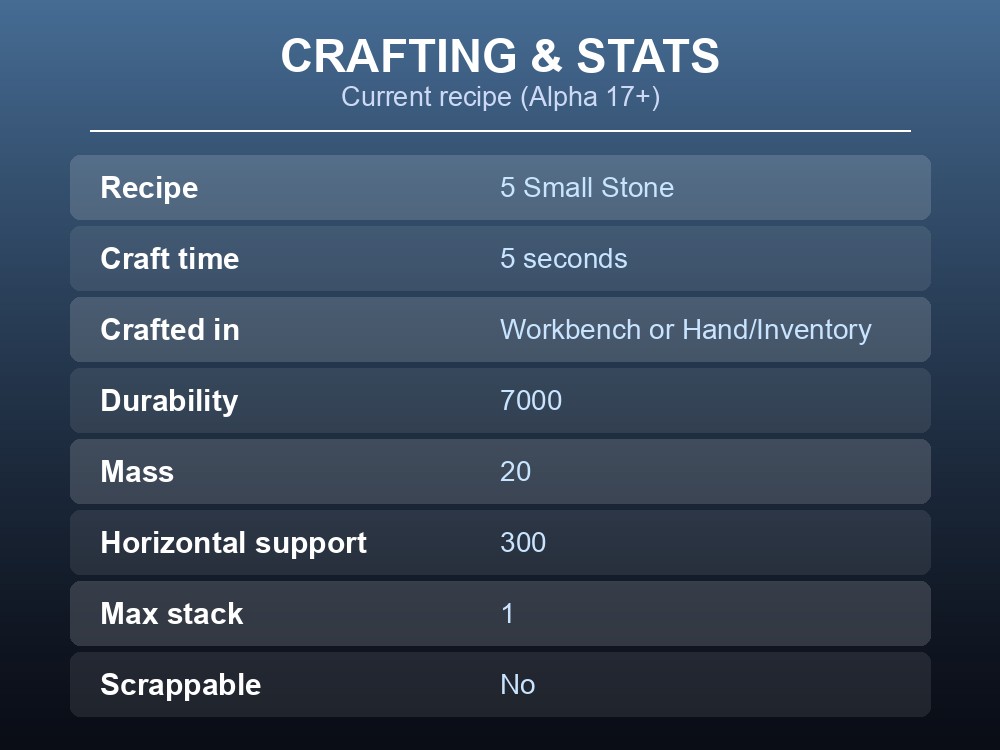
An LCB is cheap today: the current recipe needs just 5 Small Stone, crafts in "00:05" (5 seconds), and can be built "Workbench Or Hand/Inventory" — no station required. The recipe changed repeatedly first: 9 Tungsten Ingots, 9 Steel Ingots, 10 Forged Steel, 10 Forged Iron, then finally 5 Small Stone (Alpha 17). The placed block itself is durable — 7000 hit points, 20 mass, 300 horizontal support (max load) — with a max stack of just 1, and it's flagged not scrappable. It was also a starting item historically (multiplayer, then singleplayer from Alpha 16), but Version 1.0 removed it from starting items entirely — current-version players craft their first one.
What the LCB blocks is narrower than "no zombies here." It "should prevent all Point of Interest Zombies from respawning within its area," and if the claim includes a POI, it "should prevent Quests from selecting that POI as a quest location" — letting you take over a POI without it getting assigned as someone's quest target. It does not stop open-world or horde spawns: the wiki's test case walls off a Forest plot and still finds zombies inside later, because untouched natural ground still spawns them; the documented fix is covering that ground with player-placed blocks, not the claim alone. Two points the source itself flags as unresolved, and left undocumented here too: destroying an LCB makes its old area unclaimable for some length of time — "This could be for a period of time, still testing" — and vultures may ignore the spawn suppression entirely: "there may be special rules for certain entities such as vultures that will still allow them to spawn. More testing is required."
Practical tips
- Claim your actual base first — placing a 4th LCB anywhere drops your oldest one to 1 durability and kills its protection.
- Being in the same party as the LCB owner doesn't grant build rights — you need a direct ally relationship with that specific player.
- Don't rely on a claim alone to stop horde or open-world spawns; cover natural ground with player-placed blocks too.
- Budget just 5 Small Stone and 5 seconds to drop your first one before your first night.
Running your own 7 Days to Die server
Land claim size, the damage multiplier, and the land claim duration setting are all server-side values, not something one player controls solo — which matters the moment you're playing with a group. A gamever 7 Days to Die server keeps those map/server settings reachable without a config-file hunt, stays up between sessions so your claim's offline timer isn't at the mercy of your own PC being on, and takes automatic backups before anyone touches base-protection settings that affect the whole group's builds. Renting one takes minutes, and new servers get a free trial with promo code WELCOME.
Conclusion
A Land Claim Block is cheap to make but not a force field: a 41x41, full-height column with a 4x damage multiplier, a 7-day default offline window, and a hard cap of 3 active claims per player — place a 4th and your oldest one drops to 1 durability. It stops POI zombie respawns and keeps non-allies off your blocks, individually rather than by party, but open-world and horde spawns need physically covering natural ground, not just claiming it. Know those numbers before you plant your first one.