
How to update to Minecraft 1.21.5 Spring To Life
The Spring To Life update is finally here, and it’s packed with some of the most fun features we’ve seen in ages. From firefly bushes and falling leaves to wooly cows and howling wolves, this update makes Minecraft feel brand new again. But first - you’ve got actually to get the update.

Update Minecraft Java Edition
Open your Minecraft Launcher like usual. Over on the left, make sure you've selected Minecraft Java Edition. Now, under the version dropdown next to the Play button, look for “Latest Release”.
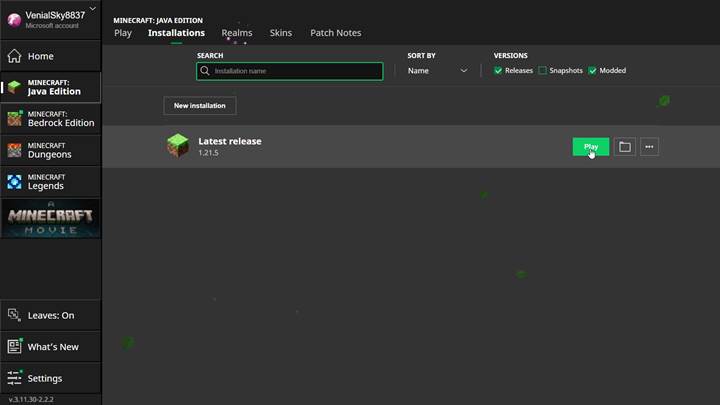
Scroll to Latest Release and pick 1.21.5
If the update’s live, you’ll see 1.21.5 right there. If it’s not showing up yet, click on Installations in the top menu, then check that “Releases” is toggled on. You might need to hit “New Installation” and manually select 1.21.5 if you’re still stuck. Once that’s done, go back to the main screen, select your new installation, and hit Play. Congrats, you're in!

Update Minecraft Bedrock Edition on PC or console
Switch to Minecraft Bedrock Edition in the launcher or just boot up the game from your platform. On most systems, the game checks for updates automatically, but sometimes it needs a little push. If you're on Xbox or PlayStation, head to your game library, find Minecraft, press the Options or Start button, and check for updates. On PC through the Microsoft Store, open the store app, search for Minecraft, and hit Update if the button appears. Once updated, launch the game and look for the new title screen and features - if you see cactus flowers or dry grass, you're good to go.
Update Minecraft on mobile (Android and iOS)
First, close Minecraft completely. Then open the Google Play Store if you’re on Android or the App Store if you're using iOS. Search for Minecraft in the store. If the update is ready, the button will say Update instead of Open. Tap it and wait for it to finish downloading. Once it’s done, relaunch the game and enjoy the Spring To Life vibes. If it still says Open and doesn’t update, try pulling down to refresh the page or restarting your device.
What to do if the update doesn’t show up
Sometimes the update doesn't appear right away, and that’s usually because it hasn’t hit your device yet or your settings are blocking it. For Java Edition, double-check that you're not running an old installation or snapshot. On Bedrock or mobile, make sure you’re logged into your account and connected to the internet. Still stuck? A simple restart of your device or clearing the cache for the store app can help. Also, if you’re using any texture packs or shaders, disable them - they sometimes block new features from loading in, especially mob variants.
When the update actually releases
Mojang says the update launches globally on March 25th. So, if it’s morning in your timezone and you haven’t seen the update yet - chill; it’s coming. Just keep checking every hour or so and maybe play with some command blocks or creative builds to pass the time.
How to tell if the update worked
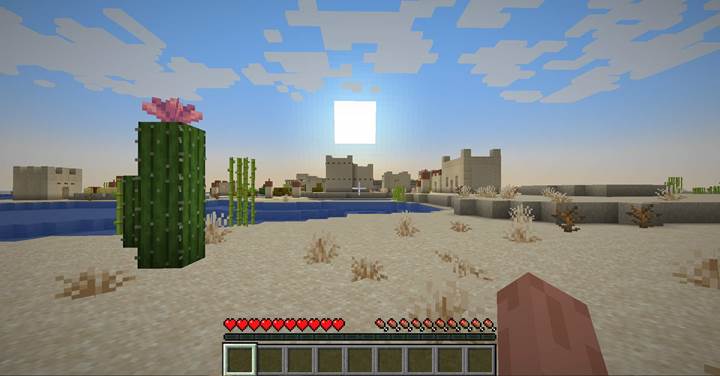
The fastest way to confirm you’ve got the update is to check for new stuff. Load up a new world and head to a cold or warm biome. Look for firefly bushes near rivers or desert flowers on top of cacti. If you spot baby animals with new coats or chickens laying colored eggs, you’re in 1.21.5. Also, listen for wolves - if they sound weird or different, congratulations, you’re hearing the new wolf personalities.
Troubleshooting update issues
If you update, a sneaky texture pack might be the culprit, but nothing looks different. Go into your settings and disable any active resource packs. That should fix missing textures, mob variants, or eggs that aren’t working right. On mobile, uninstalling and reinstalling the game can sometimes force the update through, but only try that if you're sure your worlds are backed up.
Minecraft 1.21.5 Spring To Life brings the Overworld to life with new sounds, textures, mobs, and biomes that actually feel alive. Updating is easy once you know where to look, follow the steps for your device, double-check your version, and keep an eye out for fun new features. Once you're in, take a moment to stop and listen to the wind in the trees or the low growl of a grumpy wolf. This isn’t just an update—it’s a whole vibe.