
How to Set Up RCON on Your Project Zomboid Server

RCON (Remote Console) is a protocol that lets you send admin commands to your Project Zomboid server from an outside program — without joining the game and logging in as admin first. It's how desktop consoles, Discord bots and monitoring tools list players, broadcast messages, save the world and kick or ban troublemakers remotely. This guide shows how to set the RCON password, find your RCON address in the gamever panel, connect a client, and run commands.
What you need
RCON needs exactly two things, and both live in your gamever control panel:
- The Rcon password — set it under Settings → Server Settings. Project Zomboid keeps RCON disabled until a password is set, so this field is what turns RCON on in the first place.
- Your RCON address — open the Network tab and copy the RCON address (IP + port
28596). gamever assigns this port for you, so always copy the exact address shown rather than guessing a default.
Step 1 — Set the Rcon password
Open Settings → Server Settings and type a strong value into the Rcon password field. This is the one field that makes RCON work: with it blank, the server refuses remote console connections entirely.
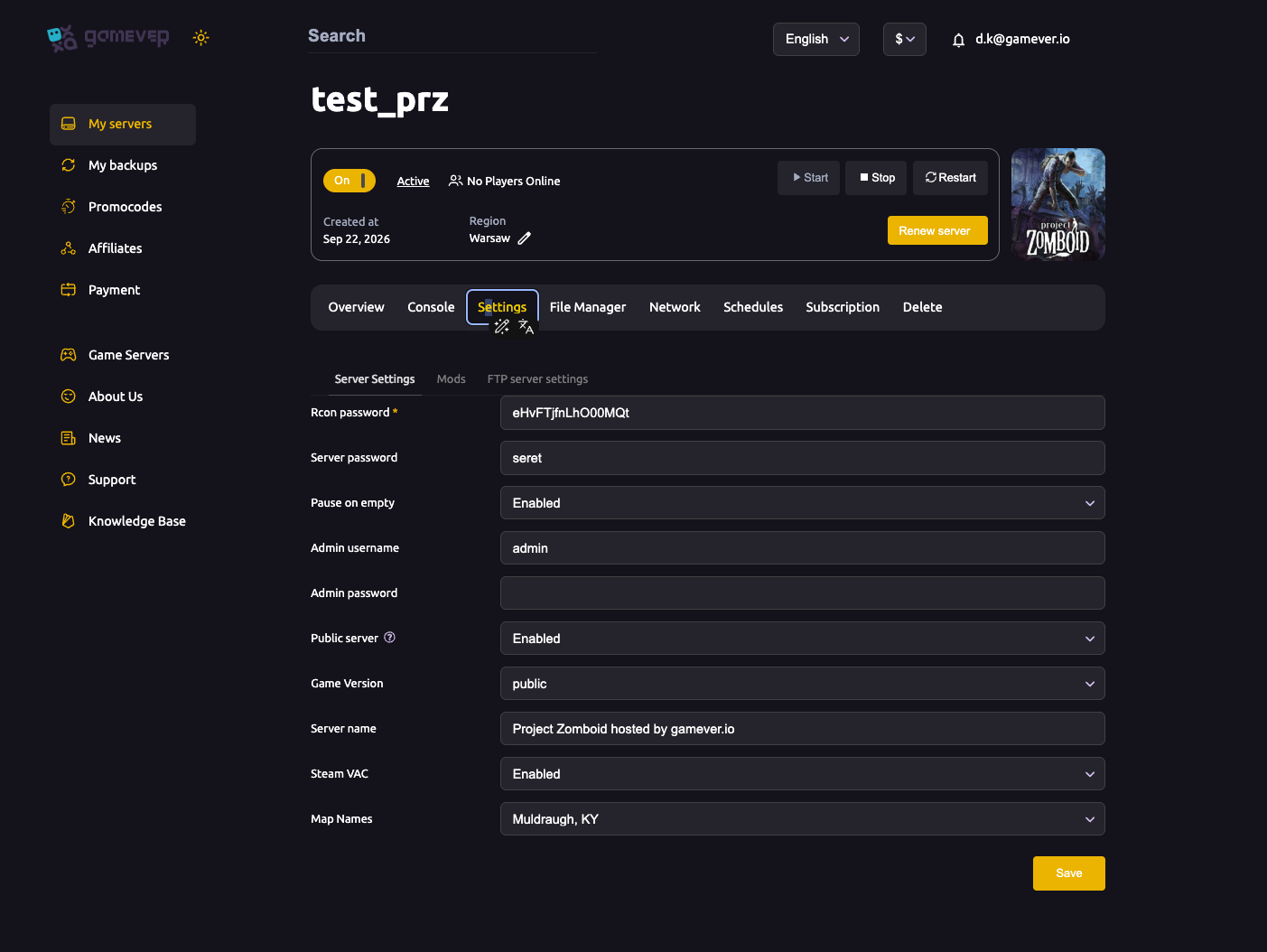
Click Save, then Restart the server so the change takes effect. Treat this password like a root password — anyone who has it, together with your RCON address, has full control of the server. It's a separate secret from your Admin password (the in-game admin account); for how those fields relate, see passwords & admin.
Step 2 — Find your RCON address
Open the Network tab. Your gamever server lists several addresses, each with its own job. The one RCON clients need is the RCON address.
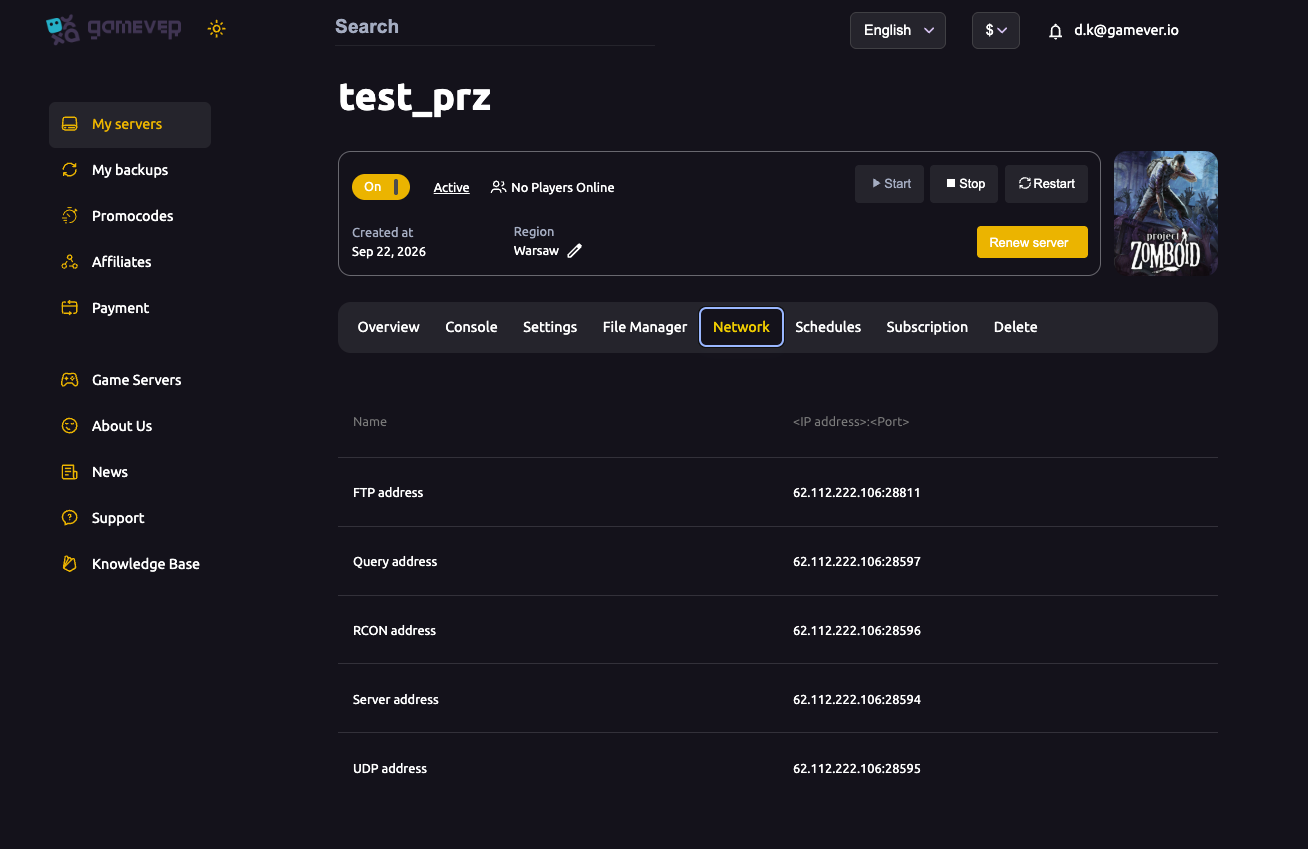
| Address | Port | What it's for |
|---|---|---|
| Server | 28594 | The main game port — what players use to join. |
| UDP | 28595 | Game traffic (Server port +1). |
| RCON | 28596 | Remote console — this is the one RCON clients use (Server port +2). |
| Query | 28597 | Server listing/query for the in-game browser (Server port +3). |
RCON runs over TCP, while the game itself uses UDP — so make sure your client is pointing at the RCON address and port, not the Server port. For the full breakdown of every port, see ports & connection.
Step 3 — Connect an RCON client
Point any RCON client at your RCON address (IP:28596 from the Network tab) and authenticate with your Rcon password. Popular options:
| Client | Good for |
|---|---|
| ZomboidRCON | A simple desktop console built for Project Zomboid. |
| BattleMetrics | Live player list, scheduled commands and ban management. |
| Discord RCON bots | Letting trusted admins run commands from Discord. |
| mcrcon (command line) | Scripts and automation. |
Once connected, you send the bare command — no leading slash. RCON is already authenticated as the server, so the syntax matches the in-game admin console with the / dropped.
Useful RCON commands
| Command | What it does |
|---|---|
players | Lists everyone currently connected. |
servermsg "<text>" | Broadcasts a message to all players. |
kickuser "<username>" | Disconnects a player. |
banuser "<username>" | Bans a player from the server. |
save | Forces an immediate save to disk. |
showoptions | Prints the server's current settings. |
quit | Saves and shuts the server down cleanly. |
Type help to list the full command set for your build. For ongoing moderation you may prefer the in-game admin account (covered in passwords & admin); RCON earns its place when you want external automation — a bot, a scheduler, or your own scripts talking to the server.
Additional Tips
- No password, no RCON. The Rcon password field is what enables RCON — leave it blank and remote tools simply can't connect.
- Keep the Rcon password private and strong. It's full server control; don't reuse your admin or server password.
- Use the exact RCON address from the Network tab (
IP:28596). It's open by default — if a client won't connect, re-copy the address and confirm the server is running. - Test with
players— it's a harmless command that confirms your connection and authentication are working. - RCON is TCP, the game is UDP — a client aimed at the Server port instead of the RCON port will never authenticate.
- Changed the Rcon password? Reconnect every RCON client with the new one.
Conclusion
RCON turns your Project Zomboid server into something you can manage from anywhere — a Discord command, a scheduled broadcast, an automated save. Set the Rcon password under Settings → Server Settings, save and restart, grab your RCON address (IP:28596) from the Network tab, and point any RCON client at it.
Rent your Project Zomboid server at gamever.io and get every setting, port and password laid out in one simple panel — no config files to hunt through. Free trial, promo code WELCOME.