
How to Set Up Crossplay on Your Valheim Server
Crossplay is what lets players on Steam, the Microsoft Store, Xbox and (since 1.0) PlayStation 5 and Nintendo Switch 2 all join the same Valheim server. Under the hood it's a networking change, not just a compatibility checkbox: with crossplay on, your server talks to Microsoft's PlayFab relay instead of Steam's networking, and players join with a short join code rather than a raw IP. This guide shows how to enable it on your gamever server, how people connect once it's on, and the one thing that will silently lock console players out.
Enable crossplay in the panel
On gamever this is a single dropdown — no launch arguments to type. Open Settings → Server settings:
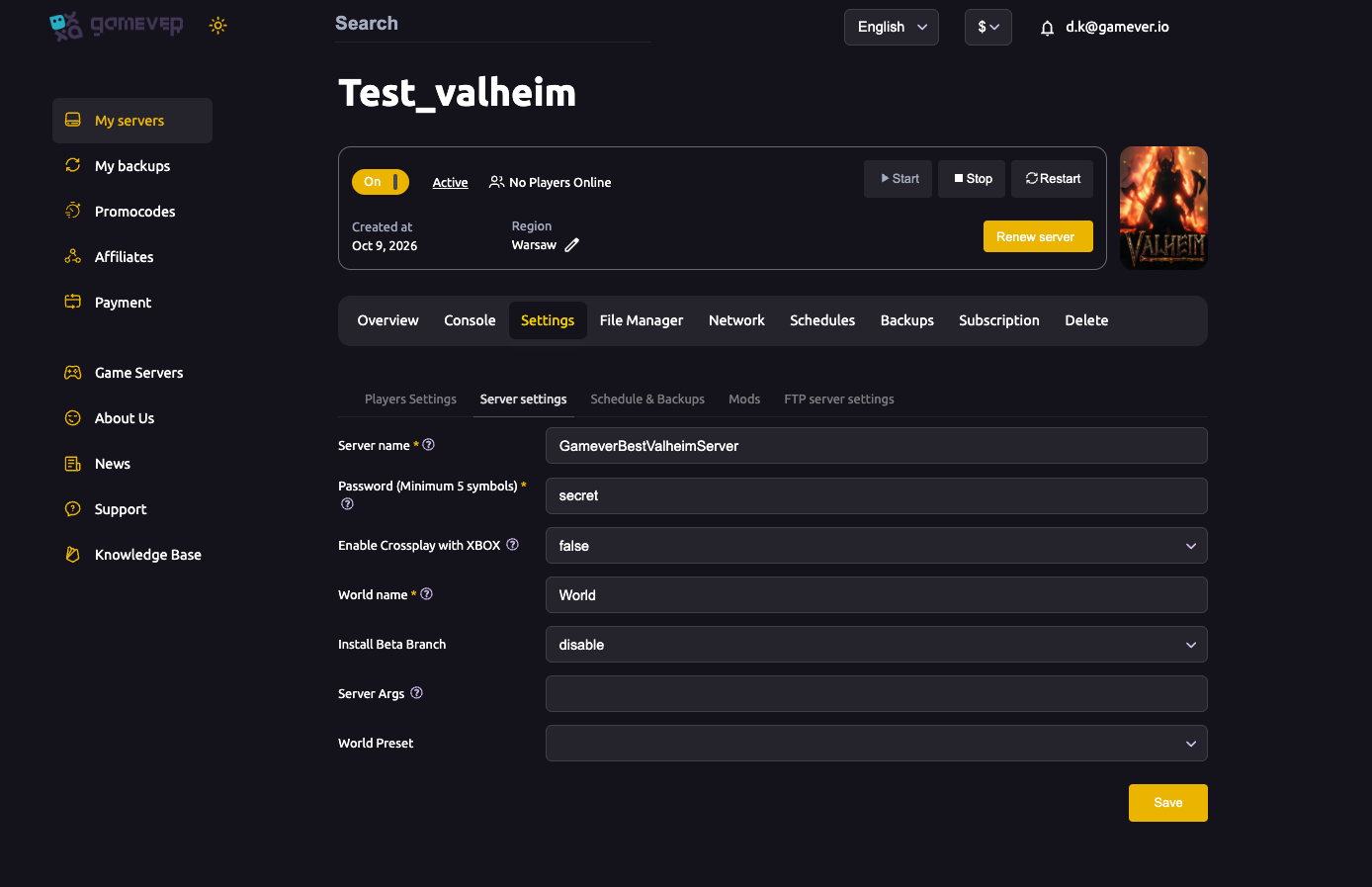
- Find Enable Crossplay with XBOX and switch it from false to true.
- Click Save, then Restart the server so the new backend loads.
That's the whole switch. The field is labelled "with XBOX" because PlayFab is the Microsoft networking layer that every console platform rides on — turning it on opens your server to the full cross-platform roster, not just Xbox. (If you'd rather not type anything into the Server Args box, you don't have to: the dropdown does the same job that the -crossplay startup argument does on a self-managed server.)
Join code vs. IP address
Enabling crossplay changes how people reach your server, so it's worth knowing both routes:
| Server mode | How players join |
|---|---|
| Crossplay on (PlayFab) | A join code is generated and printed in the server Console at startup. Players pick Join Game → Join with code and paste it. |
| Crossplay off (Steam) | PC players join by IP address (IP:29957) or the community browser. |
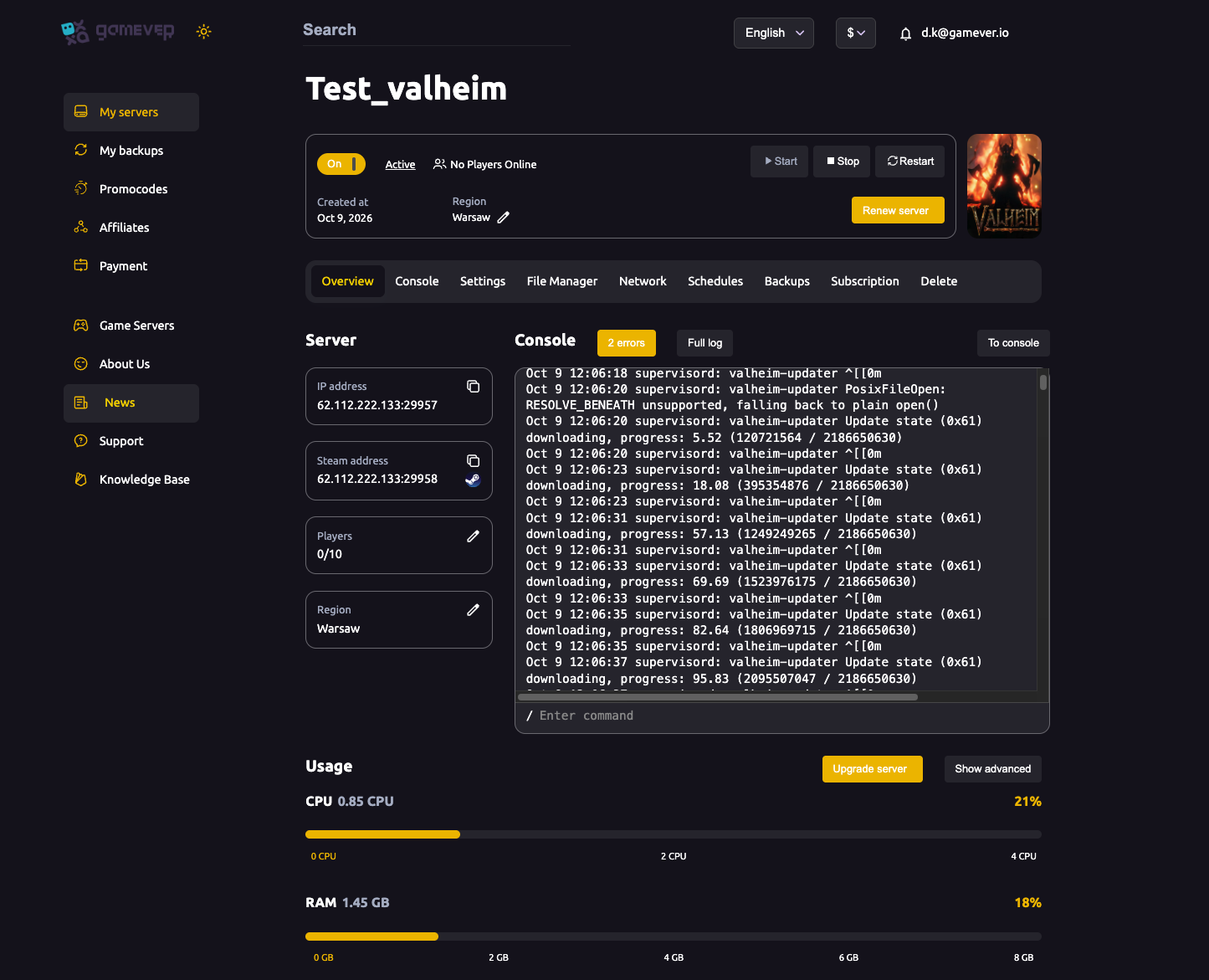
Console players can only use the join code. PlayStation, Xbox and Switch builds have no "join by IP" option, so the code is their one way in — give it to anyone on a console. PC players can use either the code or the direct IP. You'll find both in the panel: the join code appears in the live Console log when the server boots, and the IP is on the Overview and Network tabs.
For listing your server in (or hiding it from) the community browser, that's a separate flag — see public or private.
Mods block console players
This is the catch that surprises people, and it's worth stating plainly: client-side mods make a crossplay server impossible for console players to join.
Console versions of Valheim (Xbox, PlayStation, Switch) have no way to install mods — there's no file access to drop a loader onto. So the moment your server requires a client-side framework like BepInEx or ValheimPlus, anyone on a console is locked out, because they physically can't match the server's mod set. There's also a technical reason: crossplay uses the PlayFab networking path, while BepInEx hooks into Steam's, so the two don't mix cleanly.
The practical rule:
- A crossplay server should stay vanilla. Leave the Mods sub-tab toggles off if you want console players to join.
- Server-only mods that ask nothing of the client can sometimes coexist — but anything players must install locally will shut consoles out. Check the mod's own page before assuming.
- Want both mods and a mixed group? Run two servers — a vanilla crossplay one for everyone, and a separate modded PC-only one. Standing up a second server on gamever takes minutes. See installing mods for the frameworks.
Additional Tips
- Set crossplay before you invite people. Switching the backend changes how players connect, so decide early rather than mid-session.
- Grab the join code from the Console after each restart — it's printed in the live log on the Overview/Console tab.
- gamever opens your ports for you. Crossplay routes through the PlayFab relay, and your server, Steam and FTP addresses are all listed on the Network tab — there's nothing to forward.
- Admins and bans still use platform IDs, set on Settings → Players Settings (Permitted / Banned / Admin list fields) — not in-game names.
- One blocked console player isn't always your server. On Xbox, an account missing the crossplay privilege (parental/network settings) can only join servers that don't use crossplay — check that account before changing anything.
- For the full platform line-up and save-sync limits, see Valheim 1.0 crossplay.
Conclusion
Turning on crossplay for your Valheim server is one dropdown on gamever: set Enable Crossplay with XBOX to true under Settings → Server settings, then Save and Restart. That moves the server onto the PlayFab relay so PC, Xbox, PlayStation 5 and Switch 2 players can all join — console players with the join code from the Console, PC players by code or IP. The only real pitfall is mods: a crossplay server has to stay vanilla, because console Valheim can't install the client-side frameworks a modded server demands. Keep it clean and your whole group plays one world, whatever they're holding.
Rent your Valheim server at gamever.io — one-click crossplay, join codes for easy invites, and ports handled for you. Free trial, promo code WELCOME.