
How to Set Up and Use RCON on Your Factorio Server
RCON (Remote Console) is a standard protocol for running server console commands remotely — you connect from an external RCON client over the network, send a command, and the server runs it and returns the output. On a Factorio server rented from gamever, RCON is already exposed by our control panel: you just set a password and read the connection details off the panel. There's no dedicated server to install and no startup flags to edit — everything here is done through the Settings tabs, the Network tab, and the File Manager. This guide covers what RCON is for, how to turn it on through the panel, and how an external client connects.
What RCON is for (and when you don't need it)
RCON is useful when you want to manage the server from a tool other than the game itself — a desktop RCON client, a Discord bot, a monitoring dashboard, or a script. Over that connection you issue the server's own commands: promoting admins, banning or kicking players, managing the whitelist, saving the game, and so on. (The full list of what those commands do is covered in admin and server commands.)
The important thing to know first: you don't need an RCON client to run commands. Your gamever panel includes a live Console tab with a / Enter command box, so you can type any server command straight into the panel and see the output there. For most day-to-day administration, the Console tab is all you need. Reach for a separate RCON client only when you want to manage the server from an external tool or automate it.
Step 1 — Set the RCON password in Settings
RCON is gated by a password. Open Settings → Server Settings and fill in the Rcon Password field, then click Save. An external client cannot connect without this password.
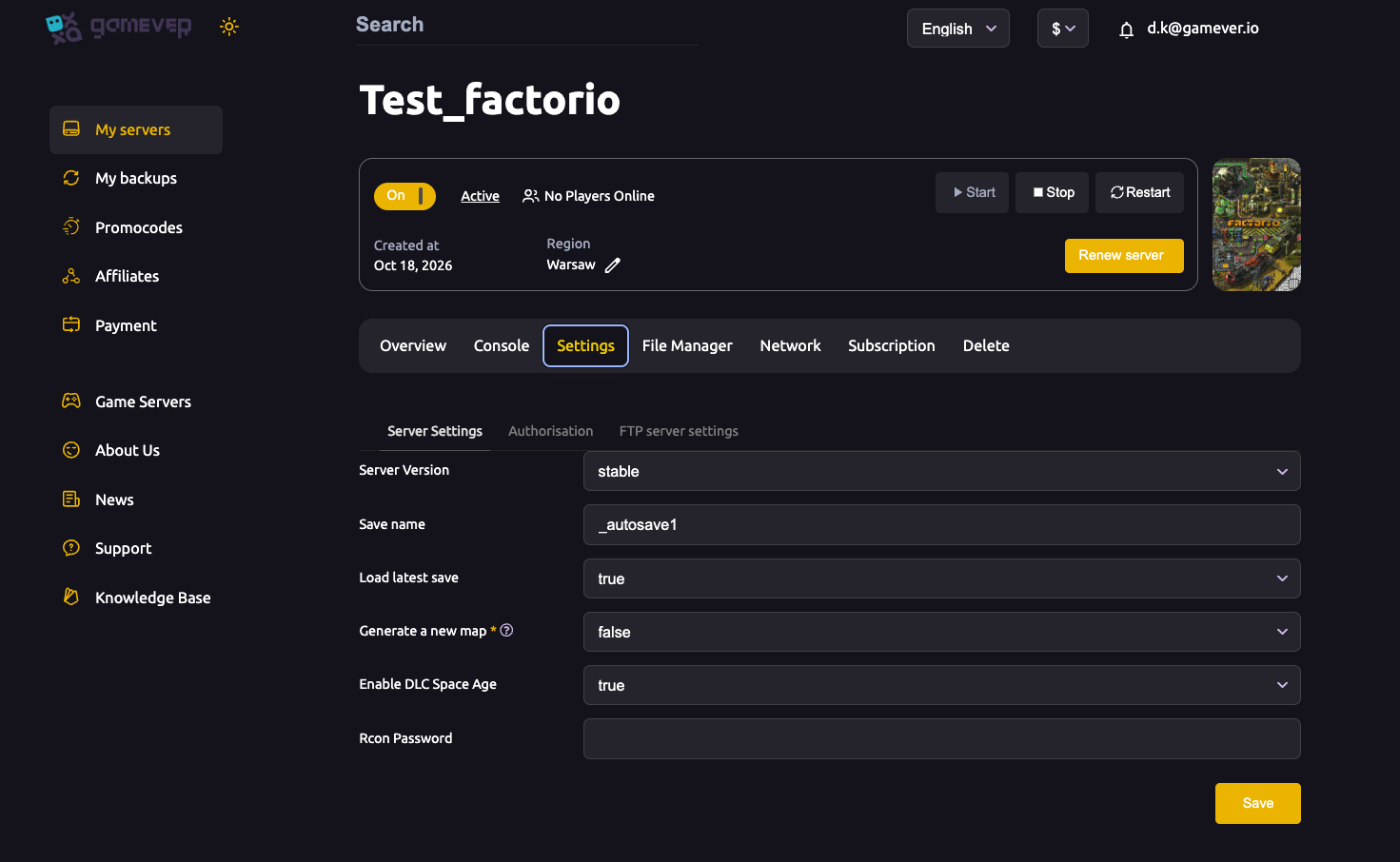
The Server Settings sub-tab holds these fields, in order:
| Field | Type | Notes |
|---|---|---|
| Server Version | dropdown | stable / experimental — pins which build the server runs |
| Save name | text | e.g. _autosave1 — which save file the server loads |
| Load latest save | dropdown | true / false — load the most recent save instead of Save name |
| Generate a new map | dropdown | true / false — create a fresh map on next start |
| Enable DLC Space Age | dropdown | true / false — run with the Space Age expansion |
| Rcon Password | text | sets the RCON password used by external clients |
After you Save, use Restart (on the Overview page) so the server comes back up with the new password in effect.
Where the password is stored
Behind the scenes, the Rcon Password field is written to a plain file named rconpw in your server's config directory, /home/server/config/, reachable from the File Manager (or over FTP). You normally never touch it — editing the Settings field is the supported way to change the password — but it's there if you want to confirm the value or rotate it directly. If you do edit it by hand, stop the server first, change the file, then start again, so the new password is read at boot.
Step 2 — Read the RCON address on the Network tab
The RCON port is panel-assigned, like every other port on your server. Open the Network tab to read it — don't try to set or forward a port yourself; our panel handles that.
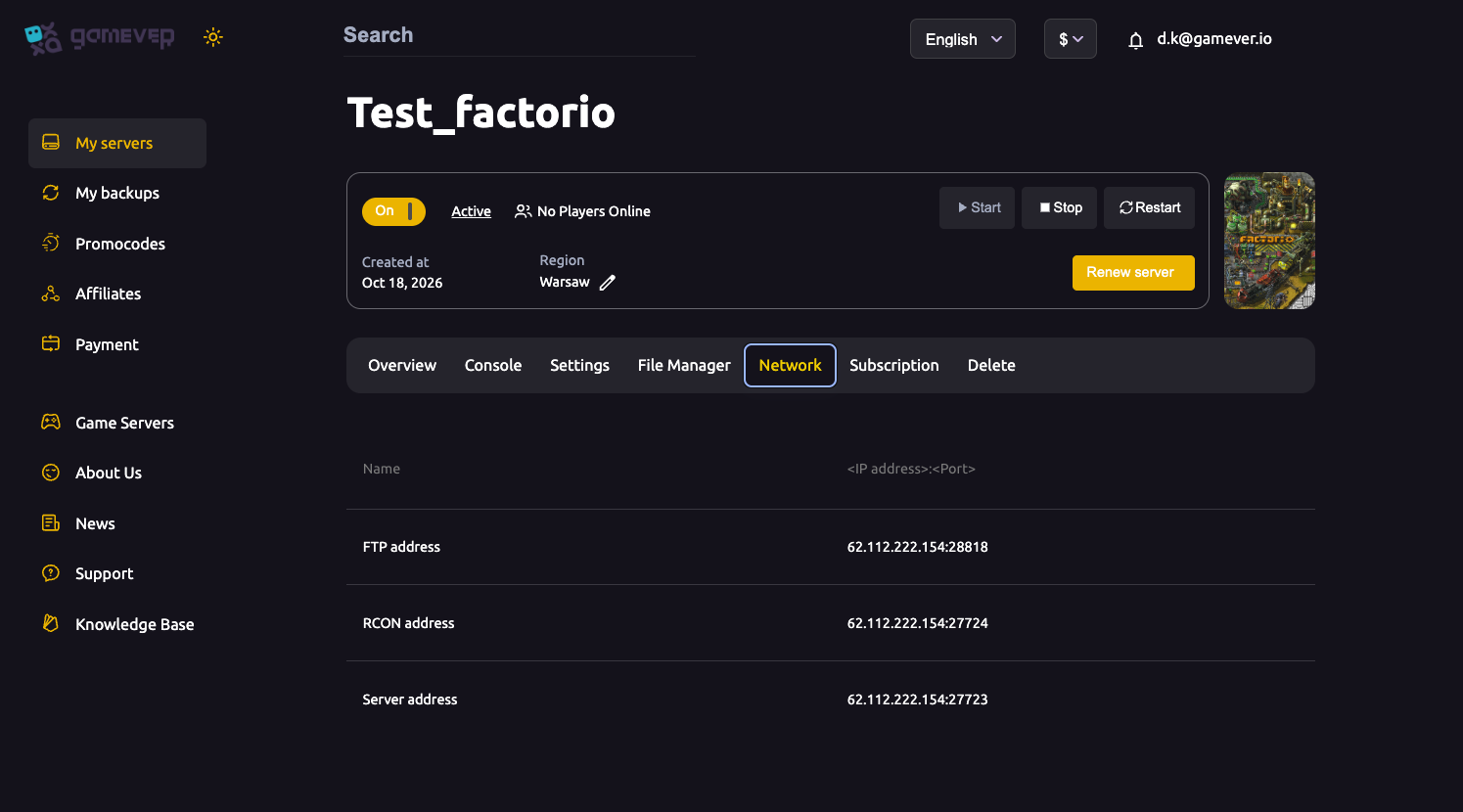
| Address | Example | Used for |
|---|---|---|
| Server address | IP:27723 | the UDP game port players connect to |
| RCON address | IP:27724 | host:port your RCON client connects to |
| FTP address | IP:28818 | File Manager / FTP client access |
Factorio's own default game port is UDP 34197, but our panel assigns its own numbers, so always use the values shown on your Network tab rather than any default you've read elsewhere.
Step 3 — Connect with an external RCON client
With the password set and the address in hand, connecting is the same as any RCON-capable game server. In your client, enter:
- Host — the IP shown in the RCON address on your Network tab.
- Port — the port shown after the colon in that same RCON address (e.g.
27724). - Password — exactly what you typed into the Rcon Password field.
Once authenticated, send a server command and the client prints the response. The panel's Console tab also shows live RCON activity, so you can watch connections and command traffic there while you test. If a client is refused, the usual causes are a password that doesn't match the Settings field, or using the game (server) port instead of the RCON port — re-check both against the Network tab.
Which commands work over RCON
RCON runs the server's management commands — the same family you'd type into the in-game console or the panel's Console box: promoting and demoting admins, banning, kicking, whitelisting, muting, listing players, and saving the game. Factorio verifies these on wiki.factorio.com under its console and multiplayer documentation. Rather than duplicate the syntax here, see admin and server commands for the exact command list and what each one does — everything there can be issued over RCON just as it can from the Console tab.
Additional Tips
- Use the Console tab first. For one-off commands you don't need a client at all — the panel's Console box runs them directly.
- Set a strong, unique RCON password. It grants full server control; don't reuse your game or account password.
- Restart after changing the password. Save in Settings, then Restart on Overview so the new value takes effect.
- Read your own ports. The RCON port is assigned to your server — always take it from the Network tab, never from a default.
- RCON vs. the game port. They're different numbers; pointing a client at the game port is the most common connection mistake.
- Keep the connection private. Only share the RCON address and password with people you trust to administer the server.
Conclusion
RCON on a gamever Factorio server is a two-field job: set the Rcon Password under Settings → Server Settings (stored in the rconpw file in your File Manager), then read the RCON address off the Network tab and point your client at that host, port and password. For everyday administration you may not need a client at all — the panel's Console tab already runs every server command for you. When you do connect externally, the same management commands apply; see admin and server commands for the full reference, and the ports and firewall article for how the panel assigns connectivity.
Rent your Factorio: Space Age server at gamever.io — RCON exposed out of the box, a live Console tab, and full File Manager and FTP access. Free trial, promo code WELCOME.