
How to Set Up an ARK Cluster (Transfer Between Maps)
A cluster links two or more ARK servers so players can carry their characters, dinos and items between maps — tame on Ragnarok, fight bosses on The Island, store loot on Aberration, all on one connected world. This guide covers what a cluster needs, the exact parameters, and how to wire it up on gamever. Applies to ARK: Survival Evolved and Survival Ascended.
What a cluster actually is
A cluster is just several ARK servers that share one Cluster ID and a shared transfer folder. When the IDs match, an Obelisk's "Travel to Another ARK" menu lists the other servers, and players can upload their survivor/dinos/items on one map and download them on another.
You need:
- One server per map — a cluster of 3 maps = 3 servers. (On gamever, rent one ARK server per map you want in the cluster.)
- The same Cluster ID on every server.
- Transfers allowed in each server's settings.
Step 1 — Give every server the same Cluster ID
A cluster is bound together by two startup parameters that must match on every server:
-ClusterId=MyArkCluster -ClusterDirOverride="ShooterGame/Saved/clusters"
-ClusterIdis a unique text string you choose. It must be identical (case-sensitive) on every server in the cluster.-ClusterDirOverridesets the shared transfer folder. It must be the same on all servers.
On gamever: the control panel doesn't expose a Cluster ID field or a command-line editor, so clustering isn't a self-serve toggle. Rent one ARK server per map, then open a ticket with Support (Console tab → Create Ticket, or the Support page) asking them to put your servers on the same Cluster ID and shared cluster storage. The transfer settings in Step 2 you can set yourself.
Step 2 — Allow transfers
By default ARK can block uploads/downloads. In GameUserSettings.ini → [ServerSettings] on each server, make sure transfers are permitted:
| Setting | Value | Effect |
|---|---|---|
PreventDownloadSurvivors | False | Allow characters to arrive. |
PreventDownloadItems | False | Allow items to arrive. |
PreventDownloadDinos | False | Allow dinos to arrive. |
PreventUploadSurvivors | False | Allow characters to leave. |
PreventUploadItems | False | Allow items to leave. |
PreventUploadDinos | False | Allow dinos to leave. |
noTributeDownloads | False | Master switch — must be False for any downloads. |
gamever: the download toggles —
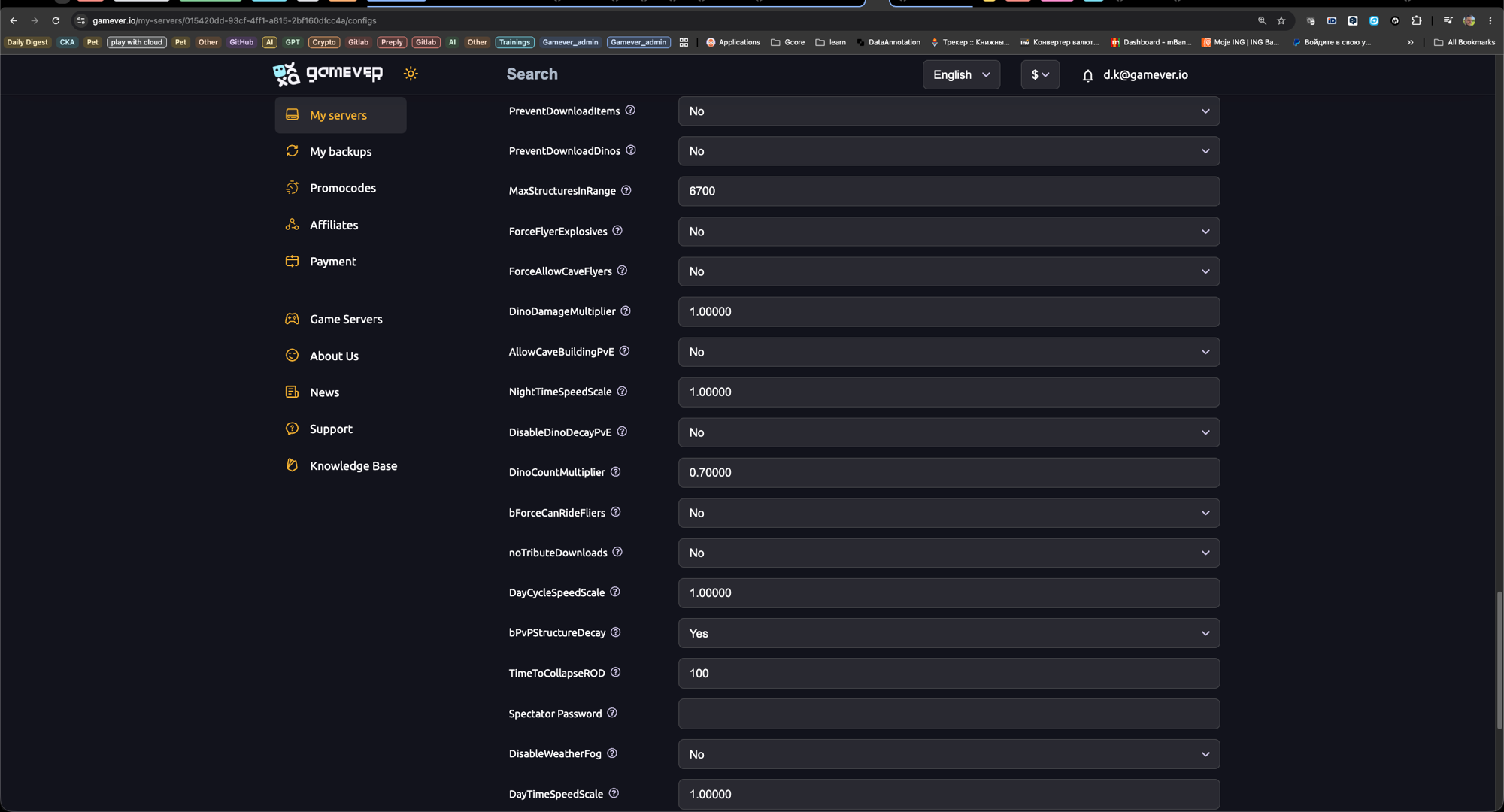
PreventDownloadSurvivors/Items/Dinos,noTributeDownloadsandCrossARKAllowForeignDinoDownload— are in the panel under Settings → Other settings. Set them, Save, and restart, the same on every server. Uploads are allowed by default, so you normally only need the download side. (To force thePreventUpload...flags you'd editGame.ini/GameUserSettings.iniafter setting Disable settings below to Yes — see our server settings guide.)
Step 3 — Use different maps, then restart
- Set each server to a different map (The Island, Ragnarok, Aberration, etc.) under Settings → Server Settings → Server Map.
- Restart every server in the cluster.
Step 4 — Test the transfer in-game
- Join one server and walk up to any Obelisk (red, green or blue) — or a Supply Crate / Tek Transmitter.
- Choose "Travel to Another ARK."
- If clustering is wired up, the other cluster members appear in the destination list.
- Pick one, upload your character/items/dinos, then download on the other side.
Troubleshooting
| Problem | Fix |
|---|---|
| Destination list is empty | The Cluster ID doesn't match on every server — it's case-sensitive, so one typo and the servers can't see each other. |
| Items/dinos upload but won't download | A PreventDownload... is still True, or noTributeDownloads=True, on the destination server. |
| Only some maps appear | The missing server has a different Cluster ID, is offline, or hasn't been restarted since the change. |
| Character arrives but dinos don't | PreventDownloadDinos (or the matching upload setting on the source) is True. |
Conclusion
A cluster turns separate maps into one connected ARK: tame, build and raid across worlds without losing your progress. The whole trick is a matching Cluster ID on every server plus transfers left enabled — get those right and the Obelisk does the rest.
Rent your ARK servers at gamever.io — spin up multiple maps and our support team links them into one cluster so your tribe can roam between worlds. One-click restarts, online 24/7. Free trial, promo code WELCOME.