
How to Set Max Players on Your Factorio Server
Factorio's player cap is not a tick-box in the control panel. On your gamever server it lives in the headless server's main config file, server-settings.json, which you edit through the panel's File Manager (or over FTP). This guide shows exactly which key to change, what the values mean, and how to apply it cleanly — all on the server you already rent from us, with no self-install or SteamCMD steps involved. If you haven't looked at the rest of that file yet, pair this with our server settings walkthrough first.
Where the setting lives
The gamever panel's Settings → Server Settings sub-tab exposes the common fields — version, save name, DLC, RCON password — but it does not have a dedicated "max players" field. That value is one key inside the config JSON instead. Open the File Manager and browse to:
/home/server/config/server-settings.json
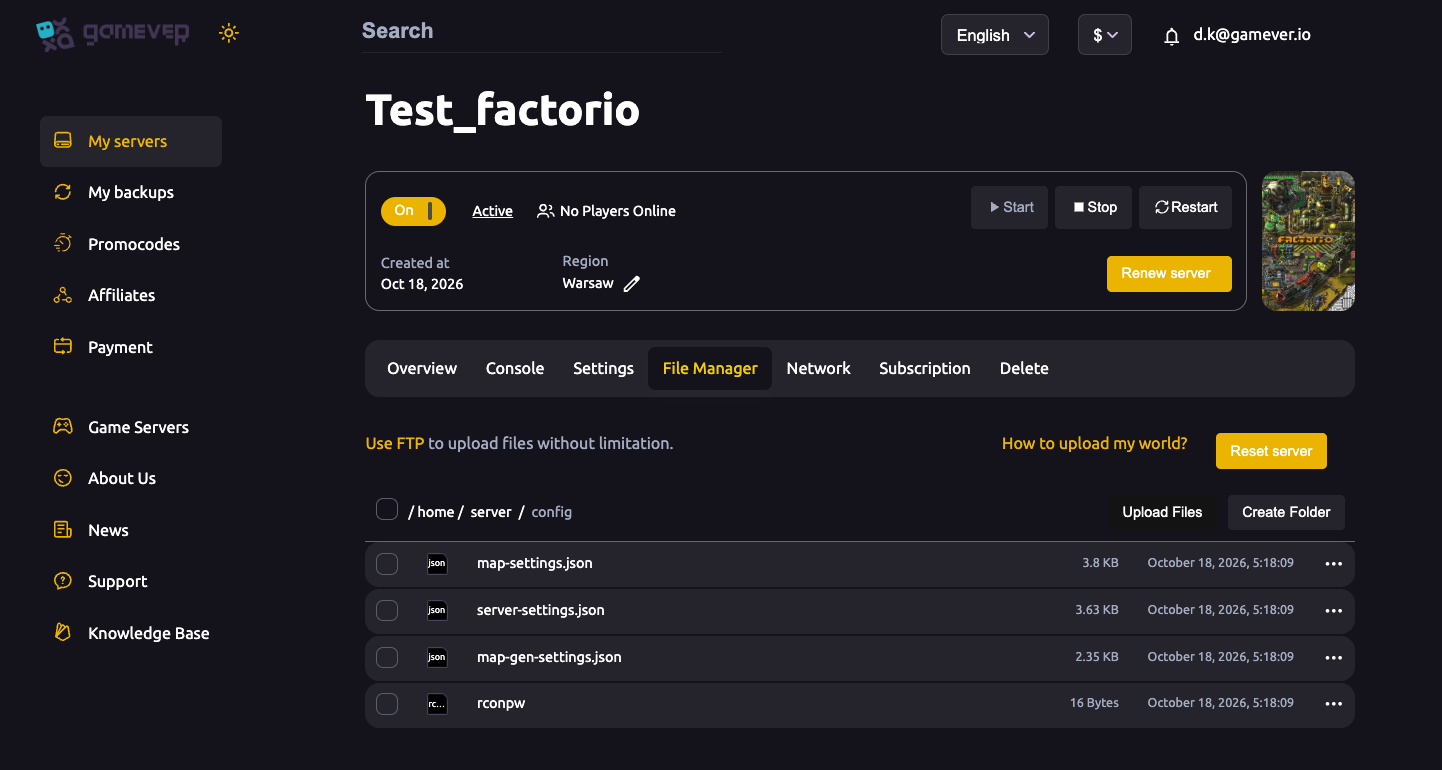
The key you want is max_players. It appears alongside the server name, description, tags, password and visibility settings in the same file.
| Key | Where | What it does |
|---|---|---|
max_players | server-settings.json | Limits how many players can be connected to the server at the same time. |
0 (value) | max_players | No limit — any number of players may connect (subject to your plan's resources). |
| Any positive integer | max_players | Hard cap at that many simultaneous players. |
Factorio's own documentation is explicit here: max_players "allows you to limit the number of players that can be connected to the server at the same time," and "if you want no limit, just set max_players to 0." So 0 is unlimited, and any whole number above it is a firm ceiling.
Changing the value, step by step
Factorio reads server-settings.json at boot, and the file is strict JSON — a single trailing comma or a missing quote will stop the server from starting. Work carefully and in this order:
- Stop the server. Use the Stop button on the Overview tab. Editing the config while the server is running risks your change being overwritten when it next saves, and the file is only read at launch anyway.
- Open the file. In the File Manager, go to
/home/server/config/and openserver-settings.jsonin the editor. - Edit
max_players. Find the line and set the number you want:
"max_players": 0,
Use 0 for no limit, or a positive number (for example 10) for a firm cap. Change only the number — leave the key name and the surrounding commas and quotes exactly as they are.
- Save the file. Double-check it is still valid JSON: every string in double quotes, commas between entries but no trailing comma after the last one in a block.
- Start the server from the Overview tab and watch the Console for a clean boot. If the server refuses to start, a JSON typo in this file is the first thing to check.
Prefer editing over FTP? Grab your FTP login from Settings → FTP server settings, connect to the FTP address shown on the Network tab, and edit the same file — the stop-edit-save-start sequence is identical.
Your plan's resources are the real cap
Setting max_players to 0 does not mean your server can host an unlimited crowd in practice. The honest limit is your plan's hardware. Factorio is famously CPU-bound: the whole simulation runs at a target of 60 updates per second (UPS), and a single busy factory with thousands of active entities, long belt systems and many biters can push one CPU core hard long before player count becomes the bottleneck. More connected players add networking and map-sync load on top of that.
So treat max_players as a policy limit (who you'll let in) and your plan as the performance limit (what the hardware can actually sustain at a healthy UPS). If your games are growing — bigger bases, Space Age megafactories, or simply more friends joining — use Upgrade server at the top of the panel to move to a plan with more CPU and RAM rather than only raising the number in the config.
Additional Tips
- UPS is the metric that matters. If the game starts to feel laggy with more players, check UPS in-game; a sustained drop below 60 means the simulation, not the player cap, is the limit — upgrade rather than just raising
max_players. - Mind the JSON. No trailing commas, all keys and string values in double quotes. A validator or a careful re-read before saving beats a failed boot.
- Stop before you edit. The config is read at launch only, so changes made while running won't take effect until a restart — and may be clobbered.
- Cap for public servers. On a publicly listed server, a sensible positive
max_playersprotects performance; reserve0for private games where you control who joins. - Pair it with a password.
max_playerscontrols how many, not who — setgame_passwordin the same file if you want to keep the server private. - Back up first. Before editing, copy
server-settings.jsonlocally via the File Manager or FTP so you can restore a known-good version instantly.
Conclusion
Factorio's player cap is a one-line change in server-settings.json: max_players sets the ceiling, and 0 means no limit. Because it is a config file rather than a panel field, the routine is stop the server, edit the key in the File Manager, save valid JSON, and start again. Just remember that 0 is unlimited only on paper — Factorio's CPU-bound simulation and your plan's resources are the real ceiling, so scale the plan up as your factories and player counts grow. For the rest of the config, see our server settings guide.
Rent your Factorio server at gamever.io — full File Manager and FTP access, one-click upgrades when your factory outgrows its plan, and RCON ready out of the box. Free trial, promo code WELCOME.