
How to Set Join and Admin Passwords on Your Icarus Server

Your gamever Icarus server has two separate passwords, and they do very different jobs. One decides who can join the server at all; the other decides who can run admin commands once they are in. They live side by side on the Settings tab of your control panel, so it is easy to confuse them — or, worse, to leave one blank without realising what that means. This guide explains the difference, how to set both from the panel, and the one security trap every Icarus host should know about before inviting anyone in.
Two passwords, two jobs
Open the Settings tab and you will see both fields near the top of the page. Here is what each one controls:
| Field | What it does | Blank means… |
|---|---|---|
| Server password | The join password. Anyone connecting must enter it to get onto the server. | Open — anyone who can find your server can join. |
| Server admin password | The admin password. A player logs in with it in-game to unlock admin/cheat commands. | Danger — any joiner can claim admin. Always set it. |
The key thing to hold onto: the join password keeps strangers out, and the admin password keeps joiners from taking over. They are independent. You can run an open server (blank join password) that still has a locked-down admin password, and that is a perfectly normal setup for a public community. What you should never do is leave the admin password blank.
Set both passwords in the panel
This is the simple, supported way to configure both — no file editing required.
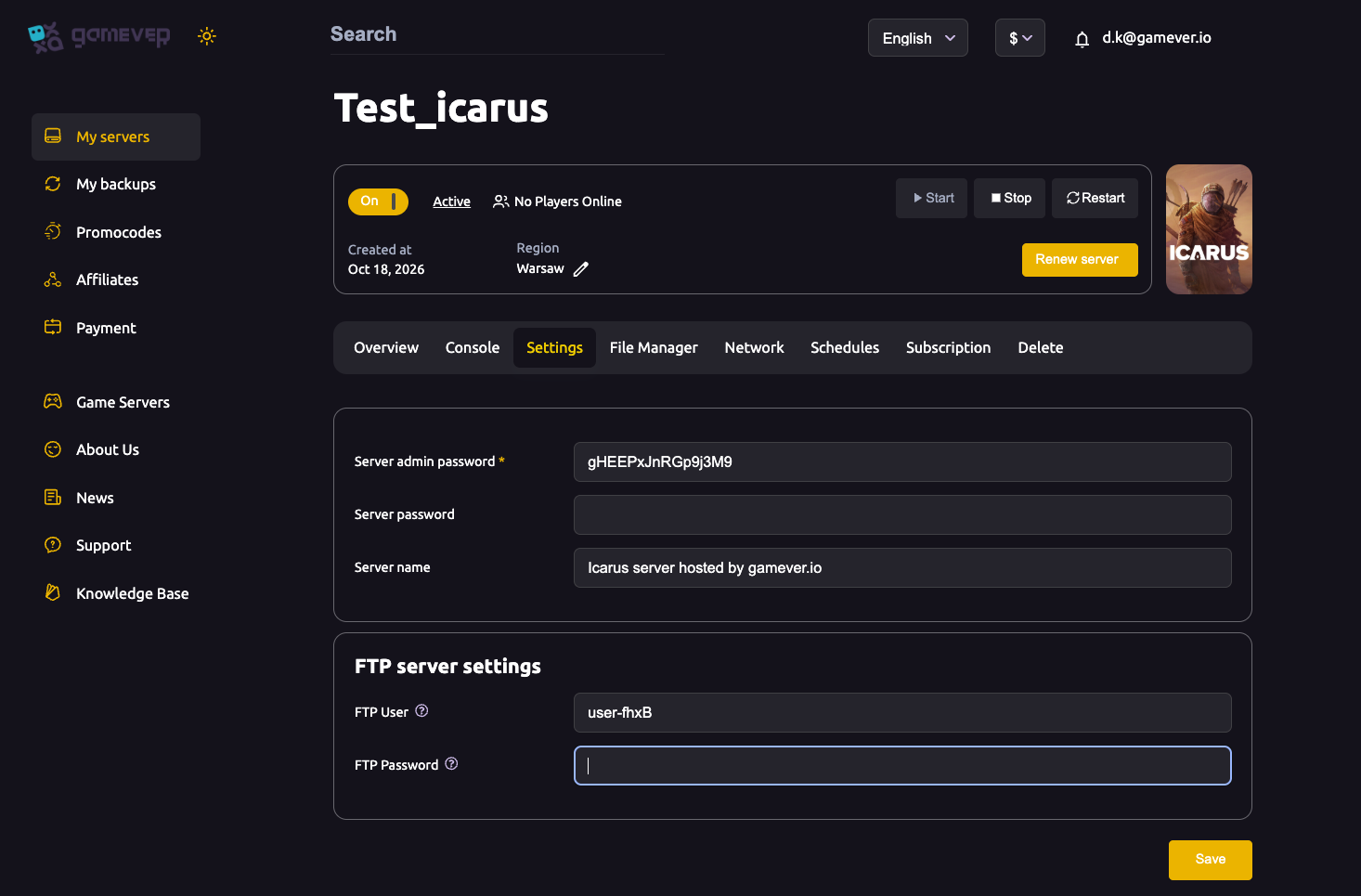
- Open your server in the panel and go to the Settings tab.
- In Server admin password, type a strong password. This is the one you will use in-game to become admin — keep it private.
- In Server password, type a join password if you want the server to be private. Leave it blank for an open, public server.
- (Optional) Set the Server name here too — it is what players see in the browser, and it is the supported way to name an Icarus server.
- Click Save.
- Go to the Overview tab and click Restart so the server reloads with the new passwords.
Passwords only take effect after that Save-then-Restart. If a change does not seem to apply, confirm the server actually restarted.
Why a blank admin password is dangerous
This is the most important point in the whole guide. On Icarus, if the admin password is empty, any player who joins can claim admin for themselves. There is no separate owner check holding them back — the admin password is the gate. Leave it blank and the first stranger to wander in can grant themselves cheat commands, change your world, kick other players, or wipe progress.
So the rule is simple: always set a Server admin password, even on a private server where you trust everyone, and even before you have invited a single person. Treat it as mandatory, not optional. A long, random admin password that only you know is the single best thing you can do to protect the server.
By contrast, a blank join password is a legitimate choice — it just means the server is open to the public. That is fine for a community server, as long as the admin password behind it is set.
How players join with the join password
When you set a Server password, everyone who connects needs it. Icarus loads one prospect (world) at a time, so once your friends are through the join password they are all in the same session. Share the join password privately with the people you want on the server, alongside the connection details from the Network tab. For the full walkthrough of finding the server and connecting, see how players connect and join.
If you ever want to close an open server, just add a join password in Settings, Save, and Restart — existing players stay on, but new arrivals will need the password.
Editing the passwords in ServerSettings.ini
The panel fields are the easy route, but both passwords also live in a config file, which you can edit through the File Manager (or over FTP). This is useful if you prefer editing config directly, or are already in the file changing other settings.
The file is ServerSettings.ini, under:
/home/config/Saved/Config/WindowsServer/
Inside the [/Script/Icarus.DedicatedServerSettings] section you will find:
| Key | Matches the panel field |
|---|---|
JoinPassword | Server password (the join password) |
AdminPassword | Server admin password |
To edit them safely, stop the server first (Icarus only reads this file at boot), change the values, Save, then Start the server again. If you set the passwords from the Settings tab, there is no need to touch this file at all — it is simply the honest alternative path, not a required step.
Additional Tips
- Set the admin password before you invite anyone. The blank-admin trap is wide open from the first boot, so close it first.
- Use two different passwords. Never reuse the same string for joining and for admin — a joiner who knows the join password should not be one typo away from admin.
- Keep the admin password private. Share the join password with players; share the admin password with no one but your trusted co-admins. See admin access and commands for how it is used in-game.
- Changing a password logs nobody out. Players already connected stay on until they disconnect; the new password applies to the next join.
- Always Save, then Restart. A saved-but-not-restarted change will not be live.
- Edit the .ini with the server stopped. If you use the File Manager route, stop the server first or your change may be overwritten on shutdown.
Conclusion
Icarus gives you two passwords for two reasons: the Server password decides who gets in, and the Server admin password decides who runs the place. Set them both from the Settings tab, Save, and Restart — and above all, never leave the admin password blank, because on Icarus an empty admin password hands control to the first person who joins. For the deeper admin workflow see admin access and commands, and for getting your group onto the server see how players connect and join.
Rent your Icarus server at gamever.io — a clean control panel for your passwords, server name and files, backups when you need them, and friendly support. Free trial, promo code WELCOME.