
How to Set a Password on Your Factorio Server
Running a Factorio server with us means you already have a headless server up and listening — your job is to decide who gets to join it. If you want your factory to be private, you set a join password: anyone connecting is then prompted to enter it. This guide covers exactly where that password lives, how to set it safely, and how it differs from the two other "passwords" the panel exposes so you don't mix them up. Everything here is done through your gamever control panel — the File Manager and the Settings tabs — with no self-install steps.
Where the join password lives
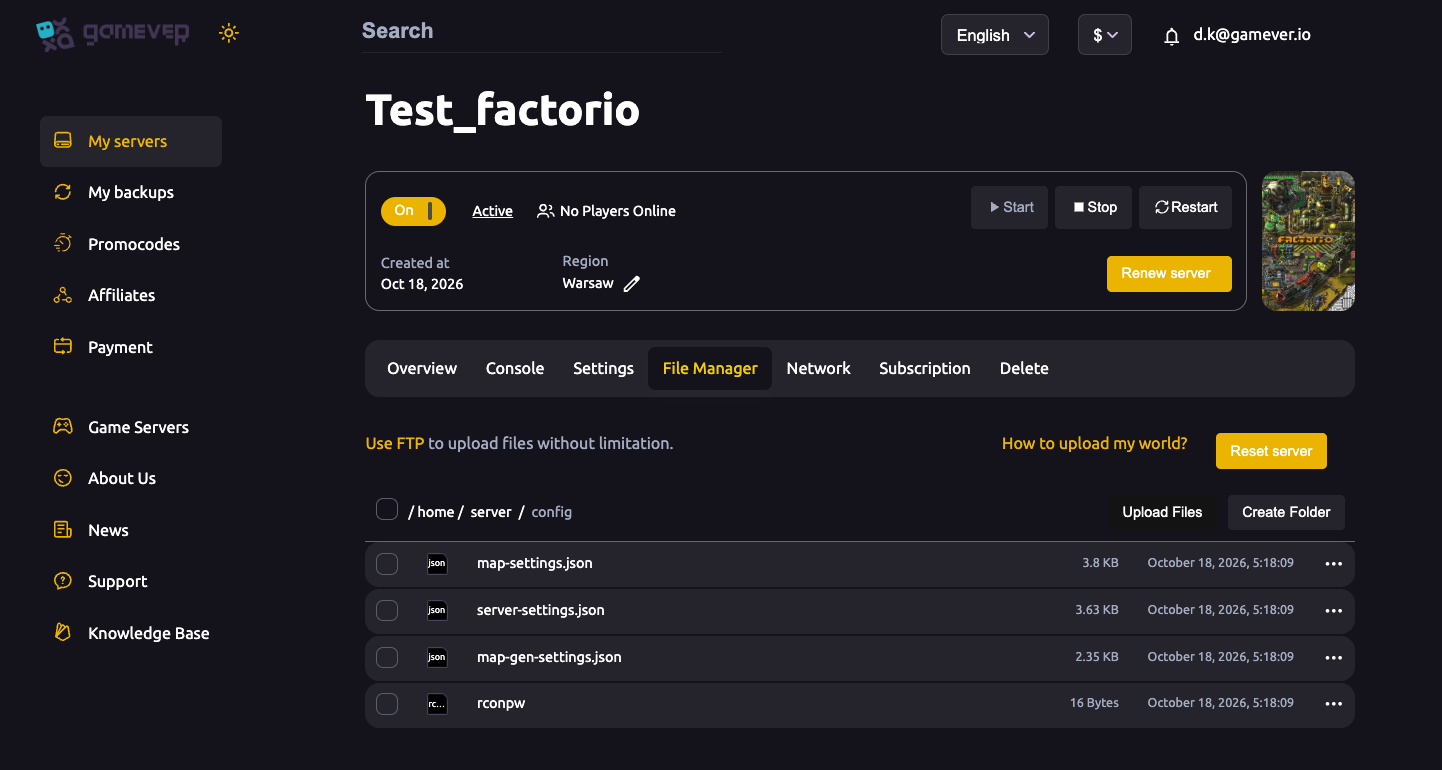
Factorio's join password is the game_password field inside server-settings.json. That file is the headless server's main config, and on your server it sits in the File Manager at /home/server/config/. Factorio only reads it when the server boots, so it isn't an in-panel toggle you can flip live — you edit the JSON and restart.
How it behaves is simple:
game_password value | Result |
|---|---|
Blank ("") | Server is open — anyone who can reach it joins with no prompt. |
| A set string | Server is password-protected — joiners are asked for it before they can connect. |
Setting the password step by step
Because the server reads server-settings.json at boot, you must stop it before editing, or your change is overwritten when it next saves.
- Stop the server. Use the Stop button at the top of the panel (or Overview). Wait for it to show as stopped.
- Open the File Manager tab and browse to
/home/server/config/. - Edit
server-settings.json. Find thegame_passwordline and set your password as the value, for example"game_password": "factory2024",. Leave the surrounding quotes and comma exactly as they were. - Save the file, keeping it valid JSON. Factorio's config is strict — a stray or trailing comma, or a missing quote, stops the server from booting. Change only the value between the quotes.
- Start the server again from the panel. The password takes effect on this boot.
Players connecting by IP will now be prompted for the password. To change or remove it later, repeat the same stop-edit-start cycle; setting the value back to "" reopens the server.
Three different "passwords" — don't confuse them
The panel surfaces three credentials that all get loosely called a "password." They do completely different jobs:
| Credential | Where it is | What it does |
|---|---|---|
game_password (join password) | server-settings.json in File Manager | The password players type to join. This is the one this guide sets. |
| Factorio username + token | Settings → Authorisation tab | A factorio.com account username and auth token used to list the server publicly and download mods — not a join password. |
| Rcon Password | Settings → Server Settings sub-tab (and the rconpw file) | The password for a remote-admin (RCON) console connection — not how players join. |
The distinction that trips people up most is the join password versus the public-listing credentials. The game_password decides whether joiners need a secret to connect. The Factorio username and token on the Authorisation tab are entirely separate: they're how your server declares itself to Factorio's public server browser and how it authenticates to the mod portal. Making your server public (listing it in the in-game browser) is controlled by those credentials — see making your server public — and a public server can still require a game_password. In fact, most listed public servers do: the two settings are independent, so you can be both discoverable and password-gated.
The Rcon Password is different again. It guards the RCON admin channel (whose address is on the Network tab), letting you or tools run server commands remotely. It has nothing to do with players joining the game, and setting it never password-protects the join itself.
Additional Tips
- Keep it valid JSON. The single most common cause of a server that won't restart after a password change is a broken
server-settings.json— check the Console for a parse error if it fails to boot. - Stop before you edit. Editing config while the server runs risks your change being overwritten on the next save; always stop first.
- Blank means open. If you leave
game_passwordempty, anyone who finds your address can join — only acceptable for a deliberately open server. - Public and private aren't opposites. You can list the server publicly via the Authorisation credentials and keep a
game_passwordso only people you share it with get in. - Never share your token. The factorio.com token on the Authorisation tab is account-sensitive; share your
game_passwordwith players, never the token. - Can't get in after setting it? Confirm players are using the exact password (it's case-sensitive) and the right address from the Network tab — see players can't connect.
Conclusion
Setting a join password on Factorio comes down to one field: game_password in server-settings.json, edited through the File Manager at /home/server/config/. Stop the server, set the value (blank for open, a string to lock it), save it as valid JSON, and start again. Keep it clear in your head that the join password is not the public-listing username/token on the Authorisation tab, and not the Rcon Password either — three separate controls for three separate jobs.
Rent your Factorio: Space Age server at gamever.io — full File Manager and FTP access, RCON, and one-click control so your factory runs exactly how you want it. Free trial, promo code WELCOME.