
How to Schedule Automatic Restarts on Your Valheim Server

A Valheim server that runs for days slowly accumulates memory use and the odd hitch — the classic fix is a scheduled restart. gamever gives you a one-click daily restart when idle, plus a full Schedules tab for custom restart times, so your server stays snappy without you babysitting it. This guide covers both.
Quick option: daily restart if idle
Open Settings → Schedule & Backups:
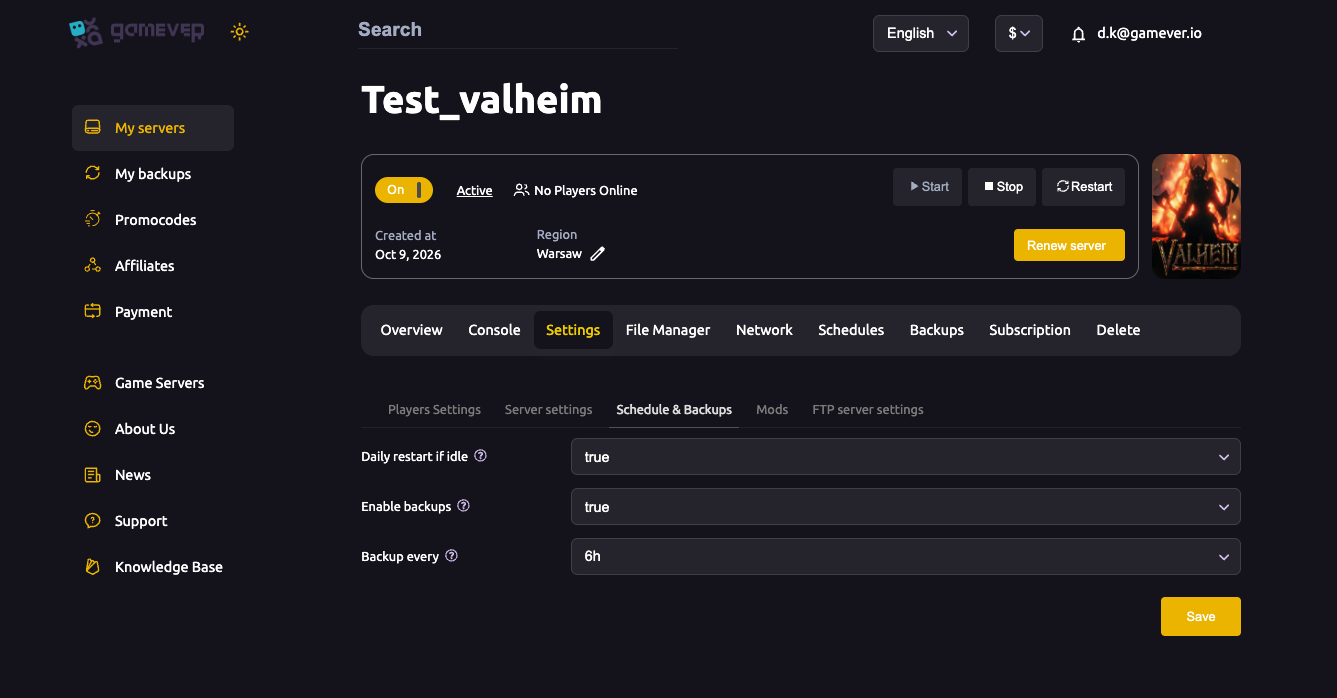
| Setting | What it does |
|---|---|
| Daily restart if idle | true = the server restarts itself once a day when no one is online, so players are never kicked mid-session. |
| Enable backups | Turns scheduled backups on (see backup & restore). |
| Backup every | How often a backup is taken (e.g. 6h). |
Set Daily restart if idle = true, Save, and you're done — the server quietly cycles itself during a quiet moment each day.
Custom restarts: the Schedules tab
Want restarts at specific times (say, 6 AM daily, or before a wipe event)? Use the Schedules tab:
- Open Schedules.
- Add a task, choose Restart, and set the time/recurrence.
- Save.
This is the way to pin an exact restart time rather than the "when idle" behaviour. A restart saves the world first, so no progress is lost (Valheim also autosaves periodically).
Why restart on a schedule?
- Clears accumulated memory — a long-uptime server can creep up in RAM; a restart resets it.
- Applies pending updates — Valheim/server updates install on restart.
- Smooths performance — fewer long-run hitches (pair with fixing lag).
A single daily restart is plenty for most servers — don't over-restart, as each one briefly takes the world offline and interrupts anyone trying to join at that moment.
Additional Tips
- "Idle" restart is safest — it won't kick active players.
- Use Schedules for an exact time — if you need a fixed daily hour.
- Once a day is enough — more just adds downtime.
- Restarts save first — the world is written before it cycles.
- Updates land on restart — a scheduled restart keeps the server current.
Conclusion
Keeping a Valheim server healthy is largely one toggle: set Daily restart if idle = true on Schedule & Backups and it cycles itself during a quiet moment each day, or use the Schedules tab to pin an exact time. Either way the world saves first, memory is cleared, and your server stays fast for the long haul.
Rent your Valheim server at gamever.io — automatic daily restarts and a full scheduler built in. Free trial, promo code WELCOME.