
How to run event on my Ark Survival Evolved server
Activating events on your ARK: Survival Evolved server can be a great way to keep your players engaged and add some excitement to the game. In this guide, we'll show you how to activate and run events on your server.
Step 1: Download GameUserSettings.ini File
The first step is to download the GameUserSettings.ini file from your Ark server. This file contains all of the server settings and can be edited to enable events. You can find this file in Root/server/ShooterGame/Saved/Config/LinuxServer directory.
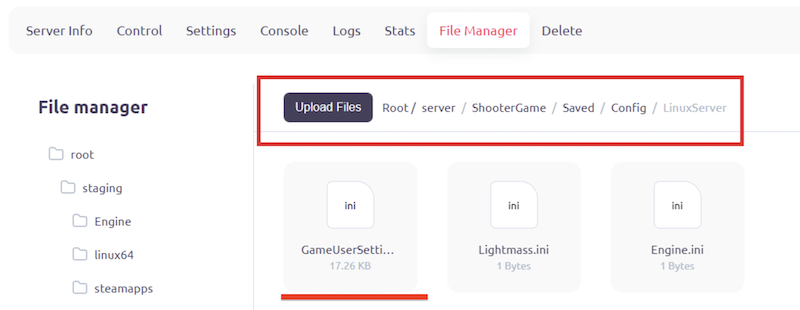
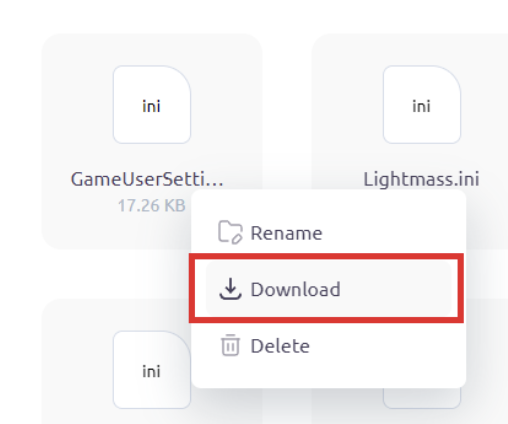
Right click on this file and then press ”Download”.
Step 2: Add ActiveEvent
Once you have downloaded the GameUserSettings.ini file, open it in a text editor such as Notepad. Look for the [ServerSettings] section and add the following string: ActiveEvent =<eventname>. Replace <eventname> with the name of the event you want to run. For example, if you want to run the Summer Bash event, the string would be ActiveEvent=Summer.
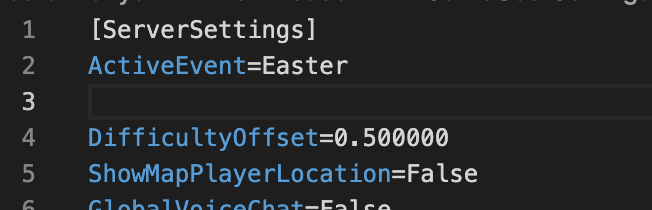
[ServerSettings]
ActiveEvent=<eventname>
You can find the corresponding event name here:
|
eventname |
Description |
|
Easter |
Allows for the Easter Event to be activated |
|
Arkaeology |
Allows for the Arkaeology Event to be activated. |
|
ExtinctionChronicles |
Allows for the Extinction Chronicles Event to be activated. |
|
WinterWonderland |
Allows for Winter Wonderland 2020 Event to be activated. |
|
vday |
Allows for Love Evolved to be activated. |
|
Summer |
Allows for Summer Bash 2020 Event to be activated. |
|
FearEvolved |
Allows for ARK: Fear Evolved 4 to be activated. |
|
TurkeyTrial |
Allows for ARK: Turkey Trial 4 to be activated. |
|
birthday |
Allows for ARK: 5th Anniversary to be activated. |
|
None |
Disables active event. |
Step 3: Upload Setting File to Server
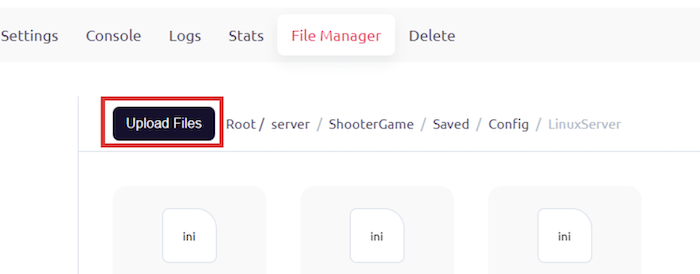
After making the changes to the GameUserSettings.ini file, save the file and upload it to your Ark server. You can do this using an FTP client or through the server's control panel.
Step 4: Restart Server to Apply Changes
Once you have uploaded the GameUserSettings.ini file to the server, you will need to restart the server for the changes to take effect. You can do this through the server's control panel or by using a command in the console.
Step 5: Conclusion
Congratulations! You have successfully run an event on your Ark Survival Evolved server. By enabling events, you can bring new challenges and excitement to your players and keep the game fresh and engaging. Remember to choose events that will be fun and fair for all players on the server. Have fun!