
How to Reset Your Minecraft World (Fresh World or New Seed)
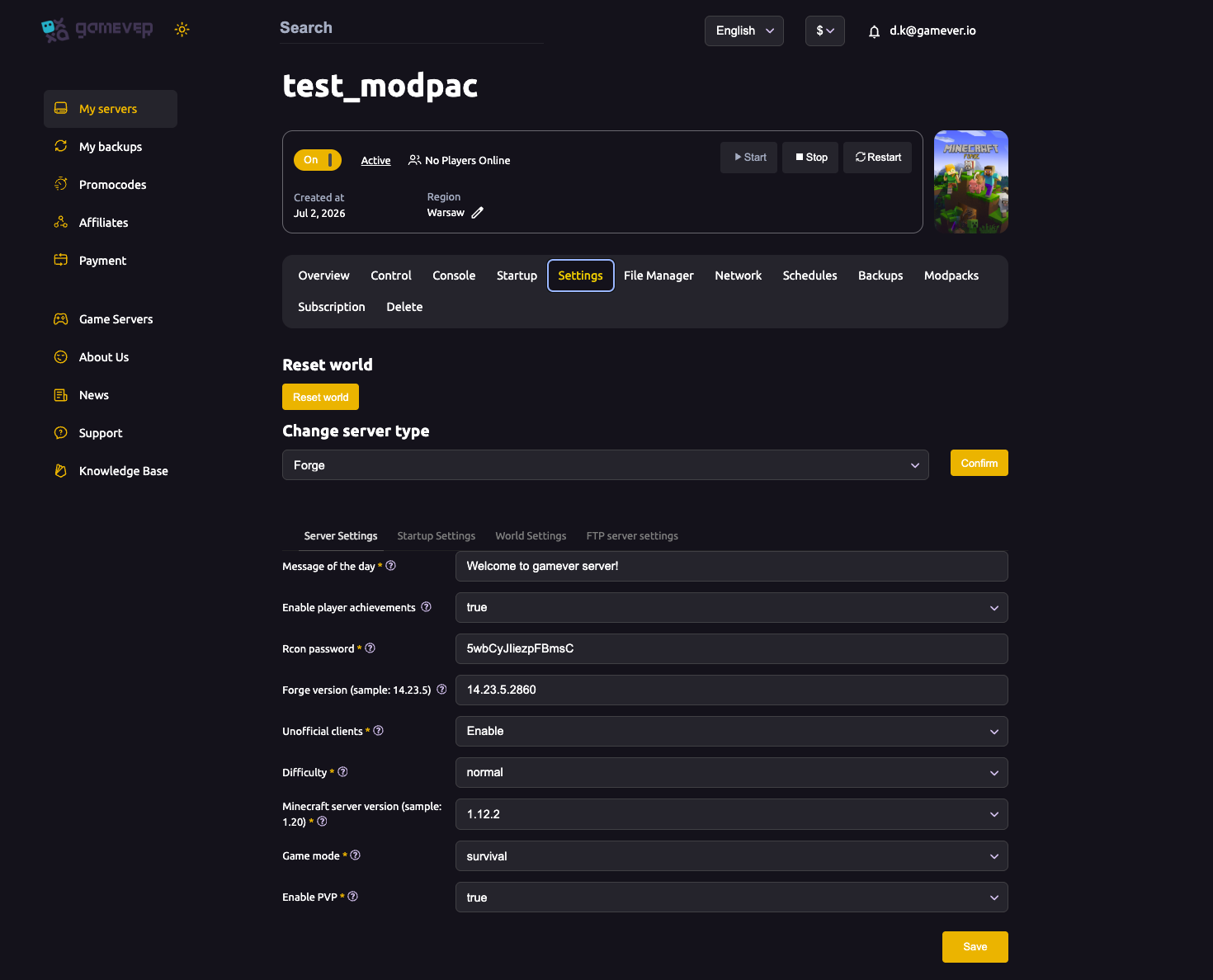
Sometimes you want a clean slate: a new season, a different seed, or a fresh start after switching modpack or server type. gamever makes it one button — but because it erases your current world, there's one thing to do first. This guide covers resetting safely.
The Reset world button
At the top of the Settings page (above the Change server type dropdown and the sub-tabs) is a Reset world button:
- Back up first (see below) — this step is irreversible.
- Open the Settings tab.
- Click Reset world and confirm.
- The current world is removed and a fresh world is generated on the next start.
The File Manager also has a "Reset server" option and a "How to upload my world?" helper in the /home/ view for related world-management tasks.
Back up before you reset — always
Resetting deletes your current world and cannot be undone. Before clicking:
- Take a snapshot from the Backups tab, or
- Download the
world/folder over FTP from the File Manager.
That way, if you change your mind, you can restore the old world.
Using a specific seed on the fresh world
The reset generates a new world using your current world settings. To control the terrain:
- Set the Seed field on Settings → World Settings before the fresh world generates (blank = random). See world settings.
- Reset the world (or start it) so the new seed takes effect.
Remember: a seed only affects a newly generated world — changing the seed without a reset does nothing to terrain you've already explored.
When a reset is the right move
| Situation | Why reset |
|---|---|
| New season / fresh start | Everyone begins again on a clean map. |
| Switched modpack | The old world often won't load under a new mod set — see install a modpack. |
| Changed server type | A modded world may be incompatible with Vanilla/Paper — see change server type. |
| Want a specific seed | Set the seed, then reset to generate it. |
Additional Tips
- Back up before every reset — it's irreversible; a backup is your undo.
- Set the Seed first if you want a specific world — seeds only apply to fresh generation.
- Reset after a modpack or type switch if the old world won't load.
- Tell your players before a reset so no one loses a build unexpectedly.
- Keep the old world (FTP download) if there's any chance you'll want it back.
Conclusion
The Reset world button on the Settings page gives you a clean Minecraft world whenever you need one — a new season, a new seed, or a fresh start after a modpack or server-type change. The only rule: back up first, because the reset is permanent. Set your seed beforehand if you want a specific map, confirm, and your server generates a brand-new world on the next start.
Rent your Minecraft Java server at gamever.io — reset to a fresh world in one click, with a Backups tab and FTP so your old world is always safe first. Free trial, promo code WELCOME.