
How to Reset or Wipe Your Project Zomboid Server
Whether your group wants a fresh apocalypse, you changed the map or sandbox in a way that needs a clean world, or a save has gone bad, resetting a Project Zomboid server gives you a blank Knox County to start over in. On gamever you can do this from the File Manager. The one rule: back up first, because a wipe is permanent. This guide walks through it.
Back up before you wipe — always
A reset deletes your world. If there's any chance you'll want it back:
- Download your current save data and config over FTP first, see backup & restore.
- Or make sure you have a recent My backups restore point.
Only continue once you have a copy you're happy with.
Resetting from the File Manager
Open the File Manager and go to /home/configs/Server/:
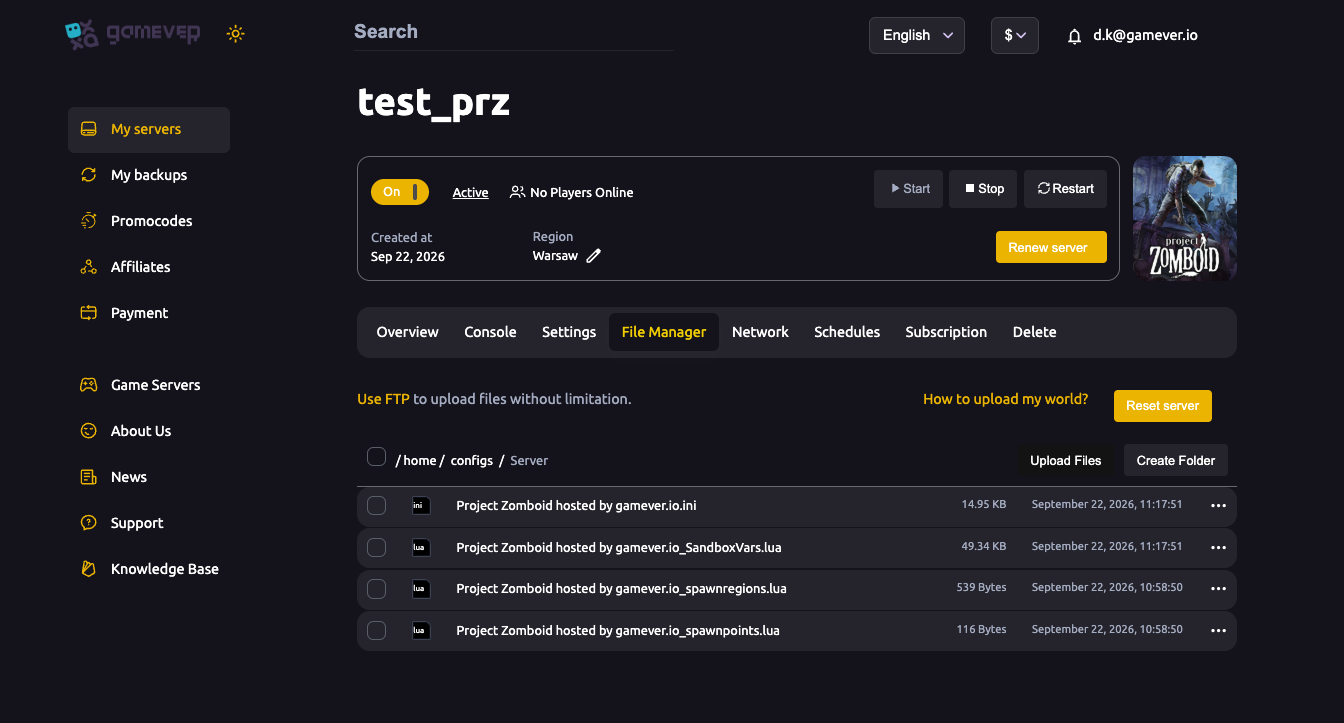
You have two ways to get a clean world:
- Reset server — the File Manager provides a Reset server button that clears the world for a fresh start.
- Delete the save data — stop the server and remove the
Saves/data over FTP, then start again to generate a new world.
Either way, stop the server first, do the reset, then start it — it generates a brand-new world on next boot.
Keeping your settings but wiping the world
If you only want a new world and want to keep your tuned config:
- Your sandbox settings (
<Server name>_SandboxVars.lua) and main.iniunder/home/configs/Server/carry over — only the generated world needs clearing. - That way a fresh start keeps your difficulty, map and server settings while giving everyone an untouched Knox County.
Additional Tips
- Back up first — a wipe can't be undone.
- Stop the server before resetting or deleting save data.
- Keep your config if you only want a new world, not new settings.
- A fresh world pairs well with a map or sandbox change — see change map and sandbox settings.
- Tell your group before wiping — everyone loses their characters and builds.
Conclusion
Resetting a Project Zomboid server is straightforward from the File Manager — use the Reset server button or clear the Saves/ data with the server stopped, and a fresh world generates on next boot. Keep your config if you only want a new map or difficulty. Just remember the golden rule: back up first, because there's no undo on a wiped apocalypse.
Rent your Project Zomboid server at gamever.io — a one-click reset and full file access so a fresh start is always easy. Free trial, promo code WELCOME.