
How to Reset or Wipe Your Icarus Server

Sometimes a prospect goes sideways: a party wants a clean run on a different map, a save gets cluttered, or you simply want to start fresh on the server you rent from gamever. This guide covers two ways to wipe your Icarus server — the one-click Reset server button in the panel, and a targeted delete of the current prospect's save file — both done entirely through your gamever control panel, no reinstall or self-hosting required.
Because Icarus uses an open-world model that loads one prospect (world) at a time, there's an important consequence to understand up front: resetting your server means abandoning the current prospect. There's no second world sitting in reserve. Whatever map and progress are loaded now is what you're clearing. For how that single-prospect model works, see how Icarus open world and prospects work.
This is destructive and irreversible. Deleting a prospect or resetting the server permanently removes that world and everyone's progress on it. There is no undo. Always take a backup first — see backups and restore — so you can roll back if someone objects after the fact.
Back up before you do anything
Before either route, stop and save a copy. Icarus writes a prospect out cleanly only when the server is stopped properly, so the safe order is:
- Stop the server from the Overview tab (or the top Stop button).
- Take a backup via My backups in the left sidebar, or download the prospect file over FTP / the File Manager (path below).
- Keep that copy somewhere off the server until you're sure the wipe was intended.
If you ever want this world back, that saved .json is the only way to restore it. Don't skip it.
Route 1 — the File Manager Reset server button
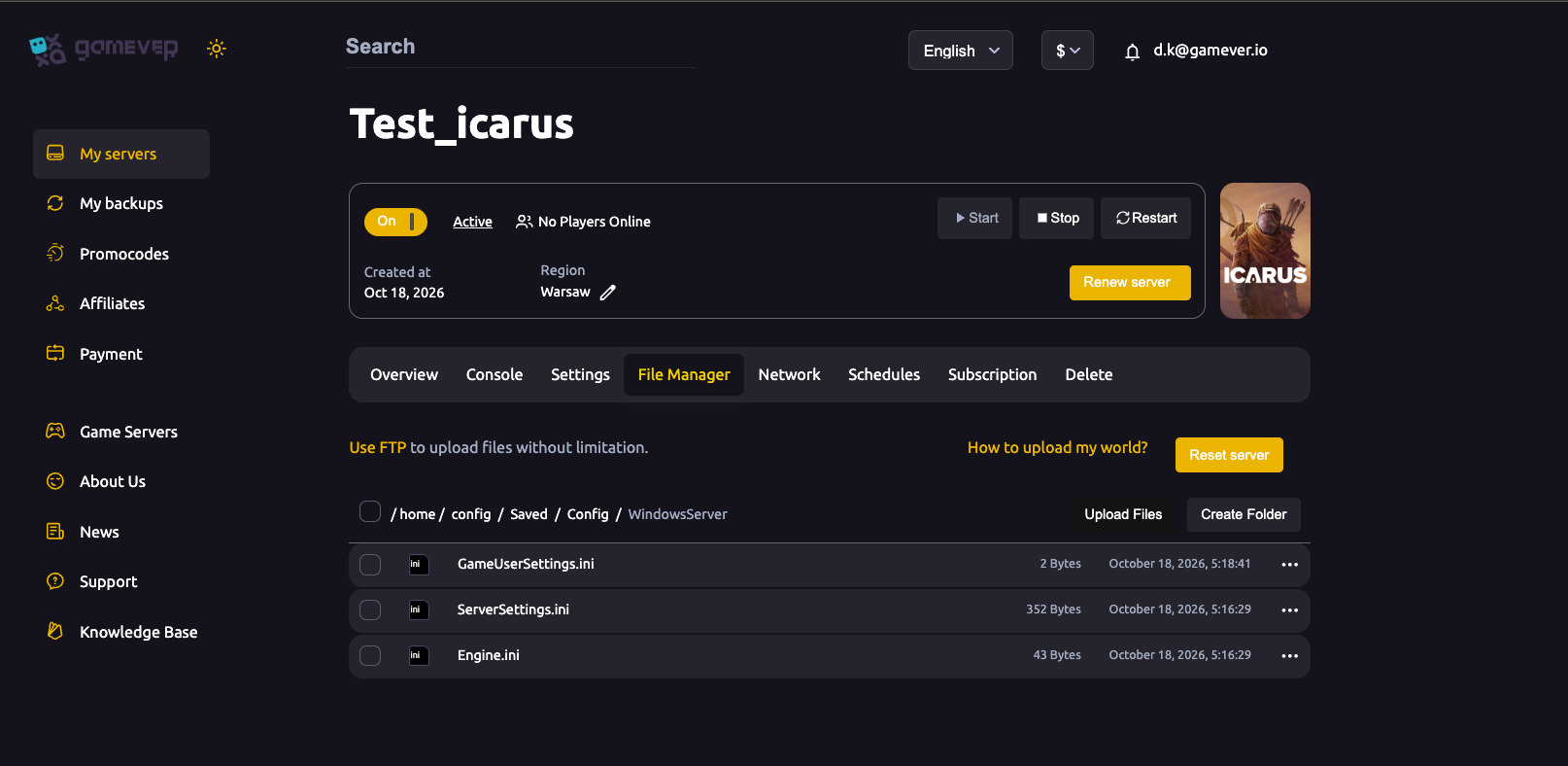
The quickest wipe is the built-in one. Open the File Manager tab; alongside the Upload Files / Create Folder controls and the "How to upload my world?" note you'll find a Reset server action.
| Step | Action |
|---|---|
| 1 | Stop the server (Overview → Stop) and confirm it's fully stopped. |
| 2 | Take your backup (see above) — Reset is irreversible. |
| 3 | In File Manager, use Reset server to clear the server back to a clean state. |
| 4 | Start the server again from Overview. |
| 5 | Join the server and create a new prospect (choose your map and settings) to begin fresh. |
This is the simplest path when you just want a clean slate and don't need to keep anything.
Route 2 — delete the current prospect by hand
If you'd rather surgically remove just the active world — for instance to drop one prospect while keeping other files tidy — you can delete the prospect's save file directly. Icarus keeps each prospect as a single .json under:
Icarus/Saved/PlayerData/DedicatedServer/Prospects/
Each world is one .json file in that folder. To wipe it:
| Step | Action |
|---|---|
| 1 | Stop the server first — Icarus only writes and releases the prospect cleanly when stopped, and config/save files shouldn't be touched while it's running. |
| 2 | Take your backup, or download the .json over FTP to keep a copy. |
| 3 | In File Manager (or over FTP, using the login from Settings → FTP server settings), open Icarus/Saved/PlayerData/DedicatedServer/Prospects/ and delete the prospect's .json file. |
| 4 | Start the server again. |
| 5 | Join and create a new prospect to generate a fresh world. |
RocketWerkz warns against renaming or editing a prospect .json — doing so can corrupt the save beyond recovery. For a wipe you only ever delete the file cleanly; never hand-edit it.
Additional Tips
- Decide with your group first. Once the prospect is gone, nobody gets their progress back — agree on the wipe before you pull the trigger.
- Stop, then wipe, then start. Deleting or resetting while the server is live risks a half-written save and a confused boot.
- Keep the backup off-server. A copy that lives only on the server you're wiping isn't much of a safety net — download it.
- New prospect, new rules. A reset is the natural moment to pick a different map or adjust prospect settings — plan the new run before you create it.
- Ports stay the same. Your server address and ports are panel-assigned and don't change when you wipe — players reconnect to the same address shown on the Network tab.
- Watch the Console. After starting a fresh prospect, check the Console tab for a clean load before inviting everyone back in.
Conclusion
Wiping an Icarus server is straightforward once you accept the trade-off: because Icarus runs one prospect at a time, resetting means letting the current world go. Use the File Manager → Reset server button for a clean one-click wipe, or delete the active prospect's .json under Icarus/Saved/PlayerData/DedicatedServer/Prospects/ for a targeted clear — in both cases, stop the server first, back up, then start and create a new prospect. And because there's no undo, treat that backup as mandatory, not optional.
Rent your Icarus server at gamever.io — full File Manager and FTP access, one-click resets, and easy backups and restore so a fresh start is never a risky one. Free trial, promo code WELCOME.