
How to Recover a Corrupted Rust Server Save
A corrupted save is the Rust admin's nightmare: the server won't finish loading, the console throws an error, or startup hangs forever and nobody can join. This usually happens after a hard crash, a server killed mid-save, a full disk, or a plugin that broke an entity. This guide is specifically about corruption recovery — reading the boot error, rolling back to a good save, and knowing when a fresh map is the only way out. For normal, non-emergency rollbacks see our back up and restore guide; this one is for when the world simply won't load.
Read the console first
The fix depends on the exact message, so open the Console tab and look at the server's boot output. The common ones:
| Console message | What it means |
|---|---|
Error loading save (...) + NullReferenceException, startup frozen | The .sav file is genuinely corrupt. |
Server hangs at Spawning entities and never finishes | A corrupt entity in the save (often a mod/plugin leftover). |
Couldn't load ... .sav - file doesn't exist, then a new empty map generates | Not corruption — the file the server expects isn't there (see the update note below). |
Error names a specific entity/plugin type (e.g. MiniCopter.ServerInit) | A plugin crash, not a corrupt world — disable plugins first. |
Reading the message saves you from wiping when you didn't have to.
Where your save lives
Open the File Manager and browse to your server's identity folder:
/home/server/server/<server-identity>/
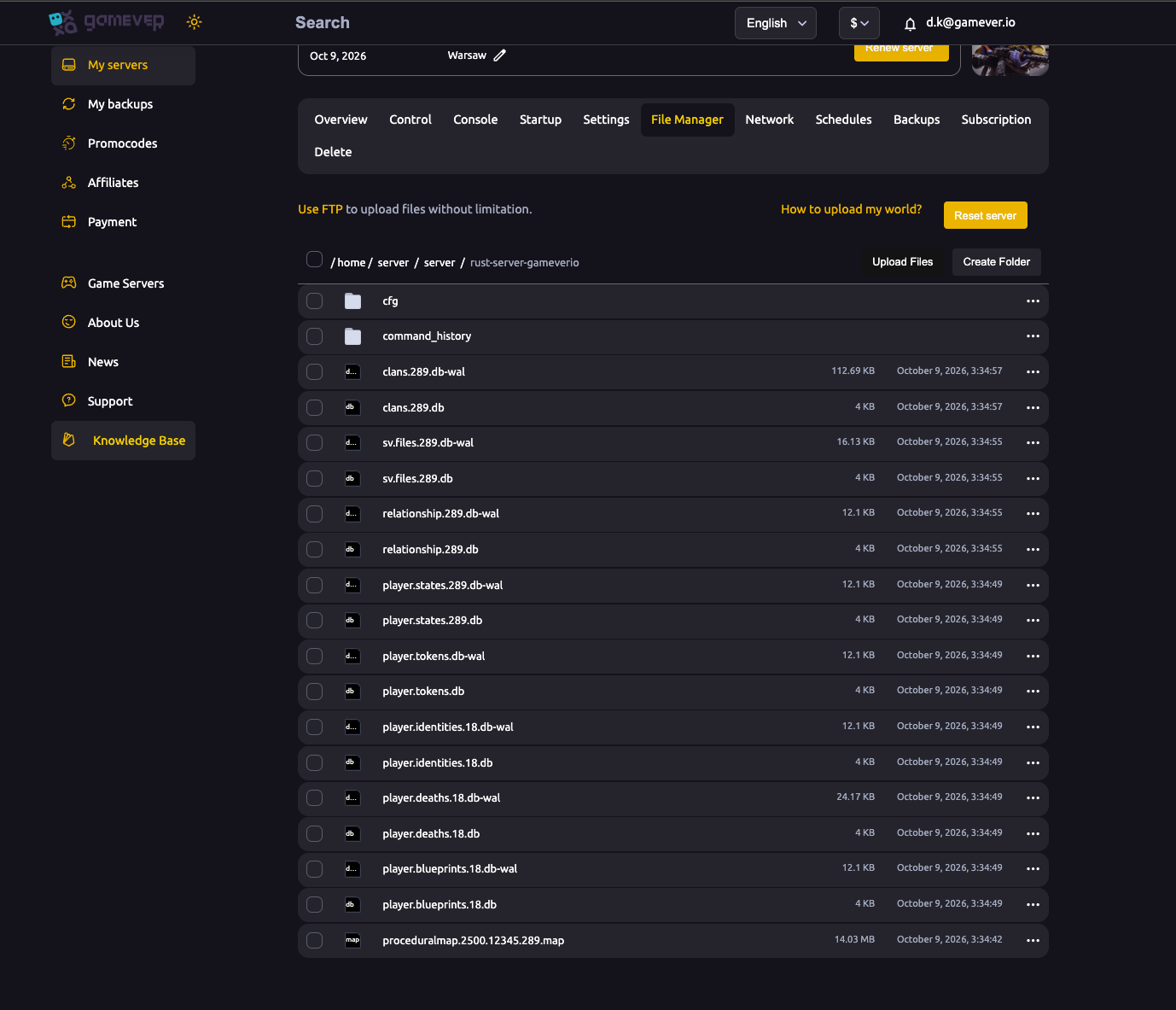
The files that matter for recovery:
| File | What it holds |
|---|---|
proceduralmap.<size>.<seed>.<protocol>.sav | The world save — map state, entities, player buildings and deployables. This is what corrupts. |
proceduralmap.<size>.<seed>.<protocol>.sav.1, .sav.2, … | Rotating backups Rust writes on each save. Higher number = older. |
proceduralmap.<size>.<seed>.<protocol>.map | A terrain cache only — safe to delete, Rust rebuilds it from the seed. |
player.blueprints.*.db, player.states.*.db, player.deaths.*.db, … | Player data, stored separately from the world. |
The number before the extension (<protocol>) is the network protocol version. Remember that — it changes after certain updates and forced wipes, which is why the "file doesn't exist" case below is not corruption.
Step 1 — Stop and snapshot the broken state
Before touching anything, stop the server (Console tab) and make a backup from the Backups tab — yes, even of the broken state. That gives you a safe point to return to if a recovery attempt makes things worse, and you never lose the only copy of the corrupt file (sometimes it's partially salvageable).
Step 2 — Restore a panel backup (cleanest fix)
If you have backups, this is the simplest route. On the Backups tab, pick the newest snapshot from before the corruption and click Install Backup — it replaces the current server files with that snapshot, and the server loads the restored world on restart. You lose whatever happened since that snapshot, but you get a world that boots. The step-by-step mechanics (Make / Install / Download) are covered in back up and restore.
Step 3 — Roll back to a rotating .sav copy
No usable panel backup? Rust's own rotating copies are your next best thing. With the server stopped, in the File Manager:
- Rename the broken
proceduralmap.….savtoproceduralmap.….sav.broken(so you keep it). - Copy the newest rotating backup,
proceduralmap.….sav.1, and rename the copy to the original.savfilename (drop the.1). - Start the server.
- If
.sav.1is also corrupt, repeat with.sav.2, then.sav.3— each is older than the last.
Every step older loses more progress, so start from .sav.1 and only go further back if you have to.
"File doesn't exist" after an update is not corruption
If the console says it couldn't load the .sav because the file doesn't exist and then generates a fresh map, your world is usually fine — the protocol number in the filename no longer matches the updated server, so it looked for a file that isn't there. The server is trying to start clean rather than load your world.
Fix it by renaming your existing save's protocol number to the one the console is now looking for (rename proceduralmap.<size>.<seed>.<oldnumber>.sav to …<newnumber>.sav in the File Manager), then restart. This applies to version updates — not to Rust's forced monthly map wipe, where a fresh map is intended and renaming the old save around it isn't supported.
Step 4 — When a full wipe is the only option
If every .sav copy is corrupt and you have no clean backup, the last resort is to delete the .sav and let the server generate a fresh map. You lose all buildings and deployables, but note: player blueprints survive, because they live in the separate player.blueprints.*.db files, not the world save. If you want a complete reset (blueprints and player data too), follow our wipe guide or use the Reset server button in the File Manager.
Additional Tips
- Read the error before you act — a plugin crash and a corrupt world look similar but need opposite fixes.
- Plugin-named error? Rename
oxide/pluginstooxide/plugins-disabled, start the server, and if the save loads, re-enable plugins in small batches to find the culprit. - Always stop the server cleanly from the panel — a world killed mid-save is the most common cause of corruption.
- Watch disk space. A save written to a full disk comes back unloadable; our hosting manages this, but heavy plugin/log buildup can still fill it.
- Schedule backups. Automatic daily backups plus a sane save interval and scheduled restarts mean a corrupt save is a quick rollback, not a lost server.
Conclusion
A corrupted Rust save is recoverable far more often than it looks. Stop the server, read the console, snapshot the broken state, then restore a panel backup — or roll back to one of Rust's rotating .sav.1 / .sav.2 copies. If the error is really "file doesn't exist" after an update, it's just a protocol-number mismatch, not corruption. Only when every copy is gone do you fall back to a fresh map, and even then your players keep their blueprints.
Rent your Rust server at gamever.io — built-in automatic backups, one-click restore, full File Manager access and a live console to catch problems early. Free trial, promo code WELCOME.