
How to Play Crossplay on Your ARK Server (Steam + Microsoft Store)
gamever runs ARK: Survival Evolved, which supports crossplay between the Steam version and the Microsoft Store version (the Windows Game Pass edition). So your Steam friends and your Game Pass friends can all play on the same server. There's nothing to switch on in the panel — crossplay just works. What differs is how each platform connects, and that's the one thing worth knowing.
Get your server address
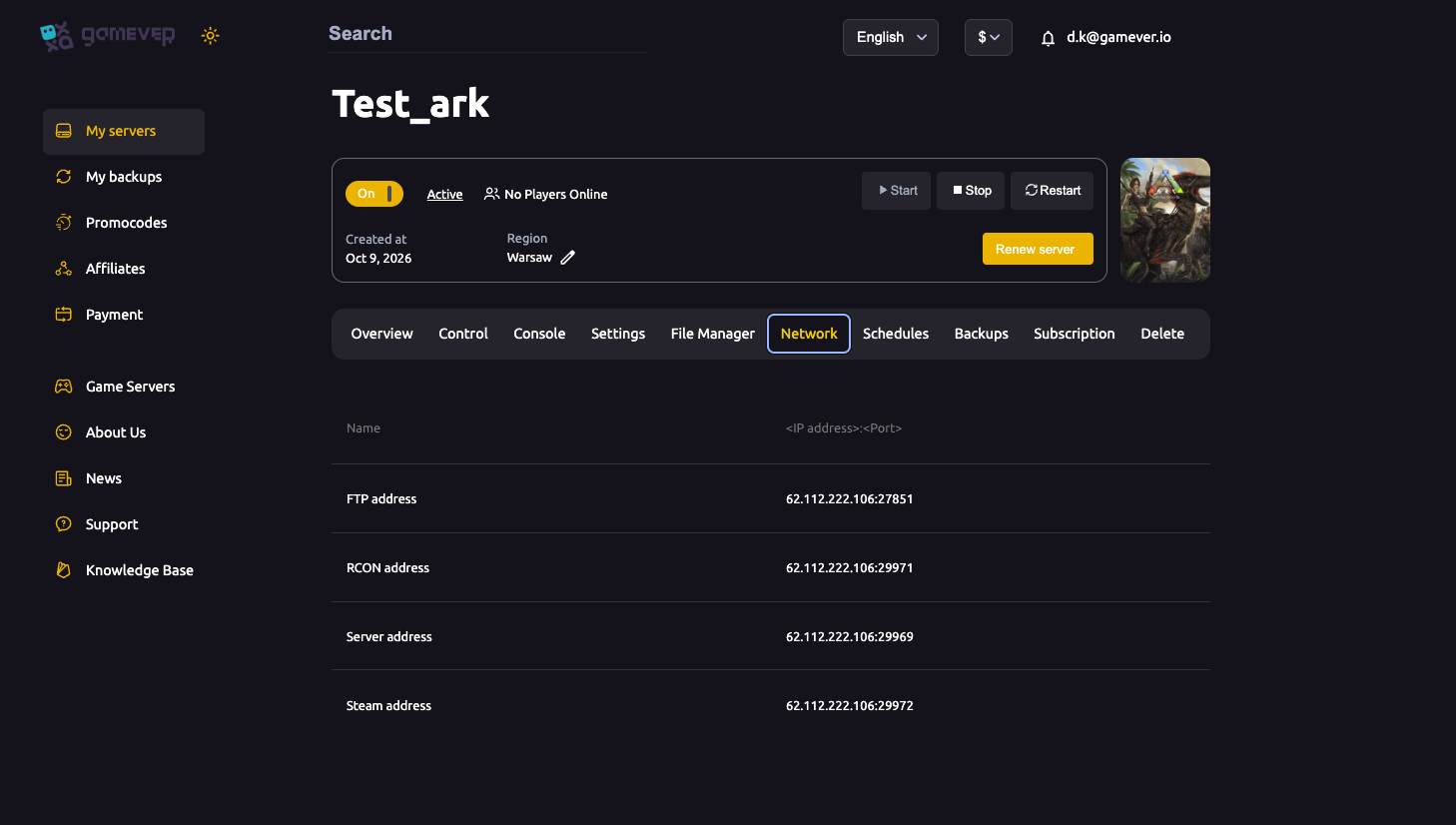
Everyone connects to the same place: your server's Server address (IP:port). Find it on the Network tab (or on the Overview tab's IP address).
Steam players
Steam players have the easy path:
- Server browser: in ARK, open the unofficial server list and search for your server name.
- By IP: or add your Server address to Steam favourites / use the in-game console.
Microsoft Store (Game Pass) players — connect by console
The Microsoft Store version can't use the Steam server browser, so Game Pass players join by direct connect instead:
- Launch ARK and load into any session screen.
- Open the console (press Tab on PC).
- Type:
open <Server address>
— using the exact IP:port from your Network tab, e.g. open 62.112.222.106:29969.
- Press Enter. The game connects straight to your server.
That's the whole trick: Game Pass players reach your server by typing open IP:port in the console, because they can't browse to it the way Steam players can.
Nothing to configure on the server
You don't need to flip a crossplay setting in the panel — gamever's ARK: Survival Evolved servers accept both platforms as they are. Just hand everyone the Server address and point your Game Pass players at the console method above.
Additional Tips
- Give out the exact Server address from the Network tab — Game Pass players need the precise
IP:portforopen. - Steam players can use the browser; Microsoft Store players must use
open IP:portin the console. - Set a server password? Players still connect the same way, then enter the password when prompted — see password protect your server.
- Can't connect? It's usually a version mismatch or the server still booting, not crossplay — see our can't-join fix guide.
- This is ARK: Survival Evolved (ASE) crossplay — the edition gamever hosts.
Conclusion
Crossplay on a gamever ARK server needs zero server-side setup: Steam and Microsoft Store players share the same world. Steam players browse or join by IP; Game Pass players open the console and type open <IP:port> from your Network tab. Share one address and the whole squad is in — whatever store they bought the game from.
Rent your ARK server at gamever.io — crossplay-ready out of the box, with a simple panel and 24/7 uptime for the whole tribe. Free trial, promo code WELCOME.