
How to Make Your Factorio Server Public (Username and Token)
By default your gamever Factorio server is reachable by anyone you hand the address to, but it won't show up in Factorio's in-game public server browser until you give it a set of factorio.com login credentials. Factorio requires this so that only accounts verified against factorio.com can advertise a public game. On a server you rent from us this is a few fields on one Settings tab — there's nothing to install and no port to open. This guide covers exactly what the public server browser needs, where to find your token, and how to apply it from the control panel.
What "public" actually requires
Factorio's own documentation is explicit: a server appears in the public list only when login credentials are filled in. In the wiki's words, "The server will appear in the public server list. This requires the login credentials below to be filled in." Those credentials are a factorio.com account username and an authentication token (a username and password also works, but the token is the safer choice — see below).
Two things have to line up for a public listing:
| Requirement | Where it lives | Notes |
|---|---|---|
| Account credentials | Settings → Authorisation tab | Your factorio.com username + token |
| Visibility set to public | server-settings.json (visibility) | The visibility block's public value must be enabled |
If either piece is missing — no credentials, or visibility not set to public — the server still runs and friends can join by address, it simply won't be advertised in the browser.
Step 1 — Get your username and token
Both values come from your factorio.com account, not from Factorio itself and not from the panel:
- Sign in at factorio.com and open your account/profile page.
- Note your username exactly as shown.
- Find the authentication token on that page and copy it.
A few things to be clear about. The token is not your password and it is not your email address — it's a separate, long credential issued by factorio.com specifically so that a server can authenticate without storing your actual password. Never put your account email into any server field. If the profile page offers to reveal or regenerate the token, that's the value you want; regenerating it invalidates the old one, so you'd then update the panel with the new token.
Step 2 — Enter them on the Authorisation tab
In the panel, open Settings → Authorisation. You'll see two fields, Factorio username and Factorio Token:
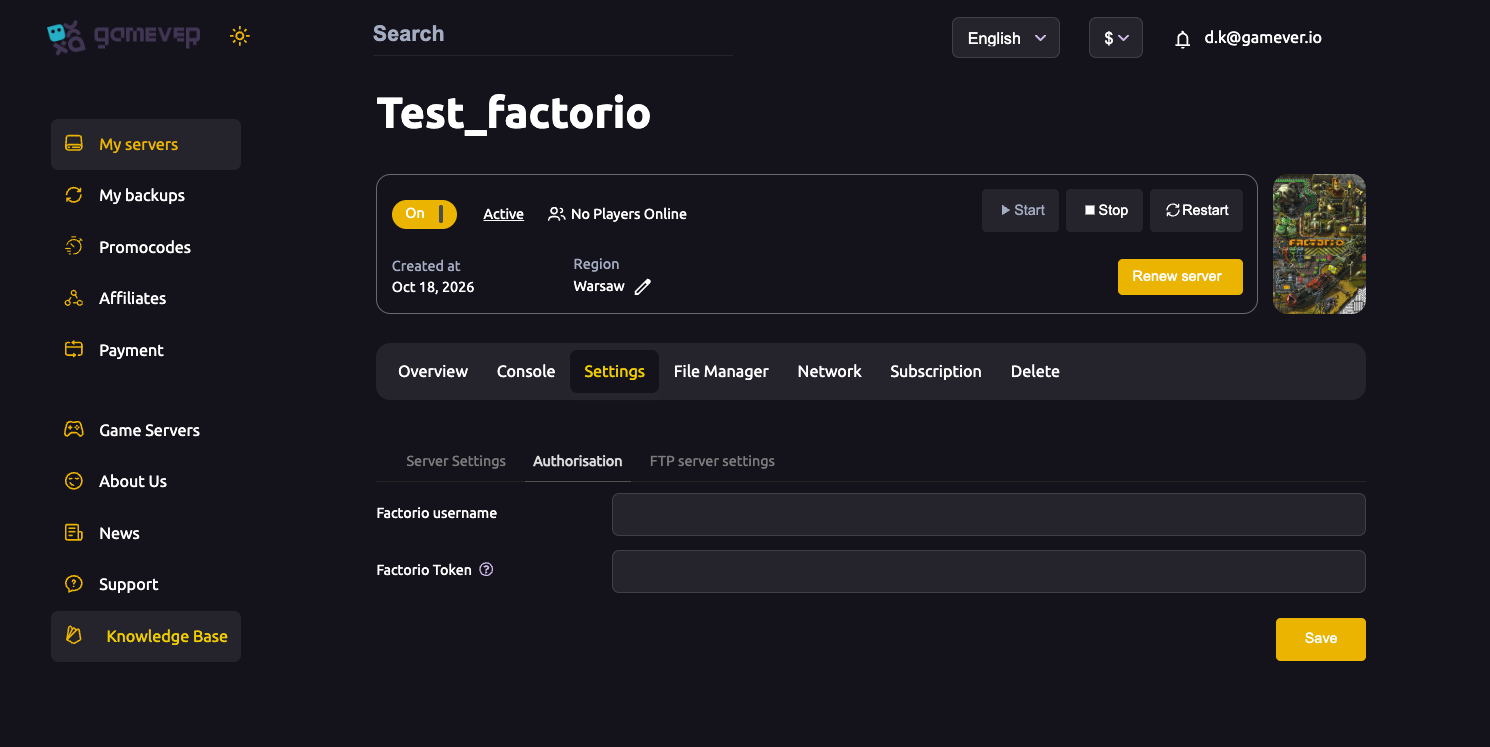
| Field | What to enter |
|---|---|
| Factorio username | Your factorio.com account username |
| Factorio Token | The authentication token from your factorio.com profile |
Paste each value in, then click Save. These are the same credentials Factorio uses to authenticate against the mod portal, so once they're set they also unlock mod-portal downloads from the panel — see installing mods for that side of it.
Step 3 — Confirm visibility, then Save and Restart
The credentials authorise the listing; the visibility setting decides whether it's actually advertised. That value lives in server-settings.json, which you edit through the File Manager under /home/server/config/. Make sure the visibility block allows public (its public value enabled). Because Factorio reads this JSON only at boot and the file is strict (a single trailing comma stops the server starting), stop the server before editing, make your change, save the file, and then start it again.
Once credentials are saved and visibility is public, click Restart on the Overview to apply everything. Within a minute or so your server name should appear in the in-game Play → Browse public games list. If it doesn't, re-check that the username and token are exact and that visibility is public.
Security: treat the token like a password
The authentication token is sensitive. Anyone holding it can advertise servers as your account, so handle it with the same care as a password:
- Never paste it into chat, screenshots, Discord or a public config you share. Factorio's wiki notes the credentials are stored in plain text in the settings file, which is exactly why it recommends the token over your password: "For security reasons it is recommended to use authentication token."
- Keep it out of anything public. The token belongs only in the Authorisation tab (or
server-settings.json, which stays on your server). - If it leaks, regenerate it on factorio.com and update the panel with the new value.
Additional Tips
- Public ≠ no password. Listing the server publicly and protecting it with a join password are independent — you can do both. See set a server password to gate who can actually connect.
- Give the server a clear name. The name and description from
server-settings.jsonare what players see in the browser, so make them recognisable. - Use the token, not the password. Both authenticate, but the token is the safer value to store.
- Mods come along for free. The same username and token let the panel pull mods from the Factorio mod portal — no extra login needed.
- Ports are handled for you. Your game and RCON addresses are shown on the Network tab; there's nothing to port-forward for a public listing.
Conclusion
Making a Factorio server public is really two small jobs: prove the listing is yours with a factorio.com username and auth token on Settings → Authorisation, and set visibility to public in server-settings.json. Save, restart, and your factory shows up in the in-game browser for anyone to join. Keep that token private — it's a credential, not a convenience — and remember it doubles as your key to mod-portal downloads.
Rent your Factorio server at gamever.io — public listing, RCON and full File Manager access from one panel. Free trial, promo code WELCOME.