
How to make a piston in Minecraft
Exploring the vast world of Minecraft often leads players to discover the versatile and essential component known as pistons. These Redstone-powered devices are not only integral to various automatic machines but also offer a wide range of functionalities. In this guide, we will delve into the mechanics of pistons and provide step-by-step instructions on how to create and utilize them effectively in Minecraft.
Understanding Pistons in Minecraft
A piston in Minecraft serves as a movable Redstone component that can push blocks, players, and mobs when activated by a Redstone signal. When broken, a piston transforms into an item that can be collected and reused.
Blocks Compatible with Piston Movement
While pistons can effectively move mobs and players, there are a few exceptions when it comes to blocks. Certain blocks, such as Conduit, Crying Obsidian, Enchanting Table, and more, cannot be pushed by pistons. Additionally, unobtainable blocks like Bedrock and barrier blocks also resist piston movement. On the other hand, some blocks, like crops, can be pushed but break upon contact. This knowledge becomes crucial when constructing structures such as sugar cane farms. For a comprehensive list of blocks compatible or incompatible with pistons, refer to Minecraft Wiki.
Materials Required for Crafting a Piston
To create a piston in Minecraft, gather the following items:
4 Cobblestone Blocks
3 Planks (any wood)
1 Iron Ingot
1 Redstone Dust
Cobblestone, readily available in the Minecraft overworld, can be obtained by mining stone blocks with a pickaxe. Meanwhile, acquiring an iron ingot requires smelting iron ore in a furnace or blast furnace. You can refer to our Minecraft ores guide for efficient iron ore locations. Regarding wooden planks, any type of wood can be used, and the three planks in the recipe need not be of the same type.
Crafting a Piston in Minecraft
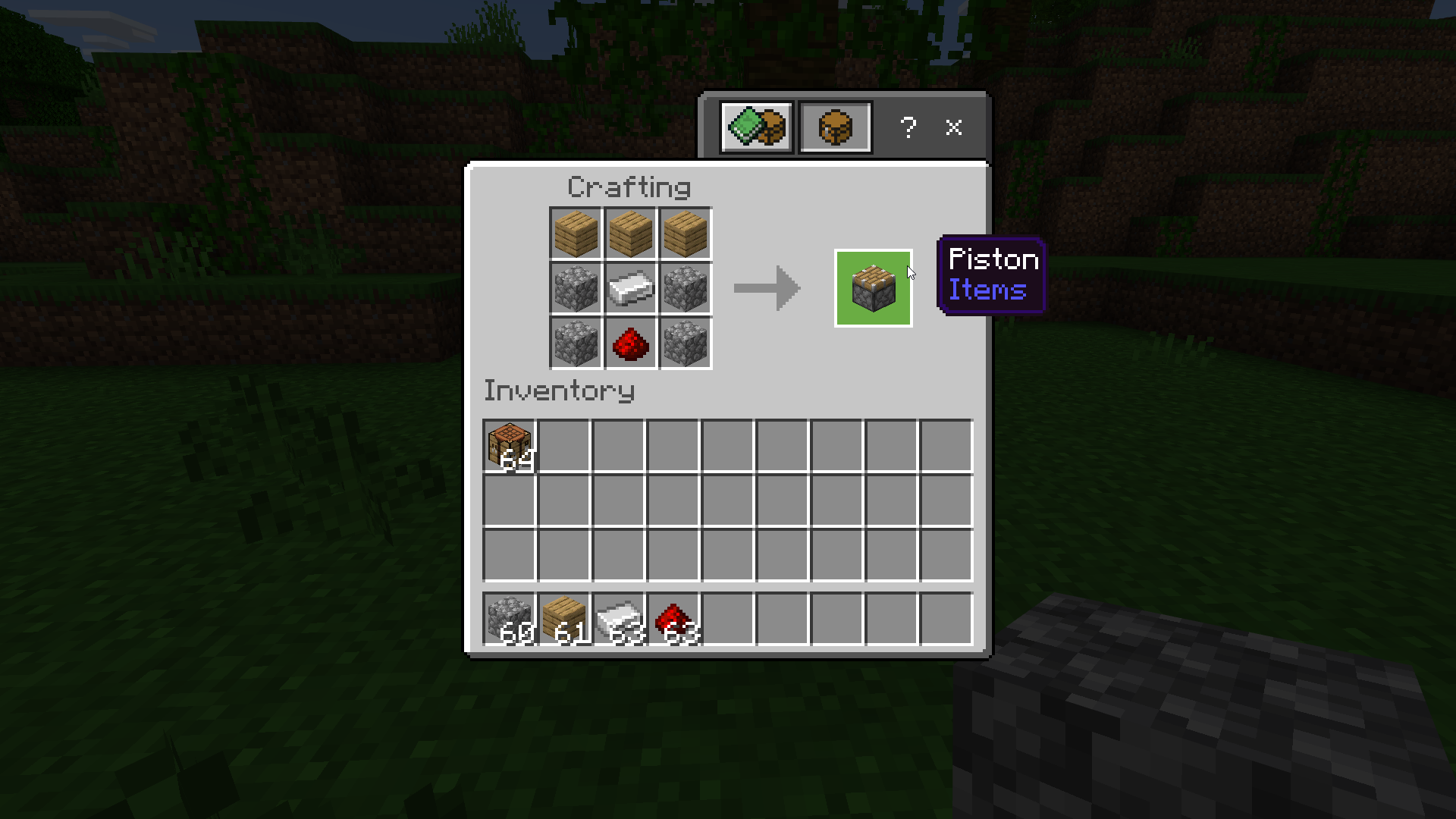
Once you have gathered all the necessary materials, follow these steps to craft a piston:
Arrange wooden planks in the top row of the crafting table. The planks can be of any type.
Place cobblestone blocks in the side columns of the middle and bottom rows, as illustrated in the diagram.
Position an iron ingot in the middle cell of the middle row, and beneath it, place Redstone dust. Completing these steps successfully results in a functional piston. Move the piston from your inventory to any desired location.
Utilizing a Piston in Minecraft
Using a piston in Minecraft is a straightforward process. Place the piston adjacent to the entity or block you wish to push, and activate it with the assistance of any Redstone component. For instance, activating a piston with a lever involves the following steps:
Position a solid pushable block on any surface.
Place the piston behind the solid block, ensuring that the wooden part faces the block to be pushed.
Attach a lever to the side or back of the piston, avoiding the top position.
Activate the lever by right-clicking or using the secondary action key. This action triggers the piston to push the block located in front of it.
Remember that when the lever is deactivated, the piston retracts, leaving the block in its new position. If you intend to have the piston pull the block instead of solely pushing it, consider using a sticky piston instead.
Frequently Asked Questions
Q: How do I craft sticky pistons?
A: Crafting a sticky piston involves combining a slime ball with a regular piston on a crafting table.
Q: Can pistons move obsidian?
A: No, pistons cannot push or pull obsidian.
Q: What happens if there are multiple blocks in front of the piston?
A: If the adjacent block is pushable, the piston will move both blocks. However, if the block is not pushable, the piston will not function.
Q: Can a piston push lava or water?
A: Interestingly, pistons can effectively push fire, water, and lava source blocks out of existence. They act as barriers to any liquid source blocks in front of them.
With the knowledge of crafting and utilizing pistons in Minecraft, you are now equipped to undertake various projects, whether it involves moving blocks or creating intricate contraptions. To further enhance your Minecraft experience, share your plans and achievements in the comments below. Happy crafting!
Conclusion
In conclusion, mastering the mechanics of pistons in Minecraft opens up a world of possibilities for players. These versatile Redstone components serve as the foundation for creating automatic machines and intricate contraptions. By understanding how pistons interact with blocks, players can strategically plan and build impressive structures, farms, and more.
Crafting a piston requires common materials such as cobblestone, wooden planks, iron ingots, and Redstone dust. These resources are easily obtainable, allowing players to incorporate pistons into their projects without difficulty.
Utilizing pistons is a straightforward process that involves placing them adjacent to blocks or entities and activating them with Redstone components like levers. With a simple flick of a lever, players can push blocks, players, and mobs, opening up new possibilities for transportation, automation, and creative designs.
While pistons have limitations and cannot move certain blocks like obsidian, they offer immense flexibility and creative potential. By combining them with other Redstone devices and mechanisms, players can create intricate and efficient systems within their Minecraft worlds.
To further enhance your Minecraft experience, consider playing on Gamever servers. Gamever provides a dynamic and engaging multiplayer environment where you can collaborate with other players, showcase your creations, and embark on exciting adventures together. With a vibrant community and a wide range of game modes, Gamever servers offer endless opportunities for exploration, creativity, and social interaction.
So, whether you're a seasoned Minecraft player or just starting your journey, embrace the power of pistons and explore the vast potential they offer. Unleash your creativity, embark on new projects, and join the thriving community on Gamever servers. The Minecraft world is waiting for your ingenious designs and captivating adventures. Enjoy the immersive experience and happy crafting!