
How to install Valheim Plus on Valheim 0.214.2
ValheimPlus is a popular mod for Valheim that adds new features and gameplay mechanics to the game. Installing ValheimPlus on Valheim 0.214.2 version is a straightforward process, and this guide will walk you through the steps.
Step 1: Download ValheimPlus
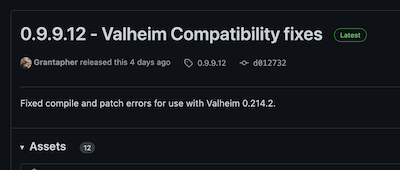
The first step is to download the special fixed version of ValheimPlus from the following link: https://github.com/Grantapher/ValheimPlus/releases/tag/0.9.9.12. This version has been updated by a different developer since the original developers have stopped active development of ValheimPlus. Make sure you download the version that is compatible with Valheim 0.214.2.
Step 2: Install BepInEx
ValheimPlus requires the BepInEx mod loader to work. You can download the latest version of BepInEx from the BepInEx website. Once you have downloaded the file, extract the contents to the Valheim game directory.
Step 3: Install ValheimPlus
Now that you have BepInEx installed, it's time to install ValheimPlus. Extract the contents of the .zip file into the game folder.
Step 4: Run Valheim
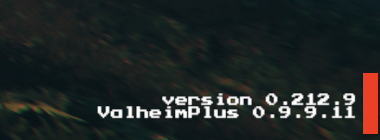
Once you have installed ValheimPlus, start the game and check if the mod is working. You should see a ValheimPlus logo in the bottom left corner of the screen. If you see the logo, then the mod is working correctly.
Step 5: Configure ValheimPlus
ValheimPlus comes with a configuration file that allows you to customize the mod's settings. You can find the configuration file (valheim_plus.cfg) in the Valheim/BepInEx/config folder. Open the file with a text editor and make any changes you want.
And that's it! You have successfully installed ValheimPlus on Valheim 0.214.2 version. Enjoy the new features and gameplay mechanics that the mod adds to the game.