
How to Install the Crafting Tweaks Mod for Minecraft
The Crafting Tweaks mod is a game-changing addition for Minecraft players, simplifying the crafting process and making it more efficient. With handy features like rotating items, balancing grids, and clearing crafting tables, this mod streamlines crafting sessions and saves time. Here’s how to install the mod, explore its features, and make the most of it in your Minecraft adventures, especially on Gamever servers, where crafting efficiency is key.
Step 1: Download Crafting Tweaks Mod
To get started, download the Crafting Tweaks mod from CurseForge or Modrinth.

Download the version that matches your Minecraft installation.
Step 2: Install Balm Library Mod
Crafting Tweaks requires the Balm library mod to function properly. Ensure you download and install Balm alongside Crafting Tweaks.
Download Balm from CurseForge or Modrinth.
Confirm that the Balm version matches your Minecraft and mod loader setup.
Step 3: Install a Mod Loader (Forge, Fabric, or NeoForge)
Crafting Tweaks is compatible with Forge, Fabric, and NeoForge mod loaders.
Download your preferred mod loader:
- Forge
- Fabric
- NeoForge
Follow the installation instructions to match your Minecraft version.
Select the Forge, Fabric, or NeoForge profile in your Minecraft launcher.
Step 4: Place Mods in the ‘Mods’ Folder
After downloading Crafting Tweaks and Balm, place the .jar files into the mods folder in your Minecraft directory.
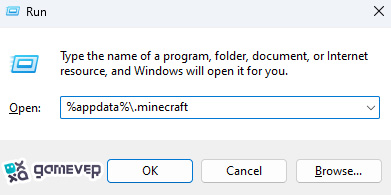
If the mods folder doesn’t exist, create it manually. Then, move the Crafting Tweaks and Balm .jar files into it.
Step 5: Launch Minecraft
Open Minecraft using the Forge, Fabric, or NeoForge profile. Once the game loads, the Crafting Tweaks mod will be active.
Features of Crafting Tweaks
This mod introduces several powerful tools to simplify crafting:
1. Rotate Button
The Rotate button cycles items around the crafting grid, making it easier to create direction-sensitive recipes without manual rearrangement.

2. Balance Button
The Balance button distributes items evenly across the grid, ensuring symmetrical crafting, which is especially useful for recipes requiring balanced input.

3. Clear Button
The Clear button returns all items from the crafting grid to your inventory instantly, saving time when restarting or modifying a recipe.

These features are particularly useful for bulk crafting or managing complex recipes, reducing the hassle of manual adjustments.
Why Use Crafting Tweaks on Gamever Servers?
When playing on Gamever servers, the Crafting Tweaks mod becomes even more valuable for multiplayer projects:
- Efficient Resource Management: Simplify bulk crafting for team builds or shared projects.
- Time-Saving Tools: Spend less time crafting and more time exploring, fighting, or building.
- Improved Gameplay Flow: The mod’s streamlined crafting features allow for a smoother gameplay experience, especially during large-scale collaborations.
Conclusion
The Crafting Tweaks mod is a must-have for Minecraft players who want to make crafting faster, easier, and more efficient. Its user-friendly interface and powerful features like Rotate, Balance, and Clear revolutionize how you manage crafting grids. On Gamever servers, this mod enhances multiplayer gameplay by saving time and ensuring efficient resource use.