
How to Install Mods on Your Factorio Server
Factorio has one of the healthiest modding scenes in the genre, and running mods on a dedicated server is refreshingly simple: every mod is a single .zip file, and the server decides which ones are active through one small config file. On a Factorio server you rent from gamever, you don't install anything from scratch — you just upload the mod files and edit the list through your control panel's File Manager (or over FTP), then restart. This guide covers where mods come from, how to turn them on and off with mod-list.json, and the few rules that keep a modded server stable.
Where Factorio mods come from
Every official mod lives on the Factorio mod portal at mods.factorio.com, and each one downloads as a single .zip file. You don't unzip it — Factorio reads the zip as-is. Each mod listing on the portal shows which Factorio versions it supports (for example 2.0 - 2.1), and the mod version must match the game version your server runs. Installing a mod built for a different major version is the most common cause of a server that won't boot after modding.
Your server's build is pinned on Settings → Server Settings via the Server Version dropdown (stable or experimental), so check which version you're on before you download anything from the portal.
The mods folder and mod-list.json
On a gamever server, your Factorio files live under /home/server/config/, reachable from the File Manager or over FTP. Mods go in a mods/ folder there, and alongside them sits mod-list.json — the file that tells the server which mods to actually load.
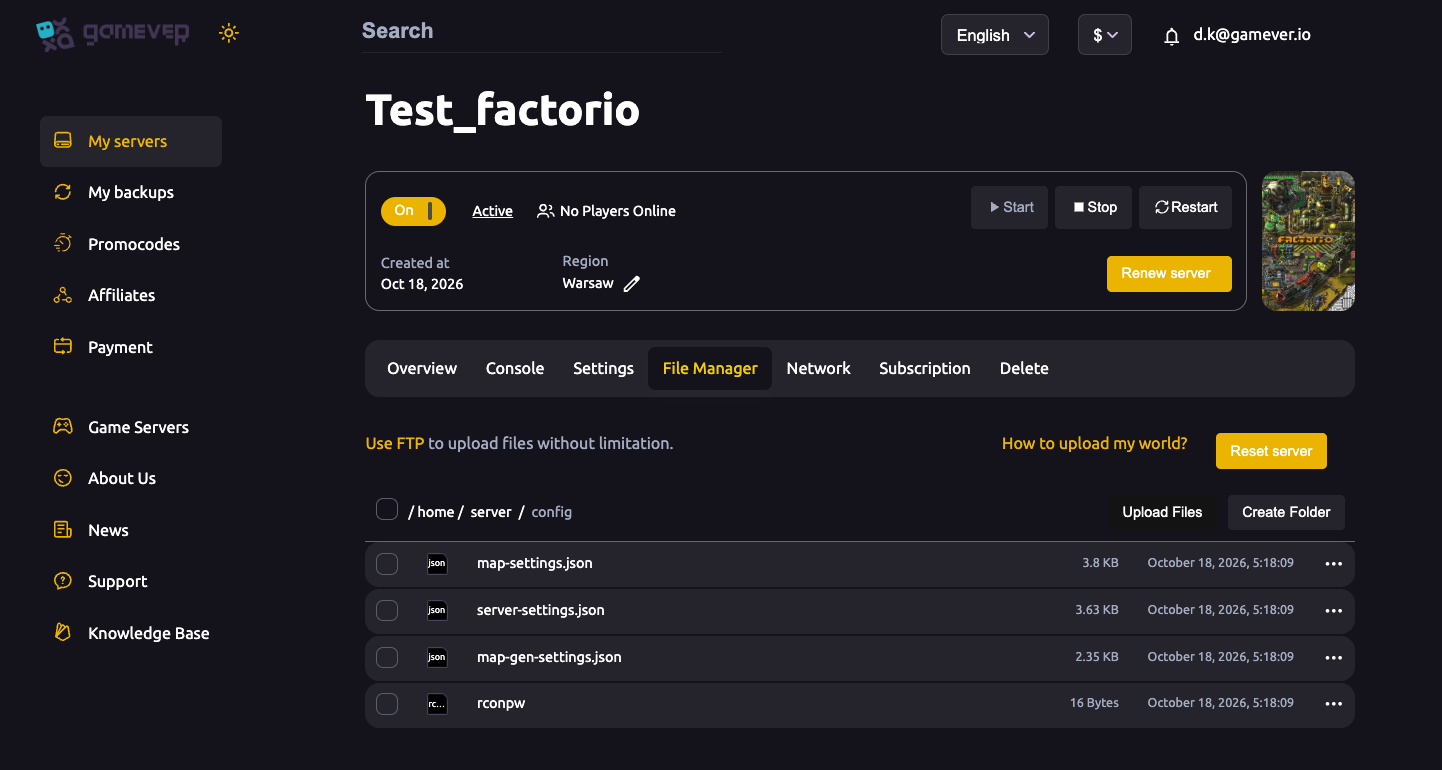
The format is strict JSON: a top-level mods array, with one object per mod carrying a name and an enabled flag. It looks like this:
{
  "mods": [
    { "name": "base", "enabled": true },
    { "name": "some-mod", "enabled": true },
    { "name": "another-mod", "enabled": false }
  ]
}
A few things to know about this file:
| Field | Value | Notes |
|---|---|---|
name | mod's internal name | Must match the mod's own name (not the pretty display title); base is Factorio itself — leave it enabled |
enabled | true / false | Turns a mod on or off without deleting its zip — the file stays in mods/, just dormant |
Factorio also auto-detects any new zip you drop into mods/: a fresh mod folder or zip is added to the end of the list automatically on the next start, so you don't strictly have to hand-edit mod-list.json to add a mod — only to disable one you want to keep on disk.
Strict JSON — no trailing commas.
mod-list.jsonis parsed strictly, exactly like the server's other JSON config files. A single stray comma after the last entry will stop the server booting. Edit carefully and validate before you start.
Installing a mod, step by step
Because mods and the mod list are only read when the server boots, you make all changes with the server stopped:
- Stop the server (Overview → Stop). Files in use won't swap cleanly.
- Download the mod
.zipfrommods.factorio.com, choosing the build that matches your server's Factorio version. Leave it zipped. - Upload the zip into the
mods/folder under/home/server/config/using the File Manager (Upload Files) or FTP. Get your FTP login from Settings → FTP server settings, and the FTP host/port from the Network tab. - Enable it — either let Factorio auto-add the new zip on next boot, or add/flip an entry in
mod-list.jsonto"enabled": true. - Start the server and watch the Console tab for a clean load. A version mismatch or a bad dependency shows up here as a startup error.
To disable a mod later, set its mod-list.json entry to "enabled": false (and restart) — there's no need to delete the zip.
Let the server download mods for you (Authorisation)
Factorio can also fetch mods from the portal itself, rather than you downloading and uploading each zip. This needs a factorio.com account username and auth token, entered on the Settings → Authorisation sub-tab.
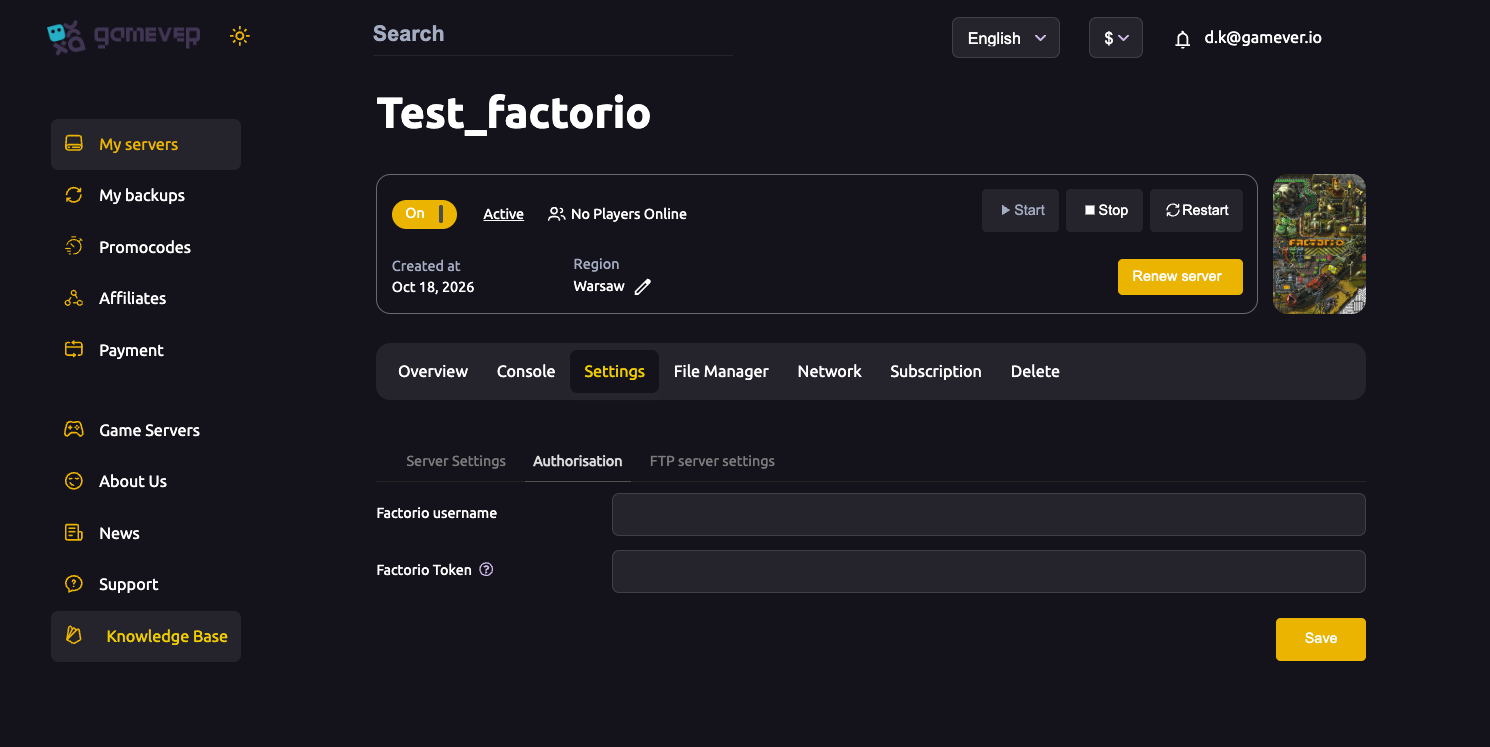
| Field | What to enter |
|---|---|
| Factorio username | Your factorio.com account username |
| Factorio Token | The auth token from your factorio.com profile page — not your account password or email |
The same credentials also let you list the server on the public browser. Generate the token from your factorio.com profile; never paste your account password.
Players download matching mods automatically
This is Factorio's best modding feature: when a player joins a modded server, the game downloads the exact same mod versions the server is running before letting them in. You don't have to send anyone a file or a mod list. As long as the server's mods are set and it boots cleanly, joiners are synced for you — which is exactly why keeping the server's mod versions consistent with its game version matters so much.
Additional Tips
- Match versions first. Pick mods that list your server's Factorio version; a mismatch is the top reason a modded server fails to start.
- Enable, don't delete. Flip
"enabled": falseto shelve a mod while keeping its zip inmods/for later. - Validate your JSON. Run
mod-list.jsonthrough a JSON checker before starting — one trailing comma kills the boot. - Read the Console. After every mod change, the Console tab is where load errors and dependency complaints appear — check it before assuming the server is up.
- Mind dependencies. Many mods require other mods; the portal page lists them, and Factorio will refuse to start if a required dependency is missing.
- Back up before big changes. Grab a copy via My backups before adding a large overhaul mod, so you can roll back if a new save becomes incompatible.
- Keep your build in sync. If you change the Factorio version on the Server Version dropdown, re-check that your mods still support the new build.
Conclusion
Modding a Factorio server comes down to three things: get the right .zip from mods.factorio.com, drop it in the mods/ folder, and make sure it's switched on in mod-list.json. Add your factorio.com username and token on the Authorisation tab if you'd rather the server pull mods from the portal itself, and remember that every joining player auto-downloads the matching versions. Always stop the server before editing files, keep your JSON clean, and match mod versions to your game build.
Rent your Factorio server at gamever.io — full File Manager and FTP access, RCON, and one-click backups so you can experiment with mods freely. Free trial, promo code WELCOME.