
How to Install Mods on Your ARK Server (Steam Workshop)

Mods are the fastest way to make an ARK server yours — stack mods, structures-plus, extra maps, quality-of-life tweaks and total conversions. This guide shows how to add Steam Workshop mods to an ARK: Survival Evolved server, set their load order, and fix the usual "mod mismatch" headaches. (ARK: Survival Ascended uses CurseForge instead — see the note at the end.)
How ARK mods work
On ARK: Survival Evolved, mods live on the Steam Workshop. The server downloads each mod by its numeric Workshop ID, and players automatically download the same mods when they join. Two things have to line up:
- The server has the mod IDs listed and downloaded.
- Each player is running the same mods at the same versions (ARK handles this for them on join).
On gamever you don't touch any of the underlying flags (-automanagedmods, ActiveMods=) by hand — the panel has a dedicated Mod Settings form that writes them for you and the server auto-downloads each mod on the next start.
Step 1 — Find the mod ID
Open the mod's Steam Workshop page. The ID is the number after ?id= in the URL:
https://steamcommunity.com/sharedfiles/filedetails/?id=731604991
                                                       ^^^^^^^^^
                                                       mod ID = 731604991
Collect the ID of every mod you want.
Step 2 — Add the mods (gamever panel)
The easy way — no file editing. Open your server in the control panel and go to Settings → Mod Settings. There are three fields:
| Field | What goes here |
|---|---|
| Steam Mods | Your regular Workshop mods — IDs comma-separated, no spaces (e.g. 731604991,889745138,1404697612). This is the field you'll use most. |
| Total conversions mod | A single total-conversion mod ID (a mod that overhauls the whole game), if you're running one. |
| Map Mod Id | The ID of a custom map mod, if you're using one (see "Adding a mod map" below). |
Fill in the relevant field, Save, and restart the server.
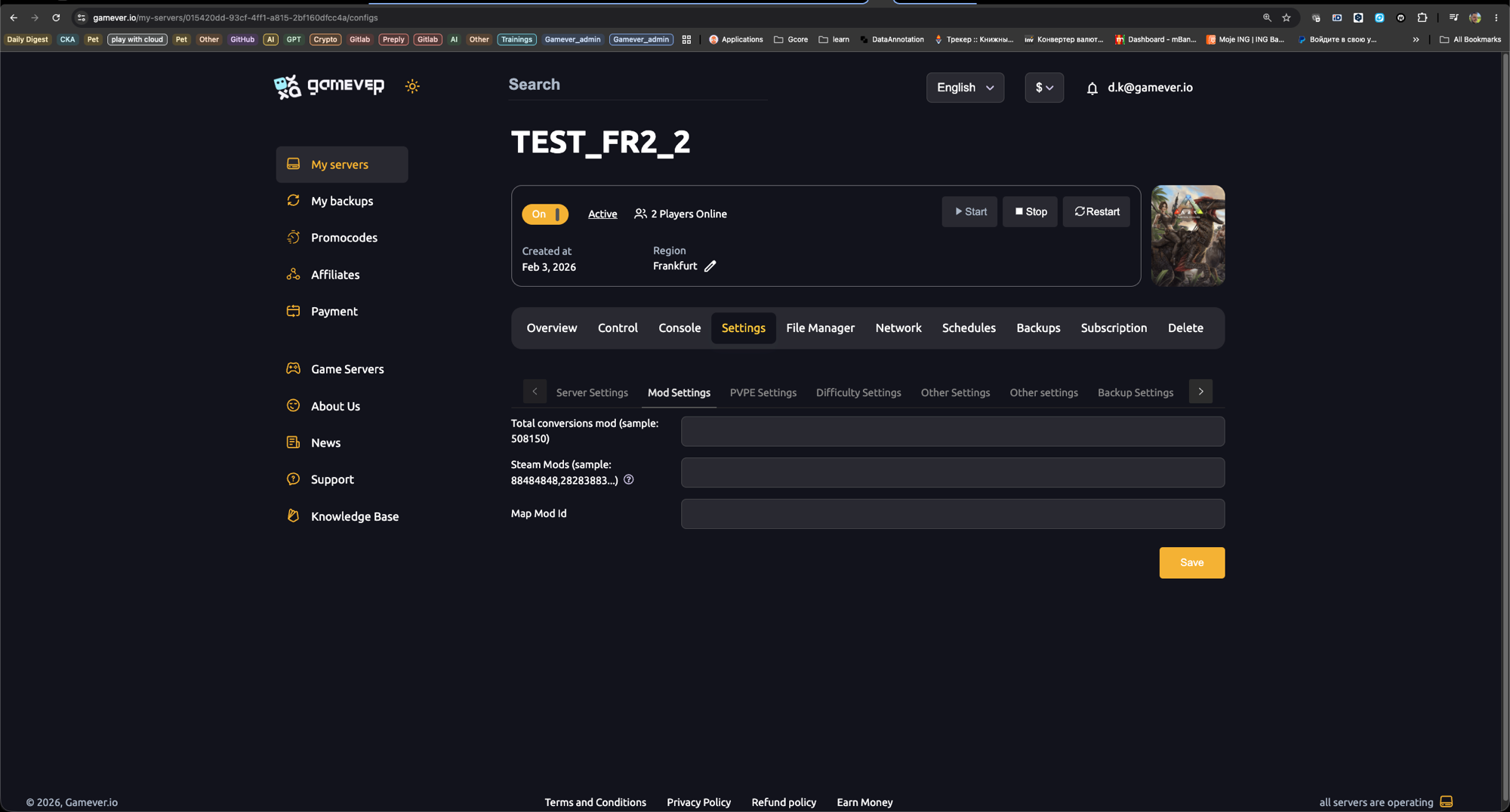
On the first boot after adding mods, the server downloads them — this takes longer than a normal start (large mods can need several minutes). Don't interrupt it; watch the Console tab until it finishes and the server reports as online.
Step 3 — (Optional) Edit the file directly
Prefer to manage the file yourself? The same list lives in:
/home/server/ShooterGame/Saved/Config/LinuxServer/GameUserSettings.ini
Under [ServerSettings], add:
ActiveMods=731604991,889745138,1404697612
Keep your edits. As covered in our server settings guide, before hand-editing
.inifiles you must set Settings → Server Settings → Disable settings below to Yes, or the panel overwrites yourActiveModsline on the next restart.
Load order matters
Priority runs left to right — the left-most ID wins. If two mods change the same thing, the one earlier in the Steam Mods field takes precedence.
CoreFrameworkMod,StructuresMod,QoLMod
- Put core framework mods first.
- Put small tweak/QoL mods last.
- Only digits and commas are valid — a stray space or trailing comma breaks loading.
Adding a mod map
Some mods are maps (e.g. custom worlds). To run one:
- Put the map mod's ID in the Map Mod Id field (Settings → Mod Settings).
- Set the map name for that mod in Settings → Server Settings → Server Map. The mod's Workshop page lists the exact map name to use.
- Restart.
Troubleshooting
| Problem | Fix |
|---|---|
| Mods don't download on boot | Re-check the IDs in the Steam Mods field — digits and commas only, no spaces — then Save and restart. |
| Players get a "mod mismatch" error | Player must be subscribed to and updated on the same mods — ARK usually auto-downloads them on join; have them verify game files and retry. |
| Server stuck "downloading" forever | A very large mod just needs time; if it truly hangs, remove the last-added mod and add mods one at a time. |
| A mod broke after a game update | Mods update independently — wait for the author to patch, or remove that ID temporarily. |
| Changes keep reverting | You edited the file without setting Disable settings below to Yes (see above). |
Golden rule: add or remove one mod at a time and restart between each. When something breaks, you'll know exactly which mod did it.
ARK: Survival Ascended (ASA) note
ASA dropped the Steam Workshop for CurseForge. The flow is the same idea — you collect numeric mod IDs (the Project ID on the CurseForge page) and enter them in your panel's mod field — but ASE Workshop IDs and ASA CurseForge IDs are not interchangeable. ASA also caps total mod size (≈20 GB crossplay / 50 GB PC-only).
Conclusion
Adding mods to ARK is just three things: grab the Workshop IDs, drop them into your panel's mod field in the right order, and let the first boot download them. Add them one at a time and you'll never be left guessing which mod broke your server.
Rent your ARK server at gamever.io and install Workshop mods from a dedicated Mod Settings panel — paste the IDs, restart, done. No FTP, online 24/7. Free trial, promo code WELCOME.